使用正则表达式配合 regex.matches 方法可以高效提取文本中特定标签之间的内容。通过构建包含捕获组的模式,如 regexoptions.singleline 标志以支持跨行匹配,即可获取所有目标片段。该方法适用于结构相对固定且无需处理复杂嵌套 html 的场景。

如何编写通用的标签提取函数
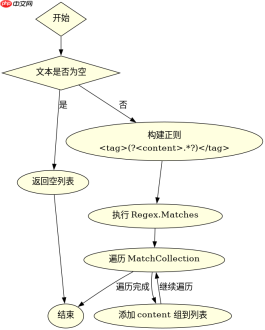
定义一个接受标签名和源文本的函数,利用正则表达式进行全局匹配。该函数返回一个字符串列表,包含所有匹配到的内容。若标签不存在或文本为空,则返回空列表。此方法避免了手动遍历字符串的繁琐,直接利用 .NET 内置的正则引擎完成提取。
using System;
using System.Text.RegularExpressions;
using System.Collections.Generic;

public class TagExtractor
{
    public static List<string> ExtractContent(string tagName, string source)
    {
        if (string.IsNullOrEmpty(source))
            return new List<string>();

        // 构建正则表达式:<tagname> 后跟任意字符(非贪婪),直到 </tagname>
        // RegexOptions.Singleline 使 . 匹配换行符
        string pattern = $"(?<content>.*?){tagName}>";
        MatchCollection matches = Regex.Matches(source, pattern, RegexOptions.Singleline);

        var results = new List<string>();
        foreach (Match match in matches)
        {
            results.Add(match.Groups["content"].Value);
        }
        return results;
    }

    public static void Main()
    {
        string text = @"<div>Hello</div>
<div>World</div>
<p>Test</p>";

        List<string> divs = ExtractContent("div", text);
        foreach (var item in divs)
        {
            Console.WriteLine($"Extracted: {item}");
        }
    }
}</string></string></content></string></string>
运行上述代码,控制台将输出两行结果:Extracted: Hello 和 Extracted: World。这验证了函数能正确识别并提取指定标签内的文本,忽略其他标签。RegexOptions.Singleline 确保了即使标签内容包含换行符也能被完整捕获。

如何处理标签属性干扰匹配
当标签包含属性时,简单的 执行此程序,输出为: 如果源文本中包含自关闭标签(如 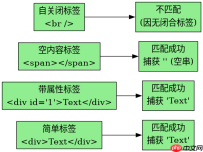
using System;
using System.Text.RegularExpressions;
using System.Collections.Generic;
public class RobustTagExtractor
{
public static List<string> ExtractWithAttributes(string tagName, string source)
{
if (string.IsNullOrEmpty(source))
return new List<string>();
// 修改模式:允许标签名后有非 > 字符(即属性)
string pattern = $"]*>(?<content>.*?){tagName}>";
MatchCollection matches = Regex.Matches(source, pattern, RegexOptions.Singleline);
var results = new List<string>();
foreach (Match match in matches)
{
results.Add(match.Groups["content"].Value);
}
return results;
}
public static void Main()
{
string text = @"<div id="header">Title</div>
<div class="body">Content</div>";
List<string> items = ExtractWithAttributes("div", text);
foreach (var item in items)
{
Console.WriteLine($"Item: [{item}]");
}
}
}</string></string></content></string></string>
Item: [Title] 和 Item: [Content]。这表明改进后的正则表达式成功忽略了标签中的属性部分,仅提取了内部文本。这种处理方式比硬编码标签名更具通用性,适用于大多数带有属性的标准 XML/HTML 标签。当标签内容为空时会发生什么
),正则表达式 (.*?) 仍能匹配到空字符串。这意味着函数不会报错,而是将空值加入结果列表。开发者需注意,若业务逻辑要求忽略空内容,需在获取结果后增加过滤步骤,例如使用 Where(s => !string.IsNullOrEmpty(s)) 清理数据。