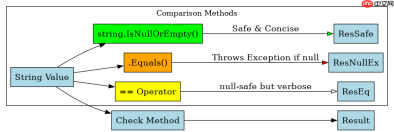
在c#中判断字符串是否为空,推荐使用 string.isnullorempty() 或 string.isnullorwhitespace(),而不是直接使用 == 运算符或 .equals() 方法。直接比较存在 null 引用异常风险,而内置静态方法能安全、高效地处理 null 和空字符串两种情况。
为什么 == 和 Equals 容易出错?
使用 == 比较字符串时,如果左侧变量为 null,虽然不会抛出异常(因为 string 重载了 ==),但逻辑上需要显式检查 null 才能确保语义正确。若使用实例方法 .Equals(),当对象为 null 时会抛出 NullReferenceException。因此,手动编写 if (s == null || s == "") 既繁琐又易错。

using System;

public class Program
{
    public static void Main()
    {
        string nullStr = null;
        string emptyStr = "";
        string validStr = "hello";

        // 错误示范:可能抛出 NullReferenceException
        try
        {
            bool isEq = nullStr.Equals("");
            Console.WriteLine("Equals result: " + isEq);
        }
        catch (NullReferenceException ex)
        {
            Console.WriteLine("Error with Equals: " + ex.Message);
        }

        // 安全做法:使用 IsNullOrEmpty
        Console.WriteLine("IsNullOrEmpty(null): " + string.IsNullOrEmpty(nullStr));
        Console.WriteLine("IsNullOrEmpty(empty): " + string.IsNullOrEmpty(emptyStr));
        Console.WriteLine("IsNullOrEmpty(valid): " + string.IsNullOrEmpty(validStr));
    }
}
IsNullOrEmpty 与 IsNullOrWhiteSpace 的区别
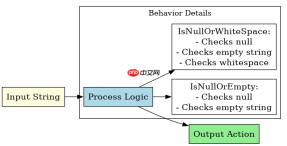
string.IsNullOrEmpty() 仅检测 null 和空字符串 ""。如果字符串包含空格(如 " "),它返回 false。而 string.IsNullOrWhiteSpace() 额外检测空白字符(空格、制表符、换行等)。在用户输入验证场景中,通常更倾向于使用后者以避免提交纯空白内容。

using System;

public class Program
{
    public static void Main()
    {
        string spaceStr = "   ";

        Console.WriteLine("IsNullOrEmpty(space): " + string.IsNullOrEmpty(spaceStr));
        Console.WriteLine("IsNullOrWhiteSpace(space): " + string.IsNullOrWhiteSpace(spaceStr));
    }
}
基于 IsNullOrWhiteSpace 的具体行为问题
当输入为仅含空格的字符串时,IsNullOrWhiteSpace() 返回 true,而 IsNullOrEmpty() 返回 false。这一差异决定了在处理表单数据或API参数时,应选择哪种方法以符合业务逻辑。例如,若要求字段不能为空且不能全为空白,则必须使用 IsNullOrWhiteSpace()。