在c# linq中使用元组作为分组统计的键,核心做法是在 groupby 方法的 lambda 表达式中直接返回一个匿名元组(如 (a, b)),linq 会自动利用元组的值相等性进行分组。这样做可以将多个字段组合成一个复合键,从而实现对多列数据的聚合统计,例如按“部门”和“职位”同时分组计算人数。

如何按单个属性进行基础分组?
按单个属性分组时,只需在 GroupBy 中指定该属性的访问路径即可。这是理解元组分组的基石,因为元组本质上是多个属性的有序集合。
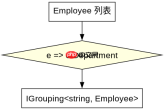
using System;
using System.Collections.Generic;
using System.Linq;

public class Employee
{
    public string Name { get; set; }
    public string Department { get; set; }
    public decimal Salary { get; set; }
}

class Program
{
    static void Main()
    {
        var employees = new List<employee>
        {
            new Employee { Name = "Alice", Department = "IT", Salary = 5000 },
            new Employee { Name = "Bob", Department = "HR", Salary = 4000 },
            new Employee { Name = "Charlie", Department = "IT", Salary = 6000 }
        };

        // 按部门分组
        var groupedByDept = employees.GroupBy(e => e.Department);

        foreach (var group in groupedByDept)
        {
            Console.WriteLine($"Department: {group.Key}, Count: {group.Count()}");
        }
    }
}</employee>
如何使用元组实现多条件分组统计?
使用元组进行多条件分组时,将需要分组的多个属性放入括号内组成元组。LINQ 会基于元组中所有元素的值来判定分组键是否相同,从而实现复杂的组合统计逻辑。

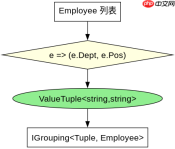
using System;
using System.Collections.Generic;
using System.Linq;

public class Employee
{
    public string Name { get; set; }
    public string Department { get; set; }
    public string Position { get; set; }
    public decimal Salary { get; set; }
}

class Program
{
    static void Main()
    {
        var employees = new List<employee>
        {
            new Employee { Name = "Alice", Department = "IT", Position = "Dev", Salary = 5000 },
            new Employee { Name = "Bob", Department = "HR", Position = "Mgr", Salary = 4000 },
            new Employee { Name = "Charlie", Department = "IT", Position = "Dev", Salary = 6000 },
            new Employee { Name = "David", Department = "IT", Position = "QA", Salary = 4500 }
        };

        // 使用元组 (Department, Position) 作为分组键
        var grouped = employees.GroupBy(e => (e.Department, e.Position));

        foreach (var group in grouped)
        {
            // Key 是一个 ValueTuple<string string>
            Console.WriteLine($"Key: ({group.Key.Item1}, {group.Key.Item2}), Total Salary: {group.Sum(e => e.Salary)}");
        }
    }
}</string></employee>
元组分组后如何访问具体的键值?
当使用元组作为分组键时,IGrouping 的 Key 属性类型即为该元组类型。可以通过 Item1、Item2 等索引属性访问具体字段的值,或者在 C# 7.0+ 中使用模式匹配或解构语法更优雅地获取键值。