junit 5 的 `@parameterizedtest` 注解支持多种数据源方法,可以返回数组、集合(如 list、set)、stream、iterator 或生成器对象。最常用的形式是返回 `string[]`、`list
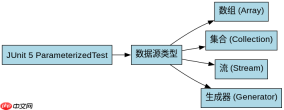
如何配置 @ValueSource 处理简单字符串数组
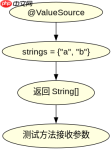
使用 `@ValueSource` 是最简单的配置方式,它要求方法返回一个基本类型数组或对象数组。对于字符串测试,通常直接返回 `String[]`。这种方式适合固定且少量的输入数据,无需额外逻辑即可将每个元素作为单独的参数传入测试方法。
import org.junit.jupiter.params.ParameterizedTest;
import org.junit.jupiter.params.provider.ValueSource;

import static org.junit.jupiter.api.Assertions.assertEquals;

class StringTest {

    @ValueSource(strings = {"hello", "world", "test"})
    void testWithArray(String input) {
        assertEquals(5, input.length()); // 注意:这里会失败,因为 "world" 长度为 5,"test" 为 4
    }
}
上述代码展示了 `@ValueSource` 的基本用法。当运行测试时,JUnit 会依次将数组中的每个字符串传递给 `testWithArray` 方法。如果数组中包含不同长度的字符串,断言可能会因预期不符而失败,这提示开发者在定义数据源时需确保数据的一致性。
如何使用 @MethodSource 处理复杂逻辑与集合
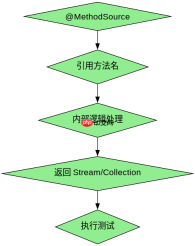
当数据源需要动态生成或包含更复杂的逻辑时,`@MethodSource` 是更好的选择。它可以引用类中的私有或公共方法,该方法必须返回数组、集合、Stream 或 Iterator。相比 `@ValueSource`,`@MethodSource` 允许在方法内部进行数据处理和过滤,提供更灵活的数据准备能力。

import org.junit.jupiter.params.ParameterizedTest;
import org.junit.jupiter.params.provider.MethodSource;

import java.util.Arrays;
import java.util.List;
import java.util.stream.Stream;

import static org.junit.jupiter.api.Assertions.assertTrue;

class ComplexDataTest {

    static Stream<string> provideStrings() {
        return Stream.of("java", "python", "c++");
    }

    @MethodSource("provideStrings")
    void testWithMethodSource(String language) {
        assertTrue(language.length() > 0);
    }
}</string>
在这个例子中,`provideStrings` 方法返回一个 `Stream
基于 @MethodSource 返回空列表时的具体行为
当 `@MethodSource` 引用的方法返回一个空的集合或流时,JUnit 的行为取决于具体的实现版本和配置。通常情况下,如果数据源为空,测试方法根本不会被执行,JUnit 会报告没有发现可运行的测试用例。这种行为有助于避免对无效数据进行无意义的测试,但也意味着开发者需要确保数据源至少包含一个有效条目,或者在测试前验证数据的非空性。