






使用 getcomputedstyle() 函数可以获取隐藏元素的实际样式属性。该函数会返回元素在渲染后的最终计算样式,即使元素通过 css 的 display: none、visibility: hidden 或 opacity: 0 被隐藏,也能正常读取其 width、height 等几何属性。

getComputedStyle() 如何绕过 display: none
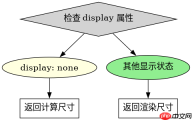
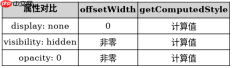
当元素设置为 display: none 时,它不占据文档流空间,但 getComputedStyle() 依然能计算出其理论尺寸。这与直接访问 offsetWidth 不同,后者对于 display: none 的元素会返回 0。因此,要获取隐藏元素的布局信息,必须依赖计算样式 API。
const el = document.getElementById('hidden-box');
const style = getComputedStyle(el);
console.log(style.width); // 例如 "100px"
上述代码中,即使 #hidden-box 是隐藏的,style.width 仍能返回其设定的宽度值。这是获取隐藏元素尺寸的标准做法。
如何处理 visibility: hidden 的元素
对于 visibility: hidden 的元素,它们虽然不可见但仍占据空间。getComputedStyle() 同样可以获取其属性。与 display: none 不同,这类元素的 offsetWidth 通常不为 0,但为了统一处理逻辑,推荐使用 getComputedStyle() 以确保获取到的是 CSS 定义的精确值,而非浏览器计算的渲染值。

使用 Husky 将 pre-commit、pre-push 和 commit-msg 检查集成到仓库中,以便代理和开发人员在更改离开工作站之前运行相同的本地防护措施。
const visHiddenEl = document.getElementById('vis-hidden');
const computedStyle = getComputedStyle(visHiddenEl);
console.log(computedStyle.visibility); // "hidden"
此例展示了如何读取可见性状态。结合尺寸读取,开发者可以全面掌握隐藏元素的布局状态。
基于 opacity: 0 的具体问题
当元素仅设置 opacity: 0 时,它在视觉上完全透明,但在 DOM 中依然可见且可交互(除非配合 pointer-events)。此时 getComputedStyle() 返回的 opacity 值为 "0"。这种隐藏方式不影响元素的几何属性读取,width 和 height 均正常返回。
const opacityEl = document.getElementById('transparent');
const opStyle = getComputedStyle(opacityEl);
console.log(opStyle.opacity); // "0"
通过检查 opacity 属性,可以区分完全隐藏(display: none)和部分隐藏(opacity: 0)的状态,从而采取不同的业务逻辑。
Java免费学习笔记:立即使用
解锁 Java 大师之旅:从入门到精通的终极指南





