






javascript 中数字转百分比显示通常使用 number.prototype.tofixed() 结合字符串拼接,或者使用 intl.numberformat api。前者通过固定小数位数并手动添加百分号实现,后者利用内置格式化器自动处理符号和精度。
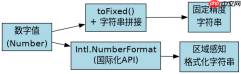
toFixed() 如何处理舍入误差
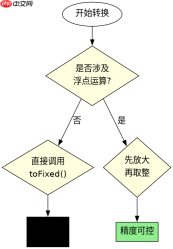
toFixed() 方法在转换时会进行四舍五入,但受浮点数精度影响,结果可能不符合预期。例如 0.1 + 0.2 的结果并非精确的 0.3,直接调用 toFixed(2) 会得到 "0.30",但若中间计算存在微小偏差,可能导致舍入到 0.29 或 0.31。因此,在处理货币或高精度数据时,建议先乘以倍数取整再转换,或使用专门的数学库。
const num = 0.156;
console.log(num.toFixed(2) + "%"); // "0.16%"

const imprecise = 0.1 + 0.2;
console.log(imprecise.toFixed(2) + "%"); // "0.30%" (看似正确,但内部值为 0.30000000000000004)

// 更安全的做法:先放大再取整
const safeNum = Math.round((0.1 + 0.2) * 1000) / 10;
console.log(safeNum.toFixed(2) + "%"); // "0.30%"
Intl.NumberFormat 如何配置区域与精度
Intl.NumberFormat 提供了更强大的国际化支持,可以自动根据地区设置添加千位分隔符和百分号。通过配置 style: 'percent' 和 minimumFractionDigits,可以精确控制输出格式。它比字符串拼接更健壮,尤其适用于多语言应用。

使用 Husky 在 JavaScript 仓库中强制执行本地 Git 钩子检查
下载
使用 Husky 将 pre-commit、pre-push 和 commit-msg 检查集成到仓库中,以便代理和开发人员在更改离开工作站之前运行相同的本地防护措施。

const formatter = new Intl.NumberFormat('zh-CN', {
  style: 'percent',
  minimumFractionDigits: 2,
  maximumFractionDigits: 2
});

console.log(formatter.format(0.156)); // "15.60%"
console.log(formatter.format(0.1));   // "10.00%"
当输入为 null 或 undefined 时程序会抛出什么错误
如果将 null 或 undefined 直接传入上述方法,程序会抛出 TypeError。因为 null 没有原型链上的 toFixed 方法,而 undefined 同样不是对象。在使用前必须进行空值检查或使用默认值。
try {
  const val = null;
  console.log(val.toFixed(2)); // TypeError: Cannot read properties of null (reading 'toFixed')
} catch (e) {
  console.error(e.message);
}
Java免费学习笔记:立即使用
解锁 Java 大师之旅:从入门到精通的终极指南





