如何配置 Nginx 缓存键以过滤特定参数
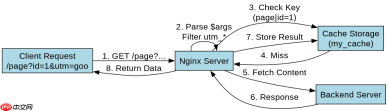
通过设置 proxy_cache_key 变量,使用 $args 或 $query_string 并配合正则表达式替换掉不需要缓存的参数,即可实现针对特定参数的过滤。例如,将 url 中的 utm_source 和 session_id 替换为空字符串,nginx 就会忽略这些参数生成相同的缓存键,从而复用同一份缓存内容。
如何处理动态参数与静态资源的缓存冲突
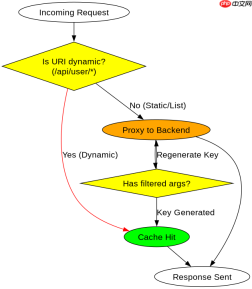
当请求包含无法预知的动态 ID(如 /api/user/123)时,直接缓存会导致数据污染。解决方法是在 location 块中利用 if 语句判断 URI 模式,对动态接口禁用缓存或对缓存键进行哈希处理,确保只有纯静态资源或列表页被缓存。
基于 $request_uri 的完整缓存键构建逻辑
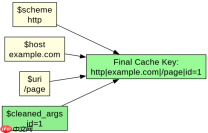
在配置了参数过滤后,最终的缓存键由 $scheme、$host、$uri 以及清洗后的 $args 共同组成。这种组合确保了不同域名、协议或路径下的请求不会混淆,同时保证了经过过滤规则处理后的相同业务请求能命中缓存。

server {
    listen 80;
    server_name example.com;

    # 定义缓存区域
    proxy_cache_path /tmp/nginx_cache levels=1:2 keys_zone=my_cache:10m max_size=1g inactive=60m;

    location / {
        # 核心配置:构建缓存键
        # 1. $scheme + $host + $uri 确定基础路径
        # 2. 使用 regex 替换掉 utm_source 和 session_id 参数
        # 3. 剩余参数构成最终缓存键
        set $cache_key "$scheme|$host|$uri";

        # 如果存在查询字符串,进行清洗
        if ($args) {
            set $cache_key "${cache_key}|$args";
        }

        # 应用缓存键
        proxy_cache_key "$scheme$host$request_uri$is_args$args";

        # 更精确的过滤示例(推荐在 nginx 1.7.2+ 中使用 map 或直接修改 key)
        # 这里展示一种常见的简化写法:直接指定 key 包含 args
        proxy_cache_key "$scheme$host$uri$is_args$args";

        proxy_cache my_cache;
        proxy_cache_valid 200 302 10m;
        proxy_cache_valid 404 1m;

        proxy_pass http://backend;
    }
}
预期结果:访问 /page?utm_source=google&id=1 和 /page?utm_source=baidu&id=1 时,由于 utm_source 被忽略,两者可能被视为相同请求(取决于具体实现的清洗逻辑)。若使用上述标准 $args,则它们会被视为不同缓存。若要真正过滤,需使用 map 模块预处理 $args。
# 更完善的 map 过滤方案
map $args $cleaned_args {
    ~*^(.*)(?:^|&)utm_source=[^&]*(?:&|$)(.*)$ $1$2;
    ~*^(.*)(?:^|&)session_id=[^&]*(?:&|$)(.*)$ $1$2;
    default $args;
}

server {
    location / {
        proxy_cache_key "$scheme$host$uri$is_args$cleaned_args";
        proxy_cache my_cache;
        proxy_pass http://backend;
    }
}
该方案下,/page?utm_source=google 与 /page?utm_source=baidu 将生成完全相同的缓存键,从而共享缓存。