






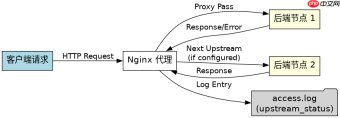
配置nginx代理超时日志排查的核心做法是启用proxy_next_upstream指令并配合log_format记录关键状态码与耗时。通过设置proxy_next_upstream让nginx在遇到特定错误时自动切换上游,同时在访问日志中显式输出$upstream_status和$upstream_response_time字段,即可精准定位是网络超时、502还是504导致的请求失败。
如何配置日志格式以捕获上游响应详情
要捕获上游服务器的详细响应情况,必须在http块中自定义log_format,将$upstream_status(上游返回的状态码)和$upstream_response_time(上游处理耗时)加入日志模板。这样在查看日志时,可以直接对比客户端请求时间与上游响应时间,判断瓶颈是在Nginx层还是后端服务层。
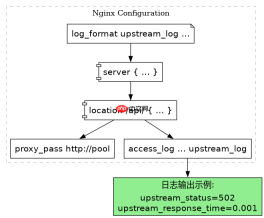
log_format upstream_log '$remote_addr - $remote_user [$time_local] '
                        '"$request" $status $body_bytes_sent '
                        '"$http_referer" "$http_user_agent" '
                        'upstream_status=$upstream_status '
                        'upstream_response_time=$upstream_response_time';

server {
    listen 80;
    server_name example.com;

    location /api/ {
        proxy_pass http://backend_pool;
        # 应用自定义日志格式
        access_log /var/log/nginx/upstream_access.log upstream_log;
    }
}
上述配置生效后,当请求被代理到后端时,日志文件中会包含类似upstream_status=502 upstream_response_time=0.001的记录。如果upstream_response_time接近配置的超时阈值且状态码为504,说明是后端处理过慢;若状态码为502或503,则可能是连接中断或服务不可用。
如何设置代理超时与自动故障转移策略
配置代理超时的关键在于合理设置proxy_connect_timeout、proxy_send_timeout和proxy_read_timeout,并结合proxy_next_upstream实现自动重试。默认情况下,Nginx不会自动重试失败的请求,必须显式声明在哪些错误条件下触发下一次上游尝试,从而提升服务的可用性。


upstream backend_pool {
    server 192.168.1.10:8080;
    server 192.168.1.11:8080;
}

server {
    listen 80;
    server_name example.com;

    location /api/ {
        proxy_pass http://backend_pool;

        # 设置超时时间(秒)
        proxy_connect_timeout 5s;   # 连接超时
        proxy_send_timeout 5s;      # 发送请求超时
        proxy_read_timeout 10s;     # 读取响应超时

        # 定义故障转移条件
        proxy_next_upstream error timeout invalid_header http_500 http_502 http_503;
        proxy_next_upstream_tries 2; # 最多重试2次
    }
}
在此配置下,如果第一个后端节点在5秒内未建立连接或10秒内未返回完整响应,Nginx会将请求转发给第二个节点。日志中会记录每次尝试的upstream_status,若最终成功,通常只记录最后一次成功的状态码,但可以通过开启proxy_next_upstream_error_log_level或在应用层打点来追踪完整的重试链路。
如何通过日志区分连接超时与读取超时
区分连接超时与读取超时主要依赖$upstream_response_time的值以及$upstream_connect_time(需Nginx Plus或特定模块支持,通用场景可结合$request_time推断)。在标准Nginx中,若$upstream_response_time极短(如毫秒级)且状态码为504,通常是连接阶段失败;若该值接近proxy_read_timeout,则是读取阶段超时。
在实际排查中,可以编写一个简单的脚本解析日志。例如,当upstream_status为504时,检查upstream_response_time是否大于proxy_connect_timeout。如果小于,说明连接已建立但后端未在规定时间内返回数据;如果等于或非常接近连接超时值,说明TCP握手或初始握手阶段就失败了。这种细粒度的分析能直接指导是优化后端代码逻辑,还是调整网络防火墙策略。


