






nginx 模块是否支持动态加载,取决于编译时是否启用了 --with-dynamic-modules 选项以及模块源码中是否包含 ngx_module_t 结构体并正确导出。如果 nginx 核心是在启用该选项的情况下编译的,且模块遵循了标准的动态模块接口规范,那么它就可以被编译为 .so 文件并通过 load_module 指令在运行时加载。
如何检查当前 Nginx 是否具备动态加载能力
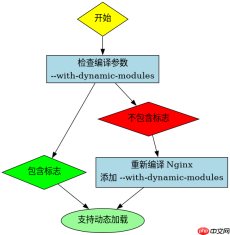
要判断当前的 Nginx 安装是否支持动态加载,最直接的方法是查看其编译参数。执行 nginx -V 命令,在输出的配置信息中寻找 --with-dynamic-modules。如果存在该标志,说明核心已开启此功能;若缺失,则必须重新编译 Nginx 才能支持动态模块。
./configure --prefix=/etc/nginx \
    --sbin-path=/usr/sbin/nginx \
    --modules-path=/usr/lib64/nginx/modules \
    --conf-path=/etc/nginx/nginx.conf \
    --error-log-path=/var/log/nginx/error.log \
    --http-log-path=/var/log/nginx/access.log \
    --with-http_ssl_module \
    --with-dynamic-modules=/path/to/your/module
make
make install
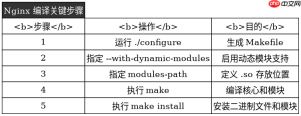
上述代码展示了如何在编译时指定动态模块路径。关键在于 --with-dynamic-modules 后跟随的是模块源码的绝对路径。编译完成后,生成的 .so 文件通常位于 objs 目录下,需要手动复制到 modules-path 指定的目录中。
模块源码需满足哪些条件才能被动态加载
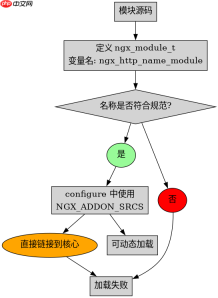
一个模块要被成功动态加载,其源码必须定义一个全局的 ngx_module_t 变量,并且该变量的名称必须符合 Nginx 的动态模块命名规范,即 ngx_http_name_module。此外,模块的 configure 脚本必须使用 NGX_ADDON_SRCS 来注册源文件,而不是直接将其链接到主程序。如果模块内部使用了静态库或依赖其他非标准库,可能会导致加载失败。

#include <ngx_config.h>
#include <ngx_core.h>
#include <ngx_http.h>

static ngx_int_t ngx_http_hello_handler(ngx_http_request_t *r) {
    // 处理逻辑
    return NGX_OK;
}

static ngx_command_t ngx_http_hello_commands[] = {
    { ngx_string("hello"),
      NGX_HTTP_LOC_CONF|NGX_CONF_NOARGS,
      NULL,
      0,
      0,
      NULL },
    ngx_null_command
};

static ngx_http_module_t ngx_http_hello_module_ctx = {
    NULL,                  /* preconfiguration */
    NULL,                  /* postconfiguration */
    // ... 其他上下文设置
};

ngx_module_t ngx_http_hello_module = {
    NGX_MODULE_V1,
    &ngx_http_hello_module_ctx, /* module context */
    ngx_http_hello_commands,    /* module directives */
    NGX_HTTP_MODULE,            /* module type */
    NULL,                       /* init master */
    NULL,                       /* init module */
    NULL,                       /* init process */
    NULL,                       /* init thread */
    NULL,                       /* exit thread */
    NULL,                       /* exit process */
    NULL,                       /* exit master */
    NGX_MODULE_V1_PADDING
};</ngx_http.h></ngx_core.h></ngx_config.h>
这段代码展示了一个最小化的动态模块结构。注意 ngx_module_t 实例的名称必须是 ngx_http_hello_module,这与 H2 标题中提到的命名规范一致。如果名称不匹配,Nginx 在加载时将无法识别该模块。
加载动态模块时常见的错误及排查方法
当尝试加载不支持或配置错误的动态模块时,Nginx 会在启动日志中抛出错误。最常见的错误是 "module is not binary compatible",这通常意味着模块是用不同版本的 Nginx 头文件编译的,或者 ngx_module_t 的结构体大小发生了变化。另一个常见错误是找不到 .so 文件,此时需检查 modules-path 是否正确配置以及文件权限是否允许 Nginx 进程读取。


