






spring boot 全局异常处理无法捕获端口占用异常,因为该异常发生在应用上下文启动阶段,此时 dispatcherservlet 尚未初始化,全局异常处理器未生效。要解决此问题,必须在 spring 容器启动前通过自定义 springapplication 监听器或命令行参数拦截并处理。

为什么全局异常处理失效
全局异常处理依赖于 DispatcherServlet 和 HandlerExceptionResolver,这些组件在 Web 请求到达时才被调用。端口绑定发生在 ApplicationContext 刷新之前,属于基础设施层面的错误,直接导致 run() 方法抛出 BindException 并终止程序,因此任何基于 Controller 或 Service 层的异常映射都无效。
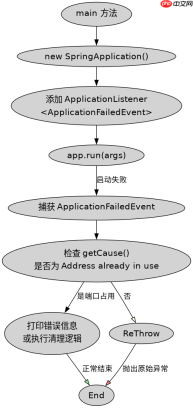
package com.example.demo;import org.springframework.boot.SpringApplication;import org.springframework.boot.autoconfigure.SpringBootApplication;import org.springframework.boot.context.event.ApplicationFailedEvent;import org.springframework.context.ApplicationListener;@SpringBootApplicationpublic class DemoApplication { public static void main(String[] args) { SpringApplication app = new SpringApplication(DemoApplication.class); app.addListeners(new ApplicationListener<applicationfailedevent>() { @Override public void onApplicationEvent(ApplicationFailedEvent event) { Throwable cause = event.getException().getCause(); if (cause != null && cause.getMessage() != null && cause.getMessage().contains("Address already in use")) { System.err.println("端口被占用,请检查进程"); } else { event.getException().printStackTrace(); } } }); app.run(args); }} </applicationfailedevent>
如何正确拦截启动失败
通过在 main 方法中注册 ApplicationListener,可以在应用完全启动失败时捕获异常。这种方式比传统的 addErrorHandlers 更可靠,因为它能获取到完整的异常链。开发者只需判断异常根因是否包含 "Address already in use" 即可识别端口冲突。


package com.example.demo;import org.springframework.boot.SpringApplication;import org.springframework.boot.autoconfigure.SpringBootApplication;import org.springframework.boot.web.server.PortInUseException;import org.springframework.context.ConfigurableApplicationContext;import java.util.Arrays;@SpringBootApplicationpublic class SafeStartApp { public static void main(String[] args) { try { ConfigurableApplicationContext context = SpringApplication.run(SafeStartApp.class, args); System.out.println("启动成功,端口: " + context.getEnvironment().getProperty("server.port")); } catch (Exception e) { if (e instanceof PortInUseException || (e.getCause() instanceof PortInUseException)) { System.err.println("端口占用: " + e.getMessage()); } else { throw e; } } }}
不同端口配置下的行为差异
当使用 application.properties 指定非默认端口(如 server.port=8081)时,上述监听器依然有效。若同时存在多个服务实例,端口冲突概率增加,建议在 CI/CD 环境中结合 netstat 或 lsof 命令进行预检,或在代码中实现自动重试机制以应对临时端口占用。


