






在 spring boot rest 接口开发中,设置跨域访问最直接且推荐的做法是实现 webmvcconfigurer 接口并重写 addcorsmappings 方法。通过配置 corsregistry,你可以指定允许跨域的源、请求方法、头部以及是否允许携带凭证。这样做后,spring mvc 的拦截器会自动处理预检请求(options)并添加必要的 cors 响应头,从而解决浏览器的同源策略限制。

如何配置全局 CORS 映射规则
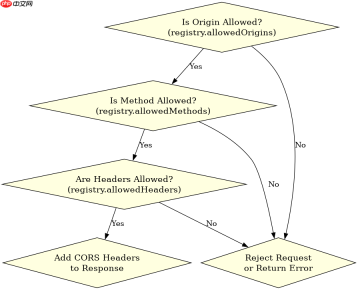
要实现全局生效的跨域配置,需要创建一个配置类实现 WebMvcConfigurer。在该类的 addCorsMappings 方法中,调用 registry.addMapping("/**") 可以匹配所有 URL 路径。接着使用 allowedOrigins 设置允许的域名,allowedMethods 定义支持的 HTTP 动词如 GET、POST 等,allowedHeaders 控制允许的请求头字段。如果前端需要发送 Cookie 或 Authorization 头,必须将 allowCredentials 设置为 true,此时 allowedOrigins 不能设置为通配符 *,而需明确列出具体域名。
import org.springframework.context.annotation.Configuration;
import org.springframework.web.servlet.config.annotation.CorsRegistry;
import org.springframework.web.servlet.config.annotation.WebMvcConfigurer;

@Configuration
public class CorsConfig implements WebMvcConfigurer {

    @Override
    public void addCorsMappings(CorsRegistry registry) {
        registry.addMapping("/**")
                .allowedOriginPatterns("http://localhost:3000", "https://example.com")
                .allowedMethods("GET", "POST", "PUT", "DELETE", "OPTIONS")
                .allowedHeaders("*")
                .allowCredentials(true)
                .maxAge(3600);
    }
}
上述代码定义了全局 CORS 策略。运行该 Spring Boot 应用后,来自 http://localhost:3000 的请求将被允许。预期结果是浏览器不再抛出 CORS 错误,且服务器响应头中包含 Access-Control-Allow-Origin、Access-Control-Allow-Methods 和 Access-Control-Allow-Credentials。对于非简单请求,浏览器会先发送 OPTIONS 预检请求,服务器根据此配置返回 204 No Content 并附带允许信息,随后才发送实际业务请求。
如何针对特定 Controller 或方法设置局部 CORS
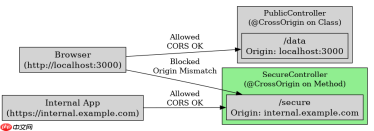
当某些接口需要特殊的跨域策略时,可以使用 @CrossOrigin 注解进行局部配置。该注解可以加在 Controller 类上,作用于该类下所有 Handler 方法;也可以单独加在某个方法上,覆盖类级别的设置。与全局配置不同,局部配置更灵活,可以为不同的 API 端点指定不同的允许源或最大缓存时间。例如,公开数据接口可能允许所有来源,而敏感操作接口仅允许特定内部域名。

import org.springframework.web.bind.annotation.CrossOrigin;
import org.springframework.web.bind.annotation.GetMapping;
import org.springframework.web.bind.annotation.RestController;

@RestController
@CrossOrigin(origins = "http://localhost:3000", maxAge = 3600)
public class PublicController {

    @GetMapping("/data")
    public String getData() {
        return "Public Data";
    }
}

@RestController
public class SecureController {

    @GetMapping("/secure")
    @CrossOrigin(origins = "https://internal.example.com", allowCredentials = "true")
    public String getSecureData() {
        return "Secure Data";
    }
}
以上代码展示了两种局部 CORS 配置方式。PublicController 类级别注解使得其所有接口都允许来自 http://localhost:3000 的请求,且预检结果缓存 3600 秒。SecureController 中的 /secure 接口则专门允许 https://internal.example.com 并启用凭证。测试时,向 /data 发送来自 localhost:3000 的请求应成功,而向 /secure 发送来自同一域名的请求也会成功,但若从其他域名访问 /secure 则会失败。这种细粒度控制有助于在保持安全的同时满足特定业务需求。
当 allowedOrigins 设置为 * 且 allowCredentials 为 true 时会发生什么
在 CORS 规范中,如果 Access-Control-Allow-Origin 设置为通配符 *,则不允许携带凭证(Cookie、Authorization 头等)。Spring Boot 遵循这一规范,当你在配置中将 allowedOrigins 设为 * 同时 allowCredentials 设为 true 时,Spring 会在启动或处理请求时检测到非法组合。实际上,Spring 会忽略 allowCredentials(true) 的设置,或者在某些版本中直接抛出异常或拒绝服务。正确的做法是:如果需要携带凭证,必须明确列出允许的源,不能使用 *。如果不需要携带凭证,可以使用 * 作为允许源,并将 allowCredentials 设为 false 或不设置(默认为 false)。


