






localStorage 读取数据时类型转换怎么处理
localstorage 只能存储字符串,读取时必须手动进行类型转换。使用 json.parse() 将 json 字符串还原为对象或数组,使用 number() 或 parseint() 将数字字符串转为数值,使用 boolean() 处理布尔值,未找到键时返回 null 需做空值检查。

JSON 序列化与反序列化的具体实现
对于复杂数据结构,必须通过 JSON.stringify() 存入,再通过 JSON.parse() 取出。直接存入非字符串类型会被隐式转换为字符串,导致取出后无法恢复原结构。
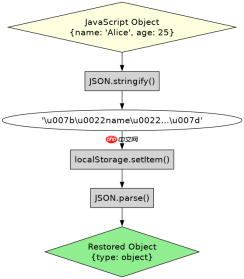
const data = { name: 'Alice', age: 25, active: true };
// 存入
localStorage.setItem('user', JSON.stringify(data));

// 取出并转换
const stored = localStorage.getItem('user');
if (stored !== null) {
    const parsed = JSON.parse(stored);
    console.log(parsed.name); // Alice
    console.log(typeof parsed.age); // number
}
Number 类型转换中的陷阱与处理
从 localStorage 读取的数字字符串若包含空格或非数字字符,parseInt 会截断,parseFloat 会解析前缀,Number() 则严格转换失败返回 NaN。需结合 isNaN 判断确保数据有效性。

FilePond 灵活的 JavaScript 文件上传库
下载
FilePond 是一个 JavaScript 文件上传库,支持通过拖拽、粘贴和 API 方式处理文件、目录、URL 和 Data URI。它包含内置的图像优化功能、异步分块上传功能,并提供了适用于 React、Vue、Angular 和 Svelte 的适配器。
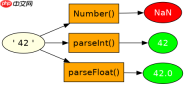
localStorage.setItem('score', ' 42 ');
const raw = localStorage.getItem('score');
const num1 = Number(raw);      // NaN
const num2 = parseInt(raw);    // 42
const num3 = parseFloat(raw);  // 42
console.log(num1, num2, num3);
基于 null 返回值的安全访问问题
当 key 不存在时 getItem 返回 null,直接对 null 调用方法会报错。必须在使用前检查是否为 null,或使用可选链操作符 ?. 安全访问属性。
const missing = localStorage.getItem('nonexistent');
console.log(missing === null); // true
// 安全访问示例
const value = missing?.toString(); // undefined
Java免费学习笔记:立即使用
解锁 Java 大师之旅:从入门到精通的终极指南





