






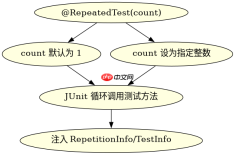
在 java 单元测试中,使用 @repeatedtest 注解可以指定某个测试方法重复执行指定的次数。该注解位于 org.junit.jupiter.api 包下,是 junit 5 提供的功能。通过在测试方法上添加 @repeatedtest(次数),junit 会在运行该测试时自动循环调用该方法多次,每次执行都会获得一个新的 repetitioninfo 实例,可用于获取当前是第几次执行以及总共有多少次执行。

如何配置重复执行的次数
配置重复执行次数非常简单,只需在测试方法上方添加 @RepeatedTest 注解并传入一个整数参数即可。例如,@RepeatedTest(5) 表示该测试方法将连续执行 5 次。如果未指定参数,默认值为 1,即只执行一次。这种机制常用于需要验证稳定性、处理随机数据或进行压力测试的场景。
import org.junit.jupiter.api.RepeatedTest; import org.junit.jupiter.api.TestInfo; import static org.junit.jupiter.api.Assertions.assertTrue; public class RepeatedTestExample { @RepeatedTest(3) void testWithFixedCount(TestInfo testInfo) { int current = testInfo.getRepetitionInfo().getCurrentRepetition(); int total = testInfo.getRepetitionInfo().getTotalRepetitions(); System.out.println("Running repetition " + current + " of " + total); assertTrue(current >= 1 && current <h2>如何使用动态名称标识每次执行</h2><p>为了让测试结果更清晰,可以在 <code>@RepeatedTest</code> 注解中使用占位符来生成动态的测试名称。支持两种占位符:<code>{currentRepetition}</code> 表示当前是第几次执行,<code>{totalRepetitions}</code> 表示总共要执行多少次。这样在测试报告或控制台输出中,每次执行都会有独立的、易于区分的名称,方便定位问题。</p><div class="aritcle_card flexRow artxards">
											<div class="artcardd flexRow">
												<a class="aritcle_card_img" rel="nofollow" href="/xiazai/skill13407" title="Java基础版"><img
														src="https://img.php.cn/upload/skill/001/246/273/6adaf20d79f23518.jpg" alt="Java基础版" onerror="this.onerror='';this.src='/static/lhimages/moren/morentu.png'" ></a>
												<div class="aritcle_card_info flexColumn">
													<a rel="nofollow" href="/xiazai/skill13407" title="Java基础版" class="overflowclass">Java基础版</a>
													<p class="overflowclass">编写健壮 Java 代码的基础能力,覆盖空指针防护、相等性判断与基础异常处理。</p>
												</div>
												<a rel="nofollow" href="/xiazai/skill13407" title="Java基础版" class="aritcle_card_btn flexRow flexcenter"><b></b><span>下载</span>
												</a>
											</div>
										</div><p><img src="https://img.php.cn/upload/article/001/242/473/179506254748734.png?x-oss-process=image/resize,p_40" alt="Java 单元测试中 @RepeatedTest 怎么重复执行测试"></p><pre class="brush:php;toolbar:false;">import org.junit.jupiter.api.RepeatedTest; import static org.junit.jupiter.api.Assertions.assertEquals; public class DynamicNameExample { @RepeatedTest(value = 4, name = "Check iteration {currentRepetition} of {totalRepetitions}") void testWithDynamicName() { assertEquals(4, 2 + 2); } }
基于 TestInfo 获取当前执行状态的具体问题
当需要在测试逻辑内部知道当前是第几次执行时,可以将 RepetitionInfo 或 TestInfo 作为参数注入到测试方法中。通过 TestInfo.getRepetitionInfo() 可以获取 RepetitionInfo 对象,进而调用 getCurrentRepetition() 和 getTotalRepetitions() 方法获取具体数值。这在需要根据执行次数改变行为或记录日志时非常有用。
Java免费学习笔记:立即使用
解锁 Java 大师之旅:从入门到精通的终极指南


