






java 中处理国际化时,resourcebundle 默认使用平台编码读取属性文件,这会导致非 ascii 字符乱码。正确的做法是使用 propertyresourcebundle 的子类或自定义加载器,将输入流包装为 inputstreamreader 并指定 utf-8 编码,或者在编译前将 .properties 文件转换为 .class 资源。对于现代 java 应用,推荐直接使用 java.util.resourcebundle.getbundle() 配合 utf-8 编码的属性文件,并通过 native2ascii 工具或构建插件自动转换。

如何确保 ResourceBundle 正确读取 UTF-8 中文内容
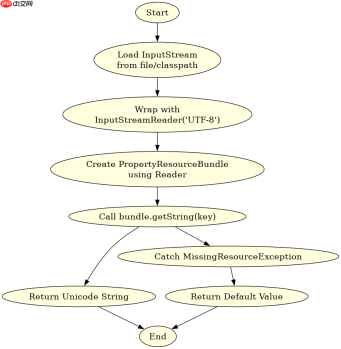
要确保 ResourceBundle 正确读取 UTF-8 中文内容,必须避免直接使用 new PropertyResourceBundle(InputStream),因为该构造函数假设输入流是 ISO-8859-1 编码。正确的做法是将 InputStream 包装在 InputStreamReader 中,显式指定 "UTF-8" 编码,然后再传入 ResourceBundle 构造函数。这样可以直接支持 Unicode 字符,无需进行转义。
import java.io.*;
import java.util.*;

public class Utf8ResourceLoader {
    public static void main(String[] args) throws Exception {
        // 模拟从 classpath 或文件系统加载 UTF-8 编码的 properties 文件
        String fileName = "messages_zh_CN.properties";
        try (InputStream is = new FileInputStream(fileName);
             Reader reader = new InputStreamReader(is, "UTF-8")) {

            // 关键步骤:使用带编码的 Reader 创建 PropertyResourceBundle
            ResourceBundle bundle = new PropertyResourceBundle(reader);

            // 获取中文值
            String welcome = bundle.getString("welcome.message");
            System.out.println("Welcome: " + welcome);

            String goodbye = bundle.getString("goodbye.message");
            System.out.println("Goodbye: " + goodbye);
        }
    }
}
上述代码中,FileInputStream 读取原始字节流,InputStreamReader 将其解码为 UTF-8 字符流,最后 PropertyResourceBundle 解析这些字符。如果属性文件中包含 welcome.message=欢迎使用系统,程序将直接输出中文,而不会出现乱码。这种方法适用于需要动态加载或修改资源文件的场景。
传统 native2ascii 转换与自动化工具对比
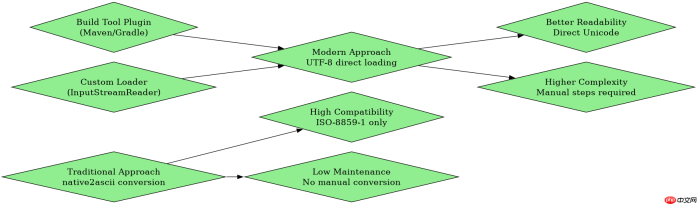
在传统 Java 项目中,.properties 文件通常被要求使用 ISO-8859-1 编码,并通过 native2ascii 工具将 Unicode 字符转换为 \uXXXX 形式的 ASCII 转义序列。虽然这种方式兼容性好,但可读性差且维护成本高。现代开发中,推荐使用 Maven 或 Gradle 插件自动处理编码转换,或者直接使用支持 UTF-8 的资源包加载机制。

// 使用 native2ascii 转换后的 properties 文件内容示例
# messages_zh_CN.properties (converted)
welcome.message=\u6b22\u8fce\u4f7f\u7528\u7cfb\u7edf
goodbye.message=\u518d\u89c1

// 对应的 Java 代码调用(无需额外编码处理)
ResourceBundle bundle = ResourceBundle.getBundle("messages", Locale.CHINA);
String msg = bundle.getString("welcome.message");
System.out.println(msg); // 输出: 欢迎使用系统
在 Maven 项目中,可以通过 maven-resources-plugin 配置 encoding>UTF-8 来确保资源文件以 UTF-8 编码处理。Gradle 项目同样可以在 build.gradle 中设置 sourceEncoding = 'UTF-8'。这些自动化手段避免了手动运行 native2ascii 命令,提高了开发效率。需要注意的是,如果使用 ResourceBundle.getBundle(),它内部仍然可能依赖平台默认编码,因此在某些旧版本 JVM 中仍需注意编码问题。建议始终显式指定编码或使用自定义加载器。
当属性文件缺失键时 ResourceBundle 的行为是什么
当 ResourceBundle 查找的键在属性文件中不存在时,它会抛出 MissingResourceException。这是默认行为,不会返回 null 或空字符串。开发者需要在代码中捕获此异常,并提供默认值或错误提示。为了避免运行时异常,可以在加载资源后检查键是否存在,或者使用 containsKey() 方法进行预检。
import java.util.*;

public class SafeResourceLoader {
    public static void main(String[] args) {
        try {
            ResourceBundle bundle = ResourceBundle.getBundle("messages", Locale.CHINA);

            // 安全地获取值,如果键不存在则提供默认值
            String welcome = getSafeValue(bundle, "welcome.message", "默认欢迎语");
            System.out.println("Welcome: " + welcome);

            // 尝试获取不存在的键
            String missing = getSafeValue(bundle, "non.existent.key", "默认缺失值");
            System.out.println("Missing: " + missing);
        } catch (Exception e) {
            e.printStackTrace();
        }
    }

    private static String getSafeValue(ResourceBundle bundle, String key, String defaultValue) {
        try {
            return bundle.getString(key);
        } catch (MissingResourceException e) {
            return defaultValue;
        }
    }
}
在上述代码中,getSafeValue 方法封装了 bundle.getString() 调用,并在捕获 MissingResourceException 后返回默认值。这种模式在实际应用中非常常见,可以防止因配置缺失导致的程序崩溃。同时,建议在启动时验证所有必需的资源键是否存在,以便尽早发现问题。
Java免费学习笔记:立即使用
解锁 Java 大师之旅:从入门到精通的终极指南


