






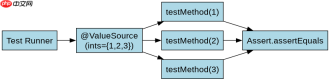
使用 @valuesource 提供测试数据时,需要在测试方法上添加该注解并指定数据类型数组,junit 会自动将数组中的每个元素作为参数依次注入到测试方法中执行多次断言验证。例如在 int[].class 或 string.class 中传入一组值,测试框架会循环调用该方法,从而避免为每个输入编写重复的测试代码。
@ValueSource 支持哪些基本数据类型
@ValueSource 仅支持 Java 的基本类型及其对应的包装类、String 和 Class,不支持自定义对象或集合类型。当需要传递复杂结构时,必须改用 @CsvSource 或 @MethodSource。对于基本类型,注解直接接收字面量值,无需额外转换。

import org.junit.jupiter.api.Test;
import org.junit.jupiter.params.ParameterizedTest;
import org.junit.jupiter.params.provider.ValueSource;

import static org.junit.jupiter.api.Assertions.assertEquals;

public class MathUtilsTest {

    @ParameterizedTest
    @ValueSource(ints = {1, 2, 3, 4, 5})
    void testAddWithIntValues(int input) {
        int result = MathUtils.add(input, 10);
        assertEquals(input + 10, result);
    }

    @ParameterizedTest
    @ValueSource(strings = {"hello", "world", "test"})
    void testStringLength(String str) {
        assertTrue(str.length() > 0);
    }
}

// 假设的辅助类
class MathUtils {
    public static int add(int a, int b) {
        return a + b;
    }
}
上述代码展示了两种常见用法:整数数组和字符串数组。运行后,JUnit 会分别以 1、2、3、4、5 调用 testAddWithIntValues,以及以 "hello"、"world"、"test" 调用 testStringLength。每次调用都是独立的测试用例,失败时会单独标记对应输入。

如何处理空值或特殊字符输入
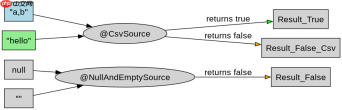
当测试逻辑涉及边界条件如空字符串或 null 值时,@ValueSource 无法直接处理 null 引用,需结合 @NullAndEmptySource 或使用 @CsvSource 显式声明空值。对于包含逗号或引号的特殊字符串,应使用 @CsvSource 并通过转义符处理,确保解析正确。
import org.junit.jupiter.api.Test;
import org.junit.jupiter.params.ParameterizedTest;
import org.junit.jupiter.params.provider.NullAndEmptySource;
import org.junit.jupiter.params.provider.CsvSource;

import static org.junit.jupiter.api.Assertions.*;

public class StringValidatorTest {

    @ParameterizedTest
    @NullAndEmptySource
    void testNullOrEmptyReturnsFalse(String input) {
        assertFalse(Validator.isValid(input));
    }

    @ParameterizedTest
    @CsvSource({"'a,b', true", "'c d', true", "'', false"})
    void testComplexStrings(String input, boolean expected) {
        assertEquals(expected, Validator.isValid(input));
    }
}

// 假设的验证器
class Validator {
    public static boolean isValid(String s) {
        return s != null && !s.isEmpty();
    }
}
第一段测试使用 @NullAndEmptySource 自动注入 null 和空字符串,覆盖安全边界。第二段使用 @CsvSource 处理含逗号的字符串,通过单引号包裹避免解析错误。这种组合方式能完整覆盖异常输入场景,且保持测试可读性。
Java免费学习笔记:立即使用
解锁 Java 大师之旅:从入门到精通的终极指南


