






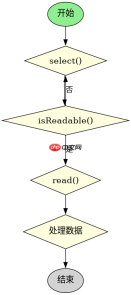
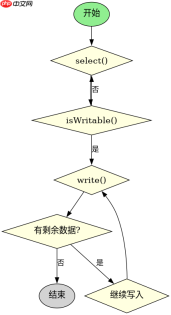
java nio 中处理读写需要结合 selector、selectionkey 和 socketchannel。核心做法是注册 op_read 和 op_write 事件,在 select() 返回后检查 isreadable() 和 iswritable() 状态并执行对应的 i/o 操作。

OP_READ 如何接收数据
当通道可读时,调用 read() 方法将数据从通道读入缓冲区。如果读取到 -1 表示连接关闭,否则处理缓冲区中的数据。
import java.nio.*;
import java.nio.channels.*;
import java.net.*;
import java.util.*;

public class ReadExample {
    public static void main(String[] args) throws Exception {
        Selector selector = Selector.open();
        ServerSocketChannel ssc = ServerSocketChannel.open();
        ssc.configureBlocking(false);
        ssc.bind(new InetSocketAddress(8080));
        ssc.register(selector, SelectionKey.OP_ACCEPT);

        while (true) {
            int n = selector.select();
            if (n == 0) continue;
            Set<selectionkey> keys = selector.selectedKeys();
            Iterator<selectionkey> it = keys.iterator();
            while (it.hasNext()) {
                SelectionKey key = it.next();
                it.remove();
                if (key.isAcceptable()) {
                    SocketChannel sc = ssc.accept();
                    sc.configureBlocking(false);
                    sc.register(selector, SelectionKey.OP_READ);
                } else if (key.isReadable()) {
                    SocketChannel sc = (SocketChannel) key.channel();
                    ByteBuffer buf = ByteBuffer.allocate(1024);
                    int read = sc.read(buf);
                    if (read == -1) {
                        sc.close();
                        key.cancel();
                    } else {
                        buf.flip();
                        System.out.println("Received: " + new String(buf.array(), 0, read));
                    }
                }
            }
        }
    }
}</selectionkey></selectionkey>
OP_WRITE 如何发送数据
当通道可写时,调用 write() 方法将缓冲区数据写入通道。通常用于发送响应或异步发送大量数据。

import java.nio.*;
import java.nio.channels.*;
import java.net.*;
import java.util.*;

public class WriteExample {
    public static void main(String[] args) throws Exception {
        Selector selector = Selector.open();
        ServerSocketChannel ssc = ServerSocketChannel.open();
        ssc.configureBlocking(false);
        ssc.bind(new InetSocketAddress(8080));
        ssc.register(selector, SelectionKey.OP_ACCEPT);

        while (true) {
            int n = selector.select();
            if (n == 0) continue;
            Set<selectionkey> keys = selector.selectedKeys();
            Iterator<selectionkey> it = keys.iterator();
            while (it.hasNext()) {
                SelectionKey key = it.next();
                it.remove();
                if (key.isAcceptable()) {
                    SocketChannel sc = ssc.accept();
                    sc.configureBlocking(false);
                    sc.register(selector, SelectionKey.OP_READ | SelectionKey.OP_WRITE);
                } else if (key.isReadable()) {
                    SocketChannel sc = (SocketChannel) key.channel();
                    ByteBuffer buf = ByteBuffer.allocate(1024);
                    int read = sc.read(buf);
                    if (read == -1) {
                        sc.close();
                        key.cancel();
                    } else {
                        buf.flip();
                        String response = "HTTP/1.1 200 OK\r\n\r\nHello";
                        ByteBuffer outBuf = ByteBuffer.wrap(response.getBytes());
                        sc.write(outBuf);
                        key.interestOps(SelectionKey.OP_READ);
                    }
                } else if (key.isWritable()) {
                    // 实际应用中可能需要更复杂的逻辑来处理部分写入
                }
            }
        }
    }
}</selectionkey></selectionkey>
如何处理 OP_WRITE 的半包问题
在实际网络编程中,write() 可能不会一次性写出所有数据,需要循环写入直到缓冲区为空。
Java免费学习笔记:立即使用
解锁 Java 大师之旅:从入门到精通的终极指南


