






LocalDateTime获取当前时间的ChronoOffsetDateTime
java 8日期时间api中并没有名为 chronooffsetdatetime 的类,通常指的是带有偏移量的日期时间对象 zoneddatetime 或 offsetdatetime。要获取当前时间的带偏移量日期时间,最直接的方法是使用 zoneddatetime.now(),它会自动应用系统默认时区的偏移量。

指定特定时区获取OffsetDateTime
如果需要明确指定某个时区(如 UTC 或 Asia/Shanghai)来获取偏移量日期时间,应使用 ZonedDateTime.now(ZoneId.of("...")) 并转换为 OffsetDateTime。这样可以确保结果中的偏移量是确定的,不依赖于运行环境的默认时区设置。


处理空值与异常的具体问题
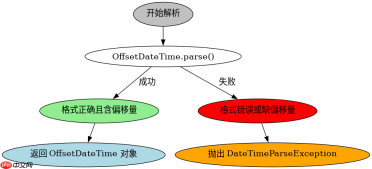
在解析或转换过程中,如果输入字符串格式不符合预期或时区ID无效,会抛出 DateTimeParseException 或 DateTimeException。例如,使用 OffsetDateTime.parse() 时若缺少偏移量信息,将直接报错。因此,在处理外部输入的日期时间字符串时,必须捕获这些异常以确保程序稳定性。
import java.time.LocalDateTime;
import java.time.ZoneId;
import java.time.ZonedDateTime;
import java.time.OffsetDateTime;
import java.time.format.DateTimeFormatter;

public class DateTimeExample {
    public static void main(String[] args) {
        // 1. 获取当前时间的 ZonedDateTime (包含时区和偏移量)
        ZonedDateTime zdt = ZonedDateTime.now();
        System.out.println("ZonedDateTime: " + zdt);

        // 2. 获取特定时间区的 OffsetDateTime
        ZoneId utcZone = ZoneId.of("UTC");
        OffsetDateTime odtUtc = zdt.withZoneSameInstant(utcZone).toOffsetDateTime();
        System.out.println("OffsetDateTime (UTC): " + odtUtc);

        ZoneId shanghaiZone = ZoneId.of("Asia/Shanghai");
        OffsetDateTime odtShanghai = zdt.withZoneSameInstant(shanghaiZone).toOffsetDateTime();
        System.out.println("OffsetDateTime (Shanghai): " + odtShanghai);

        // 3. 验证异常处理
        try {
            // 错误的格式,缺少偏移量
            OffsetDateTime.parse("2023-10-01T12:00:00");
        } catch (Exception e) {
            System.out.println("Expected Exception: " + e.getClass().getSimpleName());
        }
    }
}
预期输出示例:
ZonedDateTime: 2023-10-27T10:00:00.123+08:00[Asia/Shanghai]
OffsetDateTime (UTC): 2023-10-27T02:00:00.123Z
OffsetDateTime (Shanghai): 2023-10-27T10:00:00.123+08:00
Expected Exception: DateTimeParseException
大量免费API接口:立即使用
涵盖生活服务API、金融科技API、企业工商API、等相关的API接口服务。免费API接口可安全、合规地连接上下游,为数据API应用能力赋能!


