在浏览器开发者工具中快速调试动态插入的内联css,最直接的办法是开启“强制状态”并配合元素选择器实时查看样式来源。具体做法是在elements面板的右侧styles视图中,勾选“computed”或直接在styles栏过滤,同时确保开启了“show user agent shadow dom”和“show inherited styles”以排除干扰。对于通过javascript动态添加的样式,使用`getcomputedstyle()`或在控制台直接操作dom元素的`style`属性可以即时验证效果。若样式未生效,重点检查优先级冲突、特异性(specificity)以及是否被后续脚本覆盖。
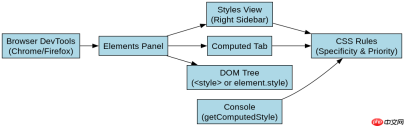
如何定位动态注入的样式节点
要定位动态注入的样式,需要在DOM树中查找对应的`
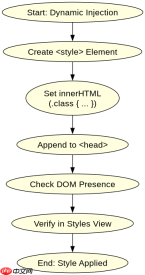
    <meta charset="UTF-8"><title>Dynamic CSS Debug</title><style id="static-style">
        .box { width: 100px; height: 100px; background: blue; }
    </style><div class="box" id="target">Target Box</div>
    <script>
        // 模拟动态插入内联样式
        const style = document.createElement('style');
        style.id = 'dynamic-style';
        style.innerHTML = '.box { background: red !important; }';
        document.head.appendChild(style);

        // 模拟通过JS直接修改style属性
        const target = document.getElementById('target');
        target.style.marginTop = '20px';

        console.log('Static Style Sheet:', document.getElementById('static-style').sheet.cssRules.length);
        console.log('Dynamic Style Sheet:', document.getElementById('dynamic-style').sheet.cssRules.length);
        console.log('Computed Background:', getComputedStyle(target).background);
        console.log('Inline Margin:', target.style.marginTop);
    </script>
预期结果:控制台输出静态样式表有1条规则,动态样式表有1条规则。计算样式显示背景为红色(因为!important),内边距marginTop为20px。在Elements面板的Styles视图中,可以看到.red背景被划掉(如果存在其他更高优先级样式)或直接显示,且inline style部分会显示margin-top。
如何处理样式优先级与冲突
处理动态样式的优先级冲突,核心在于理解CSS特异性(Specificity)和`!important`的使用。动态插入的样式如果特异性低于原有样式,可能不会生效。通过调整选择器权重或使用`!important`可以强制覆盖。在调试时,观察Styles面板中被划掉的样式即可判断优先级问题。


    <meta charset="UTF-8"><title>Priority Conflict</title><style>
        #target { background: green; }
        .box { background: yellow; }
    </style><div class="box" id="target">Conflict Test</div>
    <script>
        const target = document.getElementById('target');

        // 情况1:低特异性动态样式
        const style1 = document.createElement('style');
        style1.innerHTML = '.box { background: orange; }';
        document.head.appendChild(style1);

        // 情况2:高特异性动态样式
        const style2 = document.createElement('style');
        style2.innerHTML = '#target { background: purple !important; }';
        document.head.appendChild(style2);

        console.log('Final Background:', getComputedStyle(target).background);
    </script>
预期结果:最终背景色为紫色。因为`#target`的特异性高于`.box`,且使用了`!important`,所以覆盖了所有其他样式。在Styles面板中,绿色和黄色背景会被划掉,橙色也会被划掉,只有紫色生效。
当动态样式未应用时的排查步骤
当动态样式未应用时,首先检查元素是否正确引用了类名或ID,其次检查样式是否被正确插入到DOM中,最后检查是否有JavaScript错误阻止了样式注入。使用浏览器的Performance面板记录页面加载过程,可以回放DOM更新和样式计算过程,定位样式失效的具体时间点。
前端入门到VUE实战笔记:立即使用
在学习笔记中,你将探索 前端 的入门与实战技巧!