使用 position: fixed 结合 bottom 属性,并监听页面滚动事件动态计算剩余空间。当页面滚动到底部时,将按钮的 bottom 值设为页脚高度,使其悬浮在页脚上方;否则保持固定距离(如 20px)。这种方法能确保按钮始终可见且不遮挡内容。

如何检测页面是否滚动到底部?
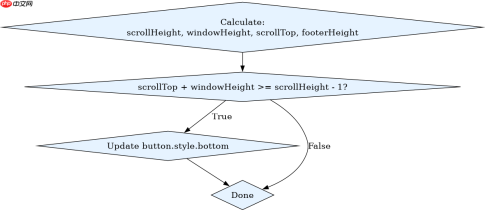
通过比较 window.innerHeight + window.scrollY 与 document.documentElement.scrollHeight 来判断。当两者相等或差值小于阈值(如 1px)时,视为到达底部。这是实现动态定位的核心条件。
    <meta charset="UTF-8"><meta name="viewport" content="width=device-width, initial-scale=1.0"><title>Fixed Button at Footer</title><style>
        body {
            margin: 0;
            padding-bottom: 100px; /* 预留页脚空间 */
            font-family: Arial, sans-serif;
        }
        .content {
            height: 2000px; /* 模拟长内容 */
            background: linear-gradient(to bottom, #f0f0f0, #e0e0e0);
            padding: 20px;
        }
        footer {
            position: relative;
            height: 50px;
            background-color: #333;
            color: white;
            text-align: center;
            line-height: 50px;
        }
        #fixed-btn {
            position: fixed;
            bottom: 20px;
            right: 20px;
            padding: 10px 20px;
            background-color: #007bff;
            color: white;
            border: none;
            border-radius: 5px;
            cursor: pointer;
            transition: bottom 0.3s ease;
        }
    </style><div class="content">
        <p>Scroll down to see the button adjust.</p><div class="aritcle_card flexRow artxards">
											<div class="artcardd flexRow">
												<a class="aritcle_card_img" rel="nofollow" href="/xiazai/gongju/2905" title="CSS"><img
														src="https://img.php.cn/upload/manual/000/969/633/6af2b1226ad9e733.png" alt="CSS" onerror="this.onerror='';this.src='/static/lhimages/moren/morentu.png'" ></a>
												<div class="aritcle_card_info flexColumn">
													<a rel="nofollow" href="/xiazai/gongju/2905" title="CSS" class="overflowclass">CSS</a>
													<p class="overflowclass">CSS 官方网站入口。访问 W3C 的 CSS 页面,查看 CSS 标准、学习资料与工作组动态;CSS 是 Web 标准,无需下载安装。</p>
												</div>
												<a rel="nofollow" href="/xiazai/gongju/2905" title="CSS" class="aritcle_card_btn flexRow flexcenter"><b></b><span>下载</span>
												</a>
											</div>
										</div>
    </div>
    <footer id="footer">Footer Content</footer><button id="fixed-btn">Action</button>

    <script>
        const btn = document.getElementById('fixed-btn');
        const footer = document.getElementById('footer');

        function updateButtonPosition() {
            const scrollHeight = document.documentElement.scrollHeight;
            const windowHeight = window.innerHeight;
            const scrollTop = window.scrollY;
            const footerHeight = footer.offsetHeight;

            // 判断是否接近底部(允许1px误差)
            if (scrollTop + windowHeight >= scrollHeight - 1) {
                btn.style.bottom = (footerHeight + 20) + 'px';
            } else {
                btn.style.bottom = '20px';
            }
        }

        window.addEventListener('scroll', updateButtonPosition);
        window.addEventListener('resize', updateButtonPosition);
    </script>
为什么需要transition属性?
添加 transition: bottom 0.3s ease 可使按钮位置变化平滑,避免突兀跳动。这提升了用户体验,尤其在滚动到底部时,按钮缓缓上移贴合页脚,视觉上更自然。

如果页脚高度动态变化怎么办?
由于 footer.offsetHeight 在每次滚动事件中实时获取,即使页脚内容动态增减导致高度变化,按钮仍能自动适配新高度。无需额外处理,因为脚本在每次滚动时重新计算 bottom 值,确保始终紧贴页脚上方 20px 处。
前端入门到VUE实战笔记:立即使用
在学习笔记中,你将探索 前端 的入门与实战技巧!