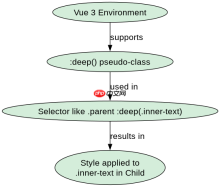
在vue组件中利用scoped css深度选择器穿透子组件,需要使用 :deep() 伪类(vue 3)或 >>> / /deep/ 语法(vue 2)。这允许父组件的样式作用于子组件内部的元素,同时保持其他样式的局部性。例如,使用 :deep(.child-class) 可以将样式应用到名为 .child-class 的子组件元素上。

Vue 3中使用:deep()的具体写法
在Vue 3中,推荐使用 :deep() 函数来穿透样式。它提供了一种更清晰、更易于维护的方式来指定需要穿透的选择器。例如,如果有一个子组件 ChildComponent,并且你想修改其内部的一个类为 .inner-text 的元素,你可以这样写::deep(.inner-text) { color: red; }。这将确保只有父组件中的 ChildComponent 实例内的 .inner-text 会被应用此样式,而不会影响其他地方的同名类。
<template><div class="parent">
    <childcomponent></childcomponent><script>
import ChildComponent from './ChildComponent.vue';

export default {
  components: {
    ChildComponent
  }
};
</script><style scoped>
.parent :deep(.inner-text) {
  color: red;
}
</style>
<p>上述代码展示了如何在Vue 3中使用 <code>:deep()</code> 来穿透子组件的样式。在这个例子中,<code>.parent</code> 类下的所有 <code>.inner-text</code> 元素都会被设置为红色文本颜色。</p>
<h2>Vue 2中使用<code>>>></code>和<code>/deep/</code>的兼容性处理</h2>
<p>在Vue 2中,由于CSS预处理器的不同支持情况,通常使用 <code>>>></code> 或 <code>/deep/</code> 来实现样式穿透。这两种方式的效果相同,但 <code>/deep/</code> 更加通用,因为它不仅适用于Sass/Less,也适用于原生CSS。例如,如果你想在Vue 2项目中修改子组件 <code>ChildComponent</code> 内部的 <code>.inner-text</code> 元素的样式,可以这样写:<code>.parent >>> .inner-text { color: blue; }</code> 或 <code>.parent /deep/ .inner-text { color: blue; }</code>。需要注意的是,随着Vue 3的普及,建议在新项目中使用 <code>:deep()</code> 以获得更好的兼容性和可维护性。</p><div class="aritcle_card flexRow artxards">
											<div class="artcardd flexRow">
												<a class="aritcle_card_img" rel="nofollow" href="/xiazai/skill13074" title="Vue工具箱(免费版)"><img
														src="https://img.php.cn/upload/skill/001/246/273/6adaf20dee630206.jpg" alt="Vue工具箱(免费版)" onerror="this.onerror='';this.src='/static/lhimages/moren/morentu.png'" ></a>
												<div class="aritcle_card_info flexColumn">
													<a rel="nofollow" href="/xiazai/skill13074" title="Vue工具箱(免费版)" class="overflowclass">Vue工具箱(免费版)</a>
													<p class="overflowclass">规避 Vue 3 常见陷阱:响应式、ref 与 reactive、computed 时机与组合式 API 优选实践。</p>
												</div>
												<a rel="nofollow" href="/xiazai/skill13074" title="Vue工具箱(免费版)" class="aritcle_card_btn flexRow flexcenter"><b></b><span>下载</span>
												</a>
											</div>
										</div>
<p><img src="https://img.php.cn/upload/article/000/969/633/179488401896008.png?x-oss-process=image/resize,p_40" alt="怎样在Vue组件中利用Scoped CSS深度选择器穿透子组件?"></p>
<pre class="brush:php;toolbar:false;"><template><div class="parent">
    <childcomponent></childcomponent>
</div>


<script>
import ChildComponent from './ChildComponent.vue';

export default {
  components: {
    ChildComponent
  }
};
</script><style scoped>
.parent /deep/ .inner-text {
  color: blue;
}
</style></template>
以上代码演示了如何在Vue 2中使用 /deep/ 来穿透子组件的样式。这里,.parent 类下的所有 .inner-text 元素将被设置为蓝色文本颜色。尽管这种方式在Vue 2中广泛使用,但在Vue 3及更高版本中,推荐转向使用 :deep() 以保持代码的一致性和未来兼容性。
当子组件使用动态类名时如何穿透?
当子组件使用动态类名时,如通过 :class 绑定,仍然可以使用 :deep() 或 /deep/ 来穿透样式。关键在于确保父组件中的选择器能够匹配到子组件中可能变化的类名。例如,如果子组件 ChildComponent 的动态类名是基于某个条件生成的,如 :class="{ 'active': isActive }",你可以在父组件中使用 :deep(.active) 来应用样式。只要 .active 类在子组件中被应用,父组件的样式就会生效。这种方法要求你对子组件的内部结构有一定的了解,以便正确编写穿透选择器。
前端入门到VUE实战笔记:立即使用
在学习笔记中,你将探索 前端 的入门与实战技巧!