使用 groupby 分组后,通过计算每组元素数量与总元素数量的比值即可得到比例。具体做法是先调用 count() 获取总数,再在分组投影中用当前组的 count() 除以总数,最后将结果转换为浮点数或百分比字符串。

如何按指定字段分组并计算各组占比?
直接回答:使用 GroupBy 方法按指定键分组,并在 Select 中计算每组大小与总数的比率。输入为包含分类信息的对象集合,结果为每个分类及其对应的占比数值。
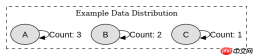
using System;
using System.Collections.Generic;
using System.Linq;

class Program
{
    static void Main()
    {
        var items = new List<string>
        {
            "A", "B", "A", "C", "B", "A"
        };

        int total = items.Count;

        var result = items
            .GroupBy(x => x)
            .Select(g => new
            {
                Key = g.Key,
                Count = g.Count(),
                Ratio = (double)g.Count() / total
            })
            .OrderBy(x => x.Key);

        foreach (var item in result)
        {
            Console.WriteLine($"{item.Key}: {item.Ratio:F2} ({item.Count})");
        }
    }
}</string>
预期输出:
A: 0.50 (3)
B: 0.33 (2)
C: 0.17 (1)
如何处理空集合或零除情况?
直接回答:在计算比例前检查集合是否为空,若为空则返回默认值或跳过计算,避免抛出 DivideByZeroException。可以通过 Any() 或 Count() 判断集合状态。


using System;
using System.Collections.Generic;
using System.Linq;

class Program
{
    static void Main()
    {
        var emptyItems = new List<string>();
        var nonEmptyItems = new List<string> { "A", "B" };

        ProcessAndPrint(emptyItems, "Empty");
        ProcessAndPrint(nonEmptyItems, "Non-Empty");
    }

    static void ProcessAndPrint(List<string> items, string label)
    {
        Console.WriteLine($"--- {label} ---");
        if (!items.Any())
        {
            Console.WriteLine("No items to process.");
            return;
        }

        int total = items.Count;
        var result = items
            .GroupBy(x => x)
            .Select(g => new
            {
                Key = g.Key,
                Ratio = (double)g.Count() / total
            });

        foreach (var item in result)
        {
            Console.WriteLine($"{item.Key}: {item.Ratio:F2}");
        }
    }
}</string></string></string>
预期输出:
--- Empty ---
No items to process.
--- Non-Empty ---
A: 0.50
B: 0.50
当分组键为null时如何处理?
直接回答:在 GroupBy 中,null 键会被归入同一组,因此无需特殊处理即可正确计算其占比。只需确保分组逻辑能接受 null 作为有效键即可。