使用linq将多层分组统计整理成平面结果,核心做法是调用 selectmany 方法对嵌套的分组数据进行展平。通过先按主键分组,再在子组内按次级键分组,最后用 selectmany 将每个子分组的元素与对应的层级键组合成新的匿名对象,即可得到包含所有层级信息的扁平化列表。

如何按部门分组并统计员工薪资总和?
要实现按部门分组并统计薪资总和,可以使用 GroupBy 结合 Sum 聚合函数。输入数据为包含 Department 和 Salary 属性的员工列表,输出结果为每个部门的名称及其薪资总和。这种方法直接生成一个包含部门信息和统计值的平面列表,无需进一步处理。
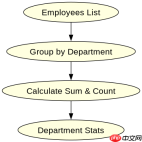
using System;
using System.Collections.Generic;
using System.Linq;

public class Employee
{
    public string Name { get; set; }
    public string Department { get; set; }
    public decimal Salary { get; set; }
}

class Program
{
    static void Main()
    {
        var employees = new List<employee>
        {
            new Employee { Name = "Alice", Department = "IT", Salary = 5000 },
            new Employee { Name = "Bob", Department = "IT", Salary = 6000 },
            new Employee { Name = "Charlie", Department = "HR", Salary = 4500 },
            new Employee { Name = "Diana", Department = "HR", Salary = 4800 }
        };

        var departmentStats = employees
            .GroupBy(e => e.Department)
            .Select(g => new
            {
                Department = g.Key,
                TotalSalary = g.Sum(e => e.Salary),
                Count = g.Count()
            })
            .ToList();

        foreach (var stat in departmentStats)
        {
            Console.WriteLine($"{stat.Department}: Total={stat.TotalSalary}, Count={stat.Count}");
        }
    }
}</employee>
预期输出:
IT: Total=11000, Count=2
HR: Total=9300, Count=2
如何在分组后保留原始员工信息以便后续查询?
若需在分组统计的同时保留原始员工信息,可在 SelectMany 中同时投影分组键和原始元素。这样得到的平面列表中,每条记录都包含部门、职位以及该员工的详细信息。这种结构适合需要基于层级条件进行过滤或展示的场景。

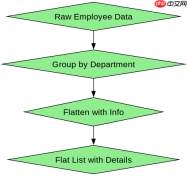
using System;
using System.Collections.Generic;
using System.Linq;

public class Employee
{
    public string Name { get; set; }
    public string Department { get; set; }
    public string Position { get; set; }
    public decimal Salary { get; set; }
}

class Program
{
    static void Main()
    {
        var employees = new List<employee>
        {
            new Employee { Name = "Alice", Department = "IT", Position = "Dev", Salary = 5000 },
            new Employee { Name = "Bob", Department = "IT", Position = "QA", Salary = 4000 },
            new Employee { Name = "Charlie", Department = "HR", Position = "Recruiter", Salary = 4500 }
        };

        var flatResult = employees
            .GroupBy(e => e.Department)
            .SelectMany(g => g.Select(e => new
            {
                Department = g.Key,
                Position = e.Position,
                Employee = e
            }))
            .ToList();

        foreach (var item in flatResult)
        {
            Console.WriteLine($"Dept: {item.Department}, Pos: {item.Position}, Name: {item.Employee.Name}");
        }
    }
}</employee>
预期输出:
Dept: IT, Pos: Dev, Name: Alice
Dept: IT, Pos: QA, Name: Bob
Dept: HR, Pos: Recruiter, Name: Charlie
当某部门没有员工时,分组统计会返回什么结果?
当某部门没有员工时,GroupBy 不会为该部门生成任何分组项,因此该部门不会出现在最终的平面结果中。例如,如果输入列表中不存在“Finance”部门的员工,则结果列表中不会有“Finance”相关的记录。这种行为符合集合操作的数学定义,即空集不会产生元素。