计算 removerange 的起点和数量,核心在于确定要删除元素的起始索引以及该范围内包含的元素个数。通常做法是先通过 findindex 或 findlastindex 定位到目标元素的索引作为起点,再根据业务逻辑(如固定长度、直到末尾或下一个特定元素)计算出需要移除的数量,最后调用 list 即可。

如何定位起始索引?
起始索引通常由条件判断决定。如果已知具体值,直接使用;如果是基于条件的查找,应使用 FindIndex 方法。该方法返回第一个匹配项的索引,若未找到则返回 -1。在调用 RemoveRange 前,必须检查返回值是否大于等于 0,以避免传入非法索引引发异常。
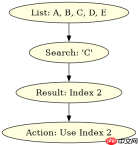
using System;
using System.Collections.Generic;

public class Program
{
    public static void Main()
    {
        var list = new List<string> { "A", "B", "C", "D", "E" };

        // 查找 "C" 的索引
        int index = list.FindIndex(x => x == "C");

        if (index >= 0)
        {
            Console.WriteLine($"Found at: {index}");
        }
        else
        {
            Console.WriteLine("Not found");
        }
    }
}</string>
预期输出:Found at: 2
如何确定删除数量?
数量取决于删除的范围。如果是删除从起点开始的所有剩余元素,数量为 list.Count - index。如果是删除固定数量的元素,需确保 index + count 不超过列表总长度,否则抛出 ArgumentOutOfRangeException。在实际开发中,建议先计算理论数量,再与剩余长度取较小值进行安全校验。

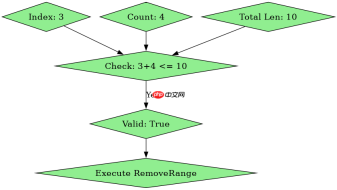
using System;
using System.Collections.Generic;

public class Program
{
    public static void Main()
    {
        var list = new List<int> { 1, 2, 3, 4, 5, 6, 7, 8, 9, 10 };
        int index = 3; // 从索引3开始,即元素4
        int count = 4; // 删除4个元素:4, 5, 6, 7

        if (index >= 0 && index + count <p>预期输出:1 2 3 8 9 10</p>
<h2>当查找失败时程序如何处理?</h2>
<p>当 <code>FindIndex</code> 返回 -1 时,说明未找到目标元素。此时不应调用 <code>RemoveRange</code>,因为负数索引是非法的。正确的处理方式是跳过删除操作或执行备选逻辑。例如,在上面的代码中,如果找不到元素,程序会打印 "Not found" 并保持列表不变。这种防御性编程避免了运行时崩溃。</p></int>