在 php 中强制下载文件并输出二进制流,核心做法是设置 http 响应头为 content-type: application/octet-stream 和 content-disposition: attachment,然后使用 readfile() 或 fpassthru() 将文件内容直接写入输出缓冲区。这样做会绕过浏览器的内联预览机制,强制触发下载对话框,同时确保二进制数据不被截断或编码错误。

readfile() 配合 header() 实现标准下载流程是怎样的
该流程通过设置 MIME 类型和附件头,利用 readfile() 一次性读取文件并输出。适用于大多数静态文件的直接下载场景,无需手动处理文件指针。
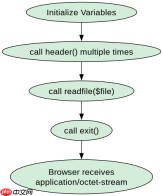
<?php $file = 'example.pdf';
if (file_exists($file)) {
    header('Content-Description: File Transfer');
    header('Content-Type: application/octet-stream');
    header('Content-Disposition: attachment; filename="' . basename($file) . '"');
    header('Expires: 0');
    header('Cache-Control: must-revalidate');
    header('Pragma: public');
    header('Content-Length: ' . filesize($file));
    readfile($file);
    exit;
}
大文件或动态生成内容时为何推荐使用 fopen 与 fpassthru
对于大文件或内存中生成的二进制数据(如图片、CSV),使用 fopen 打开文件句柄并结合 fpassthru() 可以流式输出,避免将整个文件加载到内存中导致内存溢出。

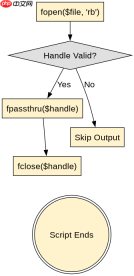
<?php $file = 'large_video.mp4';
if (file_exists($file)) {
    header('Content-Type: application/octet-stream');
    header('Content-Disposition: attachment; filename="' . basename($file) . '"');
    $handle = fopen($file, 'rb');
    if ($handle !== false) {
        fpassthru($handle);
        fclose($handle);
    }
    exit;
}
当 Content-Length 缺失时浏览器下载行为会有什么不同
如果未设置 Content-Length 头,部分浏览器可能无法显示下载进度条,或者在连接关闭前无法确定文件大小,导致下载体验不佳甚至失败。显式设置长度可优化这一过程。
php免费学习视频:立即使用
踏上前端学习之旅,开启通往精通之路!从前端基础到项目实战,循序渐进,一步一个脚印,迈向巅峰!