






在 nginx 中实现 url 伪静态重写,核心是使用 rewrite 指令配合正则表达式将动态参数映射为静态路径。具体做法是在 server 或 location 块中定义规则,指定匹配模式、替换目标及标志位(如 last 或 break),nginx 会按顺序执行这些规则并返回重定向后的结果。若存在多个规则,需注意执行顺序和标志位对后续处理的影响,避免死循环或错误匹配。

如何配置基础的重写规则与标志位
基础配置只需在 server 块内添加 rewrite 指令即可生效。例如将 /old/page 重写为 /new/page,使用 ^/old/(.*)$ /new/$1 last; 这种语法。标志位 last 表示停止当前轮询并重试新 URI,而 break 则直接终止重写过程。选择哪种标志位取决于你是否希望 Nginx 重新尝试匹配新的 location 块。
server {
    listen 80;
    server_name example.com;

    # 基础重写示例:将 /post/123 重写为 /article?id=123
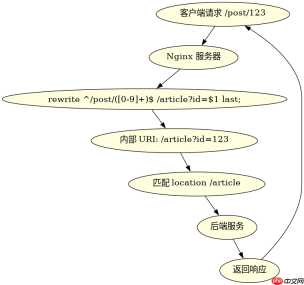
    rewrite ^/post/([0-9]+)$ /article?id=$1 last;

    location / {
        root /var/www/html;
        index index.html;
    }

    location /article {
        # 假设这里由后端处理动态内容
        proxy_pass http://backend_server;
    }
}
上述配置中,当用户访问 /post/123 时,Nginx 会将其内部重写为 /article?id=123,然后因为使用了 last 标志,Nginx 会重新在 location 块中查找匹配项,最终进入 /article 位置并由后端处理。如果改用 break,则请求会直接在当前 location 中结束,可能导致 404 错误,除非当前 location 能处理该 URI。
如何处理复杂的多条件重写逻辑
当需要基于特定条件(如 HTTP 头、变量值)进行重写时,应结合 if 指令或 map 模块。例如,仅当请求来自移动设备时才应用重写规则。使用 $http_user_agent 变量判断,并在 if 块内放置 rewrite 指令。注意 if 在 Nginx 中的行为较为特殊,应避免在其中使用 return 以外的指令导致意外行为,推荐优先使用 map 预处理变量后在 rewrite 中使用。


server {
    listen 80;
    server_name example.com;

    # 使用 map 预处理移动设备标识
    map $http_user_agent $is_mobile {
        default 0;
        ~*Mobile 1;
    }

    # 根据预处理变量进行重写
    if ($is_mobile) {
        rewrite ^/page$ /mobile/page last;
    }

    location / {
        root /var/www/html;
        index index.html;
    }

    location /mobile {
        root /var/www/mobile;
        index index.html;
    }
}
在此配置中,map 指令首先检查 User-Agent 是否包含 "Mobile",并将结果存入 $is_mobile 变量。随后 if 块检查该变量,若为真,则将 /page 重写为 /mobile/page。这种方式比直接在 if 中使用正则匹配更清晰且性能更好。预期结果是:桌面浏览器访问 /page 时正常加载 /var/www/html/page.html,而移动浏览器访问同一 URL 时会被重定向到 /var/www/mobile/page.html。
重写规则中捕获组的使用与陷阱
在重写规则中,捕获组通过括号 () 定义,并在替换字符串中通过 $1, $2 等引用。常见陷阱包括未正确转义特殊字符、捕获组数量不匹配或忽略大小写敏感性问题。例如,若要将 /blog/2023/01/post-title 重写为 /post?year=2023&month=01&title=post-title,需确保三个捕获组与替换字符串中的 $1, $2, $3 一一对应。此外,若 URL 中包含空格或特殊符号,需先进行编码处理或使用 escape 修饰符。
server {
    listen 80;
    server_name example.com;

    # 多捕获组重写示例
    rewrite ^/blog/([0-9]{4})/([0-9]{2})/([^/]+)$ /post?year=$1&month=$2&title=$3 last;

    location / {
        root /var/www/html;
        index index.html;
    }

    location /post {
        proxy_pass http://backend_server;
    }
}
此配置中,^/blog/([0-9]{4})/([0-9]{2})/([^/]+)$ 精确匹配年份、月份和文章标题,并将其分别捕获为 $1, $2, $3。替换字符串 /post?year=$1&month=$2&title=$3 将这些值嵌入查询参数。预期结果是:访问 /blog/2023/01/my-post 时,Nginx 会将其重写为 /post?year=2023&month=01&title=my-post,并传递给后端服务。若 URL 格式不符(如缺少月份),则不会触发重写,请求将继续按默认流程处理。


