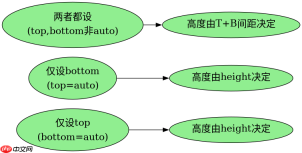
当css绝对定位盒子的`top`和`bottom`同时设置且未指定`height`时,浏览器会强制拉伸盒子的高度以填满这两个属性之间的空间。具体做法是:将元素设为`position: absolute`,并分别赋予`top`和`bottom`的数值(如`10px`),此时计算出的高度等于包含块高度减去`top`与`bottom`之和。若包含块高度为200px,`top`为10px,`bottom`为20px,则盒子高度为170px。
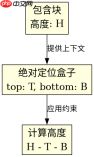
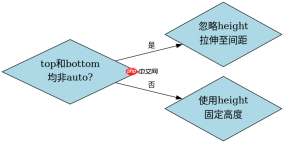
为什么同时设置top和bottom会覆盖height?
在标准流中,`height`决定高度;但在绝对定位且`top`/`bottom`均非`auto`时,`height`被忽略,由垂直间距决定实际渲染高度。这是CSS规范定义的“自动高度计算”规则之一。
div {
  position: absolute;
  top: 10px;
  bottom: 20px;
  /* height: 50px; -- 此声明无效 */
  width: 100%;
  background: lightblue;
}
预期结果:盒子高度 = 包含块高度 - 30px。例如包含块高200px,则盒子高170px。
如果只设top或只设bottom会发生什么?
仅设置`top`或`bottom`中的一个(另一个为`auto`)时,`height`生效,盒子按`height`值渲染,另一侧位置由内容或margin决定。这体现了CSS对“约束条件不足”时的回退策略。
div {
  position: absolute;
  top: 10px;
  bottom: auto; /* 默认值 */
  height: 50px;
  background: lightgreen;
}
预期结果:盒子高度为50px,底部位置由顶部+高度决定,而非由`bottom`控制。
当top和bottom的值超出包含块范围时会怎样?
若`top + bottom > 包含块高度`,盒子会被压缩甚至出现负高度(表现为视觉重叠或裁剪)。例如包含块高100px,`top: 60px`, `bottom: 60px`,则计算高度为-20px,实际渲染可能显示为0或触发布局异常。
前端入门到VUE实战笔记:立即使用
在学习笔记中,你将探索 前端 的入门与实战技巧!