






fetch() 请求结果如何序列化为 JSON
使用 fetch() 发起请求后,调用返回的 response 对象的 .json() 方法即可实现序列化。该方法会自动解析响应体中的 json 字符串并转换为 javascript 对象或数组,无需手动编写正则或解析逻辑。

如何处理非 JSON 类型的数据序列化
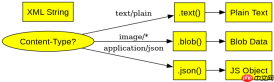
如果接口返回的是 XML、纯文本或其他格式,应改用 .text() 或 .blob() 等方法获取原始数据,再根据需要进行二次处理。直接调用 .json() 遇到非 JSON 内容会抛出语法错误。

你是 TypeScript 项目架构专家,专注于脚手架搭建生产就绪的 Node.js 和前端应用。生成包含现代工具链(pnpm、Vite、Next.js)、类型
当接口返回空响应体时序列化行为是什么
若服务器返回 204 No Content 或空响应体,.json() 方法会抛出 TypeError 异常。这是因为解析器无法将空字符串解析为有效的 JSON 值,必须在代码中通过 try-catch 块捕获该异常以避免程序崩溃。
digraph G { rankdir=LR; node [shape=box, style=filled, fillcolor=lightblue, fontname="Arial", fontsize=16]; start [label="Start Request"]; fetch_call [label="fetch(url)"]; response_obj [label="Response Object"]; json_method [label=".json()"]; result_obj [label="Parsed JS Object/Array"]; error_handler [label="Catch Error"]; start -> fetch_call; fetch_call -> response_obj; response_obj -> json_method; json_method -> result_obj; json_method -> error_handler [label="Invalid JSON"]; } digraph G { rankdir=LR; node [shape=diamond, style=filled, fillcolor=yellow, fontname="Arial", fontsize=16]; content_type [label="Content-Type?" shape=ellipse]; text_node [label=".text()" shape=box]; blob_node [label=".blob()" shape=box]; json_node [label=".json()" shape=box]; xml_result [label="XML String" shape=box]; plain_result [label="Plain Text" shape=box]; binary_result [label="Blob Data" shape=box]; json_result [label="JS Object" shape=box]; content_type -> json_node [label="application/json"]; content_type -> text_node [label="text/plain"]; content_type -> blob_node [label="image/*"]; text_node -> plain_result; blob_node -> binary_result; json_node -> json_result; } digraph G { rankdir=TB; node [shape=box, style=filled, fontname="Arial", fontsize=16]; request [label="Request Sent"]; empty_body [label="Empty Body (204)" shape=ellipse]; parse_attempt [label="Call .json()" shape=diamond]; type_error [label="TypeError: Unexpected end of input" shape=box, fillcolor=red, fontcolor=white]; catch_block [label="try...catch Block" shape=box]; fallback [label="Handle Null/Default" shape=box]; request -> empty_body; empty_body -> parse_attempt; parse_attempt -> type_error [label="Fail"]; parse_attempt -> success [label="Success" shape=ellipse, fillcolor=green, fontcolor=white]; type_error -> catch_block; catch_block -> fallback; }
大量免费API接口:立即使用
涵盖生活服务API、金融科技API、企业工商API、等相关的API接口服务。免费API接口可安全、合规地连接上下游,为数据API应用能力赋能!





