






javascript 原生防抖和节流不支持固定窗口(fixed window)模式,因为它们的实现逻辑分别基于“延迟执行”和“时间间隔内只执行一次”,无法处理滑动窗口内的精确计数。要实现固定窗口,需要手动维护一个请求时间戳数组,在每次触发时清理过期记录并判断当前数量是否超限。

如何实现固定窗口计数器
固定窗口的核心是记录最近 N 秒内的请求次数。通过维护一个时间戳队列,每次调用时移除超过窗口期的旧时间戳,若剩余数量小于阈值则允许执行并加入新时间戳,否则拒绝。
function fixedWindow(fn, windowMs, limit) {
    const timestamps = [];
    return function (...args) {
        const now = Date.now();
        // 移除窗口外的时间戳
        while (timestamps.length > 0 && timestamps[0] <p>使用示例:限制每秒最多执行 3 次。</p><div class="aritcle_card flexRow artxards">
											<div class="artcardd flexRow">
												<a class="aritcle_card_img" rel="nofollow" href="/xiazai/skill12540" title="javascript-typescript-typescript-scaffold"><img
														src="https://img.php.cn/upload/skill/001/246/273/6adaf20e352aa140.jpg" alt="javascript-typescript-typescript-scaffold" onerror="this.onerror='';this.src='/static/lhimages/moren/morentu.png'" ></a>
												<div class="aritcle_card_info flexColumn">
													<a rel="nofollow" href="/xiazai/skill12540" title="javascript-typescript-typescript-scaffold" class="overflowclass">javascript-typescript-typescript-scaffold</a>
													<p class="overflowclass">你是 TypeScript 项目架构专家,专注于脚手架搭建生产就绪的 Node.js 和前端应用。生成包含现代工具链(pnpm、Vite、Next.js)、类型</p>
												</div>
												<a rel="nofollow" href="/xiazai/skill12540" title="javascript-typescript-typescript-scaffold" class="aritcle_card_btn flexRow flexcenter"><b></b><span>下载</span>
												</a>
											</div>
										</div><pre class="brush:php;toolbar:false;">const fixedFn = fixedWindow(() => console.log('executed'), 1000, 3);
fixedFn(); // executed
fixedFn(); // executed
fixedFn(); // executed
fixedFn(); // Rate limit exceeded
固定窗口与滑动窗口的区别
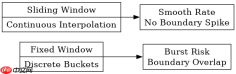
固定窗口在边界处可能出现双倍流量冲击,而滑动窗口通过更细粒度的时间切片避免了这一问题。滑动窗口通常结合固定窗口和上一个窗口的数据进行线性插值计算。
function slidingWindow(fn, windowMs, limit) {
    const history = [];
    return function (...args) {
        const now = Date.now();
        // 清理过期数据
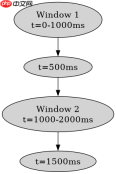
        while (history.length > 0 && history[0].time <h2>固定窗口在突发流量下的表现</h2><p>当请求集中在窗口结束和开始时刻时,固定窗口可能允许两倍的请求量通过。例如窗口大小为 1 秒,限制为 1 次/秒,若在 0.9s 和 1.1s 各发一次请求,虽然间隔仅 0.2s,但会被视为两个不同窗口的请求而被放行。</p>
Java免费学习笔记:立即使用
解锁 Java 大师之旅:从入门到精通的终极指南





