






在 spring boot 中校验端口号范围,最直接的方法是使用 @min(1) 和 @max(65535) 注解。将这两个注解加在配置类的整型字段上,spring boot 启动时会自动触发校验,若端口不在合法范围内则抛出异常并阻止应用启动。
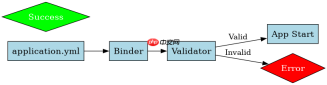
如何定义包含端口号的配置类
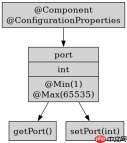
需要创建一个被 @ConfigurationProperties 标注的类来接收配置文件中的值。在该类中定义一个 int 类型的字段,并在其 getter 方法或字段声明处添加范围校验注解。这样当配置文件加载时,框架会立即验证数据的合法性。
import javax.validation.constraints.Max;
import javax.validation.constraints.Min;
import org.springframework.boot.context.properties.ConfigurationProperties;
import org.springframework.stereotype.Component;

@Component
@ConfigurationProperties(prefix = "app")
public class AppConfig {
    @Min(value = 1, message = "Port must be at least 1")
    @Max(value = 65535, message = "Port must not exceed 65535")
    private int port = 8080;

    public int getPort() { return port; }
    public void setPort(int port) { this.port = port; }
}
校验失败时的具体表现是什么
如果配置文件中的端口号超出范围,Spring Boot 会在启动阶段直接终止运行。控制台会打印出详细的 BindException 或 MethodArgumentNotValidException 错误信息,明确指出哪个字段的值违反了约束条件。这种机制确保了非法配置不会进入运行时环境。


import org.springframework.boot.SpringApplication;
import org.springframework.boot.autoconfigure.SpringBootApplication;

@SpringBootApplication
public class Application {
    public static void main(String[] args) {
        SpringApplication.run(Application.class, args);
    }
}
当输入为 app.port=70000 时,预期结果是程序启动失败,日志中包含 "Port must not exceed 65535" 的提示。这验证了 @Max 注解在启动绑定阶段的有效性。


