






使用 fetch() 发起请求后,调用返回的 response 对象的 .json() 方法即可将 dvd 数据解析为 javascript 对象。该操作会自动处理 http 响应头中的字符编码,并将 json 字符串反序列化为包含标题、年份等属性的普通对象,随后你可以在代码中直接访问这些属性。

fetch() 获取数据时如何处理网络错误
当网络中断或服务器宕机时,fetch() 不会抛出异常,而是返回一个状态码非 200 的 Response 对象。你需要检查 response.ok 属性,如果为 false,则手动抛出错误以进入 catch 块进行统一处理。
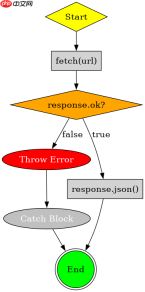
const url = 'https://api.example.com/dvds';

fetch(url)
  .then(response => {
    if (!response.ok) {
      throw new Error(`HTTP error! status: ${response.status}`);
    }
    return response.json();
  })
  .then(data => {
    console.log('DVD Title:', data.title);
  })
  .catch(error => {
    console.error('Fetch failed:', error);
  });
async/await` 语法下如何优雅地处理 DVD 数据
使用 async/await 可以让异步代码看起来像同步代码,提高可读性。在 try...catch 结构中包裹 fetch 和 .json() 调用,可以集中处理网络错误和 JSON 解析错误。


async function getDvdData() {
  try {
    const response = await fetch('https://api.example.com/dvds');
    if (!response.ok) {
      throw new Error(`HTTP error! status: ${response.status}`);
    }
    const data = await response.json();
    console.log('DVD Year:', data.year);
  } catch (error) {
    console.error('Async fetch failed:', error);
  }
}
基于程序中某个输入、条件或结果的具体问题
当接口返回的 JSON 数据中包含嵌套结构或特定字段(如 director)时,直接访问未定义的属性会导致 undefined。建议在访问前进行空值检查或使用可选链操作符 ?. 来避免运行时错误。
大量免费API接口:立即使用
涵盖生活服务API、金融科技API、企业工商API、等相关的API接口服务。免费API接口可安全、合规地连接上下游,为数据API应用能力赋能!





