在 nginx 中实现基于时间的访问控制,核心做法是引入 ngx_http_lua_module(即 openresty),利用 lua 脚本获取当前时间并与设定的时间段进行比对。通过自定义 lua 函数判断请求是否在允许的时间窗口内,若在则放行,若不在则返回 403 forbidden 状态码。这种方法比传统的 allow/deny 指令更灵活,能够精确到分钟甚至秒级,且支持复杂的逻辑组合。

如何配置基础的时间段白名单
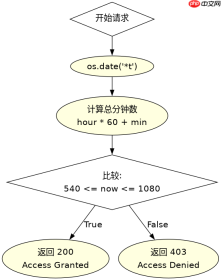
要实现基础的白名单控制,需要在 location 块中使用 content_by_lua_block 指令嵌入 Lua 代码。代码中调用 os.date() 获取当前的小时和分钟,将其转换为整数后与预设的起始和结束时间进行比较。如果当前时间在范围内,使用 ngx.exit(200) 继续处理;否则使用 ngx.exit(403) 拦截请求。这种配置方式直接作用于请求生命周期,无需重启 Nginx 即可生效(需重载配置)。
server {
    listen 80;
    server_name example.com;

    location /api/secure {
        content_by_lua_block {
            local now = os.date("*t")
            local current_minutes = now.hour * 60 + now.min

            -- 设定允许访问的时间段:09:00 (540) 到 18:00 (1080)
            local start_time = 9 * 60
            local end_time = 18 * 60

            if current_minutes >= start_time and current_minutes <p>上述配置中,<code>os.date("*t")</code> 返回一个包含日期各部分的表,我们提取小时和分钟计算总分钟数。当请求在 09:00 至 18:00 之间到达时,Nginx 会输出 "Access Granted" 并返回 200 状态码;在其他时间,则返回 403 状态码和错误提示。此方法适用于简单的日间业务限制。</p><h2>如何处理跨天或复杂的时间区间</h2><p>当需要处理跨越午夜的时间段(如 22:00 到次日 06:00)或排除特定节假日时,简单的线性比较不再适用。此时需要在 Lua 脚本中增加逻辑分支,判断起始时间是否大于结束时间。如果起始时间大于结束时间,说明时间段跨天,需要检查当前时间是否大于起始时间或者小于结束时间。此外,还可以结合 <code>ngx.time()</code> 获取 Unix 时间戳,进一步计算星期几或具体日期,以实现更精细的控制,例如仅在工作日的特定时间段开放。</p><div class="aritcle_card flexRow artxards">
											<div class="artcardd flexRow">
												<a class="aritcle_card_img" rel="nofollow" href="/xiazai/skill11901" title="Linuxdo Application"><img
														src="https://img.php.cn/upload/skill/001/246/273/6adaf20d79f23518.jpg" alt="Linuxdo Application" onerror="this.onerror='';this.src='/static/lhimages/moren/morentu.png'" ></a>
												<div class="aritcle_card_info flexColumn">
													<a rel="nofollow" href="/xiazai/skill11901" title="Linuxdo Application" class="overflowclass">Linuxdo Application</a>
													<p class="overflowclass">为 Linux.do 注册撰写高通过率、去 AI 化的中文小作文。进行自适应调查以了解申请人的真实背景,...</p>
												</div>
												<a rel="nofollow" href="/xiazai/skill11901" title="Linuxdo Application" class="aritcle_card_btn flexRow flexcenter"><b></b><span>下载</span>
												</a>
											</div>
										</div><p><img src="https://img.php.cn/upload/article/001/242/473/179429175544624.png?x-oss-process=image/resize,p_40" alt="Linux 中 Nginx location 怎么实现基于时间的访问控制"></p><pre class="brush:php;toolbar:false;">server {
    listen 80;
    server_name example.com;

    location /nightly-job {
        content_by_lua_block {
            local now = os.date("*t")
            local current_minutes = now.hour * 60 + now.min

            -- 设定跨天时间段:22:00 (1320) 到 06:00 (360)
            local start_time = 22 * 60
            local end_time = 6 * 60

            local is_access_allowed = false

            if start_time > end_time then
                -- 跨天情况:当前时间 >= 开始时间 OR 当前时间 = start_time or current_minutes = 开始时间 AND 当前时间 = start_time and current_minutes <p>该示例展示了跨天时间段的处理逻辑。当 <code>start_time</code> (22:00) 大于 <code>end_time</code> (06:00) 时,条件变为“或”关系,确保在 22:00 到 23:59 以及 00:00 到 06:00 期间均能访问。而在非跨天情况下,保持“与”关系。这种逻辑扩展使得 Nginx 能够应对绝大多数基于时间的访问控制场景,而无需依赖外部数据库或定时任务。</p><h2>Lua 脚本中 os.date 返回的表结构包含哪些字段</h2><p>在 Nginx 的 Lua 模块中,<code>os.date("*t")</code> 返回的是一个包含九个字表的元数据对象,用于精确解析时间。这些字段包括:<code>year</code>(四位年份)、<code>month</code>(1-12)、<code>day</code>(1-31)、<code>hour</code>(0-23)、<code>min</code>(0-59)、<code>sec</code>(0-61,含闰秒)、<code>wday</code>(1-7,1代表周日)、<code>yday</code>(1-366,一年中的第几天)和 <code>isdst</code>(布尔值,指示是否为夏令时)。在编写时间控制逻辑时,通常主要使用 <code>hour</code>、<code>min</code> 和 <code>wday</code> 来实现按小时、分钟或星期的过滤。了解这些字段有助于构建更健壮的时间判断逻辑,例如结合 <code>wday</code> 排除周末访问。</p>