硬盘标签写着 4k,并不代表应用实际看到的逻辑扇区也是 4096 字节。windows 11 会分别报告逻辑扇区、设备原子写入物理扇区、性能物理扇区和文件系统有效物理扇区。检查这些值可用于判断 512e、4kn 以及某些数据库或旧备份软件的兼容性,不需要修改注册表或重新格式化。
用 fsutil 读取目标卷的扇区信息
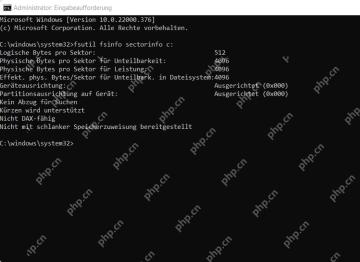
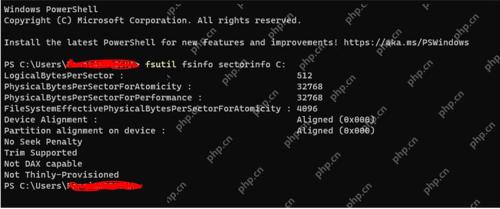
以管理员身份打开终端,运行 fsutil fsinfo sectorinfo C:,把 C 替换为目标卷盘符。记录 LogicalBytesPerSector、PhysicalBytesPerSectorForAtomicity、PhysicalBytesPerSectorForPerformance 和 FileSystemEffectivePhysicalBytesPerSectorForAtomicity。该命令只读取信息,不会改动磁盘。
按逻辑和物理值判断 512e 或 4Kn
LogicalBytesPerSector=512、物理值=4096 通常表示 512e;逻辑和物理都为 4096 才是 4Kn。若 PhysicalBytesPerSectorForPerformance 显示 8192、16384 或更大,不要直接认定磁盘损坏,Windows 11 的 NVMe 驱动可能报告设备真实值;应按目标软件的官方支持范围判断。

再用 NTFS 信息核对文件系统有效值
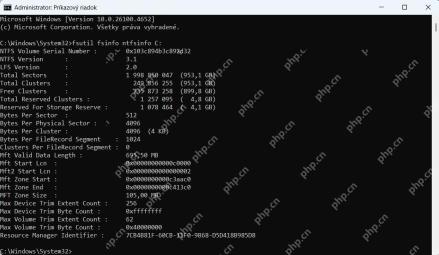
对 NTFS 卷运行 fsutil fsinfo ntfsinfo C:,查看 Bytes Per Sector、Bytes Per Physical Sector 和 Bytes Per Cluster。扇区大小与簇大小是不同概念,4KB 簇不能证明硬盘就是 4Kn。若要给数据库、镜像恢复或旧备份软件做兼容判断,应保留两条命令的完整输出,并在变更前制作可验证的备份。