本文围绕MarTech Challenge点击反欺诈预测比赛,介绍了结合XGBoost与PALM语言模型的方案。先进行数据分析与特征工程,筛选关键特征、构建新特征,如数量特征、时间多尺度特征等。再分别用XGBoost五折交叉验证和PALM模型训练预测,最后融合两者结果,以提升点击欺诈识别准确率。
☞☞☞AI 智能聊天, 问答助手, AI 智能搜索, 多模态理解力帮你轻松跨越从0到1的创作门槛☜☜☜

MarTech Challenge 点击反欺诈预测比赛思路及实现
1 背景介绍
广告欺诈是数字营销需要面临的重要挑战之一,点击会欺诈浪费广告主大量金钱,同时对点击数据会产生误导作用。本次比赛提供了约50万次点击数据。特别注意:我们对数据进行了模拟生成,对某些特征含义进行了隐藏,并进行了脱敏处理。 请预测用户的点击行为是否为正常点击,还是作弊行为。点击欺诈预测适用于各种信息流广告投放,banner广告投放,以及百度网盟平台,帮助商家鉴别点击欺诈,锁定精准真实用户。
比赛传送门
本思路将从数据分析、数据探索&特征工程、建模三个方面进行介绍:
2 赛题剖析
- 特征工程:对重要特征进行甄别和处理;利用原有特征构建新特征。
- 数量特征建模:由业务场景可知,点击反欺诈预测中一个重要的特征是点击的数量,点击作弊往往会出现重复点击的情况,所以在原特征基础上构建相应的数量特征是本次建模的一个重点。
3 总体思路(经典机器学习+百度深度学习模型)
*在6月份使用XGBoost对赛题有过提交,当时成绩是89.1413。6月份项目链接 为了进一步优化模型,同时也为了得到主办方的认可,特加入了PALM语言模型 *本方案对XGBoost和PALM语言模型进行融合 *参考6月份方案,前期为XGBoost做了很多特征工程;由于深度学习对特征工程的要求不大,故只对PALM模型需要的数据进行了缺失值补充
4 具体方案分享
读取数据
import pandas as pd
train = pd.read_csv('data/data97586/train.csv')
test1 = pd.read_csv('data/data97586/test1.csv')
train
        Unnamed: 0  android_id  apptype  carrier  dev_height  dev_ppi  \
0                0      316361     1199  46000.0         0.0      0.0
1                1      135939      893      0.0         0.0      0.0
2                2      399254      821      0.0       760.0      0.0
3                3       68983     1004  46000.0      2214.0      0.0
4                4      288999     1076  46000.0      2280.0      0.0
...            ...         ...      ...      ...         ...      ...
499995      499995      392477     1028  46000.0      1920.0      3.0
499996      499996      346134     1001      0.0      1424.0      0.0
499997      499997      499635      761  46000.0      1280.0      0.0
499998      499998      239786      917  46001.0       960.0      0.0
499999      499999      270531      929  46000.0      2040.0      3.0

        dev_width  label    lan  media_id  ...       os    osv package  \
0             0.0      1    NaN       104  ...  android      9      18
1             0.0      1    NaN        19  ...  android    8.1       0
2           360.0      1    NaN       559  ...  android  8.1.0       0
3          1080.0      0    NaN       129  ...  android  8.1.0       0
4          1080.0      1  zh-CN        64  ...  android  8.0.0       0
...           ...    ...    ...       ...  ...      ...    ...     ...
499995     1080.0      1  zh-CN       144  ...  Android  7.1.2      25
499996      720.0      0    NaN        29  ...  android  8.1.0       0
499997      720.0      0    NaN        54  ...  android  6.0.1       9
499998      540.0      0  zh_CN       109  ...  android  5.1.1       0
499999     1080.0      1  zh-CN        59  ...  Android  8.1.0      78

            sid     timestamp  version    fea_hash location   fea1_hash  \
0       1438873  1.559893e+12        8  2135019403        0  2329670524
1       1185582  1.559994e+12        4  2782306428        1  2864801071
2       1555716  1.559837e+12        0  1392806005        2   628911675
3       1093419  1.560042e+12        0  3562553457        3  1283809327
4       1400089  1.559867e+12        5  2364522023        4  1510695983
...         ...           ...      ...         ...      ...         ...
499995  1546078  1.559834e+12        7   861755946       79   140647032
499996  1480612  1.559814e+12        3  1714444511       23  2745131047
499997  1698442  1.559676e+12        0  3843262581       25  1326115882
499998  1331155  1.559840e+12        0  1984296118      225  1446741112
499999  1373973  1.559922e+12        5  1697301943       49  1915763579

        cus_type
0            601
1           1000
2            696
3            753
4            582
...          ...
499995       373
499996       525
499997       810
499998       772
499999      1076

[500000 rows x 21 columns]
字段说明
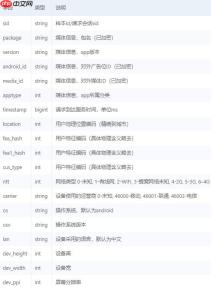
label是否作弊,0为正常,1位作弊
初步筛选特征
features = train.drop(['Unnamed: 0','label'],axis = 1)
labels = train['label']
features.columns
Index(['android_id', 'apptype', 'carrier', 'dev_height', 'dev_ppi',
       'dev_width', 'lan', 'media_id', 'ntt', 'os', 'osv', 'package', 'sid',
       'timestamp', 'version', 'fea_hash', 'location', 'fea1_hash',
       'cus_type'],
      dtype='object')
数据探索&特征工程
构造函数,寻找关键特征值
#数据探索,找到导致1的关键特征值def find_key_feature(train, selected):
    temp = pd.DataFrame(columns = [0,1])
    temp0 = train[train['label'] == 0]
    temp1 = train[train['label'] == 1]
    temp[0] = temp0[selected].value_counts() / len(temp0) * 100
    temp[1] = temp1[selected].value_counts() / len(temp1) * 100
    temp[2] = temp[1] / temp[0]    #选出大于10倍的特征
    result = temp[temp[2] > 10].sort_values(2, ascending = False).index    return result
key_feature = {}
key_feature['osv'] = find_key_feature(train, 'osv')
key_feature
{'osv': Index(['7.7.7', '7.2.1', '7.7.5', '7.8.5', '7.8.7', '3.8.0', '7.6.7', '3.9.0',
        '2.3', '8.0.1', '7.9.0', '7.6.4', '3.8.4', '7.8.9', '21100', '7.9.2',
        '4.1', '7.7.2', '7.8.2', 'Android_8.0.0', '7.8.0', '3.8.6', '7.7.0',
        '7.8.4', '8', '7.6.8', '21000', '7.8.6', '5', '6.1', '7.7.3', '9.0.0',
        '3.8.3', '3.7.8', '9.0', '8.0', 'Android_9', '7.7.4', '6.1.0'],
       dtype='object')}
通过特征类型及意义,确定需要寻找关键特征值的字段
features.info()
<class>
RangeIndex: 500000 entries, 0 to 499999
Data columns (total 19 columns):
 #   Column      Non-Null Count   Dtype
---  ------      --------------   -----
 0   android_id  500000 non-null  int64
 1   apptype     500000 non-null  int64
 2   carrier     500000 non-null  float64
 3   dev_height  500000 non-null  float64
 4   dev_ppi     500000 non-null  float64
 5   dev_width   500000 non-null  float64
 6   lan         316720 non-null  object
 7   media_id    500000 non-null  int64
 8   ntt         500000 non-null  float64
 9   os          500000 non-null  object
 10  osv         493439 non-null  object
 11  package     500000 non-null  int64
 12  sid         500000 non-null  int64
 13  timestamp   500000 non-null  float64
 14  version     500000 non-null  object
 15  fea_hash    500000 non-null  object
 16  location    500000 non-null  int64
 17  fea1_hash   500000 non-null  int64
 18  cus_type    500000 non-null  int64
dtypes: float64(6), int64(8), object(5)
memory usage: 72.5+ MB</class>
features.columns
Index(['android_id', 'apptype', 'carrier', 'dev_height', 'dev_ppi',
       'dev_width', 'lan', 'media_id', 'ntt', 'os', 'osv', 'package', 'sid',
       'timestamp', 'version', 'fea_hash', 'location', 'fea1_hash',
       'cus_type'],
      dtype='object')
确定字段,寻找对应字段的关键特征值
selected_cols = ['osv','apptype', 'carrier', 'dev_height', 'dev_ppi',       'dev_width', 'media_id', 'package', 'version', 'fea_hash', 'location', 'fea1_hash',       'cus_type']for selected in selected_cols:
    key_feature[selected] = find_key_feature(train, selected)
key_feature
{'osv': Index(['7.7.7', '7.2.1', '7.7.5', '7.8.5', '7.8.7', '3.8.0', '7.6.7', '3.9.0',
        '2.3', '8.0.1', '7.9.0', '7.6.4', '3.8.4', '7.8.9', '21100', '7.9.2',
        '4.1', '7.7.2', '7.8.2', 'Android_8.0.0', '7.8.0', '3.8.6', '7.7.0',
        '7.8.4', '8', '7.6.8', '21000', '7.8.6', '5', '6.1', '7.7.3', '9.0.0',
        '3.8.3', '3.7.8', '9.0', '8.0', 'Android_9', '7.7.4', '6.1.0'],
       dtype='object'),
 'apptype': Int64Index([1139, 716, 941, 851, 1034, 1067], dtype='int64'),
 'carrier': Float64Index([], dtype='float64'),
 'dev_height': Float64Index([2242.0, 1809.0, 1500.0, 2385.0,  918.0, 1546.0,  895.0, 1521.0,
                816.0,  830.0, 1540.0, 2219.0,  676.0, 1480.0,  818.0,  694.0,
                665.0, 2287.0, 2281.0,  851.0, 1560.0, 2131.0, 2320.0, 2248.0,
                846.0,  748.0, 2312.0, 2240.0,  770.0, 2406.0, 2223.0, 2244.0,
                749.0,  772.0, 2277.0, 3040.0,  892.0, 1493.0, 2310.0, 2466.0,
               1460.0, 1496.0, 1441.0, 2268.0,  747.0, 2960.0,  686.0,  740.0,
                771.0,  730.0,  100.0, 2252.0, 2276.0,  869.0, 2250.0, 2246.0,
                760.0, 2198.0,  773.0, 2255.0,  780.0,  658.0, 1459.0,   13.0,
               2220.0, 1523.0, 1501.0,  721.0, 2907.0,  440.0, 2170.0, 1793.0,
               2128.0, 2041.0, 1464.0, 2137.0, 2260.0, 2379.0,  711.0, 1510.0,
                 20.0, 1528.0, 1467.0, 2190.0,  685.0],
              dtype='float64'),
 'dev_ppi': Float64Index([200.0, 230.0, 128.0], dtype='float64'),
 'dev_width': Float64Index([1806.0, 1460.0, 1808.0, 2038.0, 1792.0, 2094.0,  353.0, 2406.0,
               2190.0, 2244.0, 2060.0, 2128.0, 2252.0, 2255.0,  810.0, 2159.0,
               1560.0, 2137.0, 1496.0, 2208.0, 2076.0, 2031.0, 2218.0, 2265.0,
                424.0, 1824.0, 2034.0, 2130.0, 2260.0,  393.0, 2960.0, 2220.0,
                440.0, 2201.0, 2222.0, 1439.0, 2040.0, 2163.0],
              dtype='float64'),
 'media_id': Int64Index([ 329,  384,  259,  249,  334,  734,  504,  224,  614,  254,  304,
              899,  414,  954,  764,  654,   74, 1524,  449,  344,  324,  119,
               24, 1454],
            dtype='int64'),
 'package': Int64Index([  66,   53,   49,   67,  257,  569,   42,  170,   48,   61,   82,
              281,  149,   16, 2282,   69,   64,   21,    3,   92],
            dtype='int64'),
 'version': Index([], dtype='object'),
 'fea_hash': Index(['2328510010', '2815114810', '2503203602', '16777343', '1093932919',
        '3306573181', '3673113458', '3419433775', '28776568', '1103969850',
        '2448376690', '551568242', '1692943218', '1979803871', '354322549',
        '3177694324', '2942813300', '1090611423', '3052290930'],
       dtype='object'),
 'location': Int64Index([], dtype='int64'),
 'fea1_hash': Int64Index([1593057142, 2888196143, 2300993583, 2116509743, 2348162934,
             1747410991, 1425481590, 2047788921, 3258042233, 3005505583,
             2015649839, 2284216367, 3748667254,  488923183,  301802853,
              622213499, 1585537839, 2205433386, 1898209327,  867028591,
              833232758, 2787401775,  525584485, 4175168375, 3587989039,
              710175527, 3740889281,  883805807,  690879356, 2921750575,
              724433788, 3891004279, 1162670379, 2423611183, 3521339183,
             3536215343,  446372728, 2259249447,  397893671, 3398507384,
             2775476519, 3693371431, 1606274364, 3611003032, 1109987687,
             2650303345],
            dtype='int64'),
 'cus_type': Int64Index([], dtype='int64')}
构造新特征字段
#构造新特征,新特征字段 = 原始特征字段 + 1def f(x, selected):
    #判断是否在关键特征里,是1,否0
    if x in key_feature[selected]:        return 1
    else:        return 0
    for selected in selected_cols:    #判断是否有特征比大于10
    if len(key_feature[selected]) > 0:
        features[selected+'1'] = features[selected].apply(f, args = (selected,))
        test1[selected+'1'] = test1[selected].apply(f, args = (selected,))        print(selected+'1 created')
osv1 created
apptype1 created
dev_height1 created
dev_ppi1 created
dev_width2 created
media_id1 created
package1 created
fea_hash2 created
fea1_hash2 created
查看新特征字段osv1
features['osv1'].value_counts()
0    444656
1     55344
Name: osv1, dtype: int64
进一步筛选特征
特征os的值为Android,android。意义相同当作唯一值处理,去掉

用大白话操作当前项目的 Git/GitHub——配置 GitHub(装 gh CLI + 登录 + 建仓库)、备份、拉取下载、查询历史、回滚代码、管理分支。当用户用日常语言表达 git 意图时触发(例如"git备份一下""git下载项目""git拉下来""git看看我改了啥""git回退到上一个版本""git新建个分支搞新功能""git合并到主分支""git
sid都是唯一值,也不参与建模
remove_list = ['os','sid']
col = features.columns.tolist()for i in remove_list:
    col.remove(i)
col
['android_id',
 'apptype',
 'carrier',
 'dev_height',
 'dev_ppi',
 'dev_width',
 'lan',
 'media_id',
 'ntt',
 'osv',
 'package',
 'timestamp',
 'version',
 'fea_hash',
 'location',
 'fea1_hash',
 'cus_type',
 'osv1',
 'apptype1',
 'dev_height1',
 'dev_ppi1',
 'dev_width2',
 'media_id1',
 'package1',
 'fea_hash2',
 'fea1_hash2']
features = features[col]# features
提取时间多尺度
import timefrom datetime import datetimedef get_date(features):
    #先除以1000,再转换为日期格式
    features['timestamp'] = features['timestamp'].apply(lambda x: datetime.fromtimestamp(x / 1000))
    # 创建时间戳索引
    temp = pd.DatetimeIndex(features['timestamp'])
    features['year'] = temp.year
    features['month'] = temp.month
    features['day'] = temp.day
    features['week_day'] = temp.weekday
    features['hour'] = temp.hour
    features['minute'] = temp.minute
    #添加time_diff
    start_time = features['timestamp'].min()
    features['time_diff'] = features['timestamp'] - start_time    #将time_diff转换为小时格式
    features['time_diff'] = features['time_diff'].dt.days * 24 + features['time_diff'].dt.seconds / 3600
    #只使用day 和time_diff
    features.drop(['timestamp','year','month','week_day','hour','minute'], axis = 1, inplace = True)
    return features#对训练集提取时间多尺度features = get_date(features)#对测试集提取时间多尺度test1 = get_date(test1)
features
        android_id  apptype  carrier  dev_height  dev_ppi  dev_width    lan  \
0           316361     1199  46000.0         0.0      0.0        0.0    NaN
1           135939      893      0.0         0.0      0.0        0.0    NaN
2           399254      821      0.0       760.0      0.0      360.0    NaN
3            68983     1004  46000.0      2214.0      0.0     1080.0    NaN
4           288999     1076  46000.0      2280.0      0.0     1080.0  zh-CN
...            ...      ...      ...         ...      ...        ...    ...
499995      392477     1028  46000.0      1920.0      3.0     1080.0  zh-CN
499996      346134     1001      0.0      1424.0      0.0      720.0    NaN
499997      499635      761  46000.0      1280.0      0.0      720.0    NaN
499998      239786      917  46001.0       960.0      0.0      540.0  zh_CN
499999      270531      929  46000.0      2040.0      3.0     1080.0  zh-CN

        media_id  ntt    osv  ...  apptype1 dev_height1 dev_ppi1  dev_width2  \
0            104  6.0      9  ...         0           0        0           0
1             19  6.0    8.1  ...         0           0        0           0
2            559  0.0  8.1.0  ...         0           1        0           0
3            129  2.0  8.1.0  ...         0           0        0           0
4             64  2.0  8.0.0  ...         0           0        0           0
...          ...  ...    ...  ...       ...         ...      ...         ...
499995       144  6.0  7.1.2  ...         0           0        0           0
499996        29  2.0  8.1.0  ...         0           0        0           0
499997        54  6.0  6.0.1  ...         0           0        0           0
499998       109  2.0  5.1.1  ...         0           0        0           0
499999        59  2.0  8.1.0  ...         0           0        0           0

        media_id1  package1  fea_hash2  fea1_hash2  day   time_diff
0               0         0          0           0    7  111.535278
1               0         0          0           0    8  139.671944
2               0         0          0           0    6   95.971111
3               0         0          0           0    9  152.993333
4               0         0          0           0    7  104.472222
...           ...       ...        ...         ...  ...         ...
499995          0         0          0           0    6   95.238056
499996          0         0          0           0    6   89.681111
499997          0         0          0           0    4   51.248889
499998          0         0          0           0    6   96.990556
499999          0         0          0           0    7  119.545833

[500000 rows x 27 columns]
对osv和lan进行LabelEncoder
#对OSV进行LabelEncoderfrom sklearn.preprocessing import LabelEncoder
le = LabelEncoder()#需要将训练集和测试集合并,然后统一做LabelEncoderall_df = pd.concat([train, test1])
all_df['osv'] = all_df['osv'].astype('str')
all_df['osv'] = le.fit_transform(all_df['osv'])#对lan进行LabelEncoderall_df['lan'] = all_df['lan'].astype('str')
all_df['lan'] = le.fit_transform(all_df['lan'])
对fea_hash、fea1_hash和version进行特征处理
#特征变换。对于数值过大的异常值 设置为0features['fea_hash'] = features['fea_hash'].map(lambda x: 0 if len(str(x)) > 16 else int(x))
features['fea1_hash'] = features['fea1_hash'].map(lambda x: 0 if len(str(x)) > 16 else int(x))#数据清洗。针对version非数值类型 设置0features['version'] = features['version'].map(lambda x: int(x) if str(x).isdigit() else 0)#将osv拆开features['osv'] = all_df[all_df['label'].notnull()]['osv']#将lan拆开features['lan'] = all_df[all_df['label'].notnull()]['lan']#测试集做预测,保持与features中的columns一致即可test_fea = test1[features.columns]#特征变换。对于数值过大的异常值 设置为0test_fea['fea_hash'] = test_fea['fea_hash'].map(lambda x: 0 if len(str(x)) > 16 else int(x))
test_fea['fea1_hash'] = test_fea['fea1_hash'].map(lambda x: 0 if len(str(x)) > 16 else int(x))#数据清洗。针对version非数值类型 设置0test_fea['version'] = test_fea['version'].map(lambda x: int(x) if str(x).isdigit() else 0)#将osv拆开test_fea['osv'] = all_df[all_df['label'].isnull()]['osv']#将lan拆开test_fea['lan'] = all_df[all_df['label'].isnull()]['lan']
/usr/local/lib/python3.6/dist-packages/ipykernel_launcher.py:17: SettingWithCopyWarning:
A value is trying to be set on a copy of a slice from a DataFrame.
Try using .loc[row_indexer,col_indexer] = value instead

See the caveats in the documentation: https://pandas.pydata.org/pandas-docs/stable/user_guide/indexing.html#returning-a-view-versus-a-copy
/usr/local/lib/python3.6/dist-packages/ipykernel_launcher.py:18: SettingWithCopyWarning:
A value is trying to be set on a copy of a slice from a DataFrame.
Try using .loc[row_indexer,col_indexer] = value instead

See the caveats in the documentation: https://pandas.pydata.org/pandas-docs/stable/user_guide/indexing.html#returning-a-view-versus-a-copy
/usr/local/lib/python3.6/dist-packages/ipykernel_launcher.py:21: SettingWithCopyWarning:
A value is trying to be set on a copy of a slice from a DataFrame.
Try using .loc[row_indexer,col_indexer] = value instead

See the caveats in the documentation: https://pandas.pydata.org/pandas-docs/stable/user_guide/indexing.html#returning-a-view-versus-a-copy
/usr/local/lib/python3.6/dist-packages/ipykernel_launcher.py:23: SettingWithCopyWarning:
A value is trying to be set on a copy of a slice from a DataFrame.
Try using .loc[row_indexer,col_indexer] = value instead

See the caveats in the documentation: https://pandas.pydata.org/pandas-docs/stable/user_guide/indexing.html#returning-a-view-versus-a-copy
/usr/local/lib/python3.6/dist-packages/ipykernel_launcher.py:25: SettingWithCopyWarning:
A value is trying to be set on a copy of a slice from a DataFrame.
Try using .loc[row_indexer,col_indexer] = value instead

See the caveats in the documentation: https://pandas.pydata.org/pandas-docs/stable/user_guide/indexing.html#returning-a-view-versus-a-copy
XGBoost建模
采用五折交叉验证 ensemble model
from sklearn.model_selection import KFold,StratifiedKFoldfrom sklearn.metrics import accuracy_scoredef ensemble_model(clf, train_x, train_y, test):
    #采用五折交叉验证 ensemble model
    sk = StratifiedKFold(n_splits = 5, shuffle = True, random_state = 2021)
    prob = []#记录最终结果
    mean_acc = 0#记录平均准确率

    for k, (train_index, val_index) in enumerate(sk.split(train_x, train_y)):
        train_x_real = train_x.iloc[train_index]
        train_y_real = train_y.iloc[train_index]
        val_x = train_x.iloc[val_index]
        val_y = train_y.iloc[val_index]        #子模型训练
        clf = clf.fit(train_x_real, train_y_real)
        val_y_pred = clf.predict(val_x)        #子模型评估
        acc_val = accuracy_score(val_y, val_y_pred)        print('第{}个子模型acc{}'.format(k+1, acc_val))
        mean_acc += acc_val / 5
        #子模型预测
        test_y_pred = clf.predict_proba(test)[:, -1]#soft得到概率值
        prob.append(test_y_pred)    print(mean_acc)
    mean_prob = sum(prob) / 5
    return mean_prob
使用XGBoost进行模型训练、预测
import xgboost as xgb
clf = xgb.XGBClassifier(
            max_depth=12, learning_rate=0.001, n_estimators=20000,
            objective='binary:logistic', tree_method='gpu_hist',
            subsample=0.8, colsample_bytree=0.7,
            min_child_samples=3, eval_metric='auc', reg_lambda=0.5
        )
result = ensemble_model(clf, features, labels, test_fea)
result
/usr/local/lib/python3.6/dist-packages/xgboost/sklearn.py:1146: UserWarning: The use of label encoder in XGBClassifier is deprecated and will be removed in a future release. To remove this warning, do the following: 1) Pass option use_label_encoder=False when constructing XGBClassifier object; and 2) Encode your labels (y) as integers starting with 0, i.e. 0, 1, 2, ..., [num_class - 1].
  warnings.warn(label_encoder_deprecation_msg, UserWarning)
[00:40:30] WARNING: ../src/learner.cc:573:
Parameters: { "min_child_samples" } might not be used.

  This may not be accurate due to some parameters are only used in language bindings but
  passed down to XGBoost core.  Or some parameters are not used but slip through this
  verification. Please open an issue if you find above cases.


第1个子模型acc0.89041
/usr/local/lib/python3.6/dist-packages/xgboost/sklearn.py:1146: UserWarning: The use of label encoder in XGBClassifier is deprecated and will be removed in a future release. To remove this warning, do the following: 1) Pass option use_label_encoder=False when constructing XGBClassifier object; and 2) Encode your labels (y) as integers starting with 0, i.e. 0, 1, 2, ..., [num_class - 1].
  warnings.warn(label_encoder_deprecation_msg, UserWarning)
[01:04:11] WARNING: ../src/learner.cc:573:
Parameters: { "min_child_samples" } might not be used.

  This may not be accurate due to some parameters are only used in language bindings but
  passed down to XGBoost core.  Or some parameters are not used but slip through this
  verification. Please open an issue if you find above cases.


第2个子模型acc0.89114
/usr/local/lib/python3.6/dist-packages/xgboost/sklearn.py:1146: UserWarning: The use of label encoder in XGBClassifier is deprecated and will be removed in a future release. To remove this warning, do the following: 1) Pass option use_label_encoder=False when constructing XGBClassifier object; and 2) Encode your labels (y) as integers starting with 0, i.e. 0, 1, 2, ..., [num_class - 1].
  warnings.warn(label_encoder_deprecation_msg, UserWarning)
[01:24:40] WARNING: ../src/learner.cc:573:
Parameters: { "min_child_samples" } might not be used.

  This may not be accurate due to some parameters are only used in language bindings but
  passed down to XGBoost core.  Or some parameters are not used but slip through this
  verification. Please open an issue if you find above cases.


第3个子模型acc0.89041
/usr/local/lib/python3.6/dist-packages/xgboost/sklearn.py:1146: UserWarning: The use of label encoder in XGBClassifier is deprecated and will be removed in a future release. To remove this warning, do the following: 1) Pass option use_label_encoder=False when constructing XGBClassifier object; and 2) Encode your labels (y) as integers starting with 0, i.e. 0, 1, 2, ..., [num_class - 1].
  warnings.warn(label_encoder_deprecation_msg, UserWarning)
[01:44:53] WARNING: ../src/learner.cc:573:
Parameters: { "min_child_samples" } might not be used.

  This may not be accurate due to some parameters are only used in language bindings but
  passed down to XGBoost core.  Or some parameters are not used but slip through this
  verification. Please open an issue if you find above cases.


第4个子模型acc0.8904
/usr/local/lib/python3.6/dist-packages/xgboost/sklearn.py:1146: UserWarning: The use of label encoder in XGBClassifier is deprecated and will be removed in a future release. To remove this warning, do the following: 1) Pass option use_label_encoder=False when constructing XGBClassifier object; and 2) Encode your labels (y) as integers starting with 0, i.e. 0, 1, 2, ..., [num_class - 1].
  warnings.warn(label_encoder_deprecation_msg, UserWarning)
[02:05:07] WARNING: ../src/learner.cc:573:
Parameters: { "min_child_samples" } might not be used.

  This may not be accurate due to some parameters are only used in language bindings but
  passed down to XGBoost core.  Or some parameters are not used but slip through this
  verification. Please open an issue if you find above cases.


第5个子模型acc0.8909
0.890652
array([0.10067499, 0.75248444, 0.02351505, ..., 0.9336721 , 0.9753353 ,
       0.98109853], dtype=float32)
保存预测结果,方便后续投票
#保存结果a = pd.DataFrame(test1['sid'])
a['label'] = result
palm建模
数据预处理
import pandas as pd
train= pd.read_csv('data/data97586/train.csv',encoding='utf-8')
test = pd.read_csv('data/data97586/test1.csv',encoding='utf-8')
sid = test.sid
features = train.drop(['Unnamed: 0','label','os','sid'],axis=1)
labels = train['label']
test = test[features.columns]
将时间戳转换为小时数并取整
from datetime import datetime as dt
def get_date(features):
    features['timestamp'] = features['timestamp'].apply(lambda x: dt.fromtimestamp(x/1000))
    start_time = features['timestamp'].min()
    features['time_diff'] = features['timestamp'] - start_time
    features['time_diff'] = features['time_diff'].dt.days*24 + features['time_diff'].dt.seconds/3600
    features.drop(['timestamp'],axis=1,inplace = True)    return features

features = get_date(features)
test = get_date(test)
#取整features.time_diff = features.time_diff.astype(int)
test.time_diff = test.time_diff.astype(int)
缺失值处理
这里使用了mode对osv进行处理,针对lan中的缺失值,由于lan是字符串的形式,直接补充了nan作为特征,这是因为缺失值本身可能也会代表一些信息
features.loc[:,"osv"] = features.loc[:,"osv"].fillna(test.loc[:,"osv"].mode()[0])
features.loc[:,"lan"] = features.loc[:,"lan"].fillna('nan')

test.loc[:,"osv"] = test.loc[:,"osv"].fillna(test.loc[:,"osv"].mode()[0])
test.loc[:,"lan"] = test.loc[:,"lan"].fillna('nan')
特征连接
将特征分为两类,一类是用户信息,一类是媒体信息,将他们的信息分别用空格连接起来变成两个句子,每个特征相当于句子中的一个词语,以用户和媒体信息之间的这种点击关系去做一个类似NLP中的问答任务,用户信息放在了text_a, 媒体信息放在了text_b
#连接函数def sentence(row):
    return ' '.join([str(row[i]) for i in int_type])def sentence1(row):
    return ' '.join([str(row[i]) for i in string_type])
#提取媒体信息和用户信息string_type =['package','apptype','version','android_id','media_id']
int_type = []for i in features.columns:    if i not in string_type:
        int_type.append(i)
#写入palm的训练和预测数据train_palm = pd.DataFrame()
train_palm['label'] = train['label']
train_palm['text_a'] = features[int_type].apply(sentence,axis=1)
train_palm['text_b'] = features[string_type].apply(sentence1,axis=1)

test_palm = pd.DataFrame()
test_palm['label'] = test.apptype #label不能为空,可以随便填一个test_palm['text_a'] = test[int_type].apply(sentence,axis=1)
test_palm['text_b'] = test[string_type].apply(sentence1,axis=1)
#保存palm所需的数据train_palm.to_csv('data/data97586/train_palm.csv', sep='\t', index=False)
test_palm.to_csv('data/data97586/test_palm.csv', sep='\t', index=False)
PALM模型搭建与训练
!pip install paddlepalm
Looking in indexes: https://pypi.tuna.tsinghua.edu.cn/simple
Collecting paddlepalm
  Downloading https://pypi.tuna.tsinghua.edu.cn/packages/27/0f/50c6a2700526bb7b9b90e3233368aaedbad164fdb8a112b1719722e148eb/paddlepalm-2.0.2-py2.py3-none-any.whl (104kB)
     |████████████████████████████████| 112kB 60.2MB/s eta 0:00:01
Requirement already satisfied: paddlepaddle-gpu>=1.7.0 in /opt/conda/envs/python35-paddle120-env/lib/python3.7/site-packages (from paddlepalm) (2.1.2.post101)
Requirement already satisfied: decorator in /opt/conda/envs/python35-paddle120-env/lib/python3.7/site-packages (from paddlepaddle-gpu>=1.7.0->paddlepalm) (4.4.2)
Requirement already satisfied: numpy>=1.13; python_version >= "3.5" and platform_system != "Windows" in /opt/conda/envs/python35-paddle120-env/lib/python3.7/site-packages (from paddlepaddle-gpu>=1.7.0->paddlepalm) (1.20.3)
Requirement already satisfied: astor in /opt/conda/envs/python35-paddle120-env/lib/python3.7/site-packages (from paddlepaddle-gpu>=1.7.0->paddlepalm) (0.8.1)
Requirement already satisfied: gast=0.3.3; platform_system != "Windows" in /opt/conda/envs/python35-paddle120-env/lib/python3.7/site-packages (from paddlepaddle-gpu>=1.7.0->paddlepalm) (0.3.3)
Requirement already satisfied: protobuf>=3.1.0 in /opt/conda/envs/python35-paddle120-env/lib/python3.7/site-packages (from paddlepaddle-gpu>=1.7.0->paddlepalm) (3.14.0)
Requirement already satisfied: Pillow in /opt/conda/envs/python35-paddle120-env/lib/python3.7/site-packages (from paddlepaddle-gpu>=1.7.0->paddlepalm) (7.1.2)
Requirement already satisfied: six in /opt/conda/envs/python35-paddle120-env/lib/python3.7/site-packages (from paddlepaddle-gpu>=1.7.0->paddlepalm) (1.15.0)
Requirement already satisfied: requests>=2.20.0 in /opt/conda/envs/python35-paddle120-env/lib/python3.7/site-packages (from paddlepaddle-gpu>=1.7.0->paddlepalm) (2.22.0)
Requirement already satisfied: certifi>=2017.4.17 in /opt/conda/envs/python35-paddle120-env/lib/python3.7/site-packages (from requests>=2.20.0->paddlepaddle-gpu>=1.7.0->paddlepalm) (2019.9.11)
Requirement already satisfied: chardet=3.0.2 in /opt/conda/envs/python35-paddle120-env/lib/python3.7/site-packages (from requests>=2.20.0->paddlepaddle-gpu>=1.7.0->paddlepalm) (3.0.4)
Requirement already satisfied: idna=2.5 in /opt/conda/envs/python35-paddle120-env/lib/python3.7/site-packages (from requests>=2.20.0->paddlepaddle-gpu>=1.7.0->paddlepalm) (2.8)
Requirement already satisfied: urllib3!=1.25.0,!=1.25.1,=1.21.1 in /opt/conda/envs/python35-paddle120-env/lib/python3.7/site-packages (from requests>=2.20.0->paddlepaddle-gpu>=1.7.0->paddlepalm) (1.25.6)
Installing collected packages: paddlepalm
Successfully installed paddlepalm-2.0.2
#查看并下载预训练模型from paddlepalm import downloader
downloader.ls('pretrain')
Available pretrain items:
  => RoBERTa-zh-base
  => RoBERTa-zh-large
  => ERNIE-v2-en-base
  => ERNIE-v2-en-large
  => XLNet-cased-base
  => XLNet-cased-large
  => ERNIE-v1-zh-base
  => ERNIE-v1-zh-base-max-len-512
  => BERT-en-uncased-large-whole-word-masking
  => BERT-en-cased-large-whole-word-masking
  => BERT-en-uncased-base
  => BERT-en-uncased-large
  => BERT-en-cased-base
  => BERT-en-cased-large
  => BERT-multilingual-uncased-base
  => BERT-multilingual-cased-base
  => BERT-zh-base
#下载downloader.download('pretrain', 'ERNIE-v2-en-base', './pretrain_models')
Downloading pretrain: ERNIE-v2-en-base from https://ernie.bj.bcebos.com/ERNIE_Base_en_stable-2.0.0.tar.gz...
>> Downloading... 100.0% done!
Extracting ERNIE_Base_en_stable-2.0.0.tar.gz... done!
done!
设置PALM参数,开始训练
此处的参数参考了 PaddlePALM样例: Quora问题相似度匹配 和 4月第1名方案,修改了学习率,epoch,drop率等等,大家可以自己进行调整
import paddleimport jsonimport paddlepalm


max_seqlen = 128batch_size = 32num_epochs = 30lr = 1e-6weight_decay = 0.0001num_classes = 2random_seed = 1dropout_prob = 0.002save_path = './outputs/'save_type = 'ckpt'pred_model_path = './outputs/ckpt.step15000'print_steps = 1000pred_output = './outputs/predict/'pre_params =  '/home/aistudio/pretrain_models/pretrain/ERNIE-v2-en-base/params'task_name = 'Quora Question Pairs matching'vocab_path = '/home/aistudio/pretrain_models/pretrain/ERNIE-v2-en-base/vocab.txt'train_file = '/home/aistudio/data/data97586/train_palm.csv'predict_file = '/home/aistudio/data/data97586/test_palm.csv'config = json.load(open('/home/aistudio/pretrain_models/pretrain/ERNIE-v2-en-base/ernie_config.json'))
input_dim = config['hidden_size']
paddle.enable_static()
match_reader = paddlepalm.reader.MatchReader(vocab_path, max_seqlen, seed=random_seed)# step 1-2: load the training datamatch_reader.load_data(train_file, file_format='tsv', num_epochs=num_epochs, batch_size=batch_size)# step 2: create a backbone of the model to extract text featuresernie = paddlepalm.backbone.ERNIE.from_config(config)# step 3: register the backbone in readermatch_reader.register_with(ernie)# step 4: create the task output headmatch_head = paddlepalm.head.Match(num_classes, input_dim, dropout_prob)# step 5-1: create a task trainertrainer = paddlepalm.Trainer(task_name)# step 5-2: build forward graph with backbone and task headloss_var = trainer.build_forward(ernie, match_head)# step 6-1*: use warmupn_steps = match_reader.num_examples * num_epochs // batch_size
warmup_steps = int(0.1 * n_steps)
sched = paddlepalm.lr_sched.TriangularSchedualer(warmup_steps, n_steps)# step 6-2: create a optimizeradam = paddlepalm.optimizer.Adam(loss_var, lr, sched)# step 6-3: build backwardtrainer.build_backward(optimizer=adam, weight_decay=weight_decay)# step 7: fit prepared reader and datatrainer.fit_reader(match_reader)# step 8-1*: load pretrained parameterstrainer.load_pretrain(pre_params, False)# step 8-2*: set saver to save modelsave_steps = 15000trainer.set_saver(save_path=save_path, save_steps=save_steps, save_type=save_type)# step 8-3: start trainingtrainer.train(print_steps=print_steps)# 预测部分代码,假设训练保存模型为./outputs/training_pred_model:print('prepare to predict...')
/opt/conda/envs/python35-paddle120-env/lib/python3.7/site-packages/paddle/fluid/layers/math_op_patch.py:322: UserWarning: /opt/conda/envs/python35-paddle120-env/lib/python3.7/site-packages/paddlepalm/backbone/ernie.py:180
The behavior of expression A + B has been unified with elementwise_add(X, Y, axis=-1) from Paddle 2.0. If your code works well in the older versions but crashes in this version, try to use elementwise_add(X, Y, axis=0) instead of A + B. This transitional warning will be dropped in the future.
  op_type, op_type, EXPRESSION_MAP[method_name]))
/opt/conda/envs/python35-paddle120-env/lib/python3.7/site-packages/paddle/fluid/layers/math_op_patch.py:322: UserWarning: /opt/conda/envs/python35-paddle120-env/lib/python3.7/site-packages/paddlepalm/backbone/ernie.py:181
The behavior of expression A + B has been unified with elementwise_add(X, Y, axis=-1) from Paddle 2.0. If your code works well in the older versions but crashes in this version, try to use elementwise_add(X, Y, axis=0) instead of A + B. This transitional warning will be dropped in the future.
  op_type, op_type, EXPRESSION_MAP[method_name]))
/opt/conda/envs/python35-paddle120-env/lib/python3.7/site-packages/paddle/fluid/layers/math_op_patch.py:322: UserWarning: /opt/conda/envs/python35-paddle120-env/lib/python3.7/site-packages/paddlepalm/backbone/ernie.py:191
The behavior of expression A + B has been unified with elementwise_add(X, Y, axis=-1) from Paddle 2.0. If your code works well in the older versions but crashes in this version, try to use elementwise_add(X, Y, axis=0) instead of A + B. This transitional warning will be dropped in the future.
  op_type, op_type, EXPRESSION_MAP[method_name]))
/opt/conda/envs/python35-paddle120-env/lib/python3.7/site-packages/paddle/fluid/layers/math_op_patch.py:322: UserWarning: /opt/conda/envs/python35-paddle120-env/lib/python3.7/site-packages/paddlepalm/backbone/utils/transformer.py:148
The behavior of expression A + B has been unified with elementwise_add(X, Y, axis=-1) from Paddle 2.0. If your code works well in the older versions but crashes in this version, try to use elementwise_add(X, Y, axis=0) instead of A + B. This transitional warning will be dropped in the future.
  op_type, op_type, EXPRESSION_MAP[method_name]))
/opt/conda/envs/python35-paddle120-env/lib/python3.7/site-packages/paddle/fluid/layers/math_op_patch.py:322: UserWarning: /opt/conda/envs/python35-paddle120-env/lib/python3.7/site-packages/paddlepalm/backbone/utils/transformer.py:237
The behavior of expression A + B has been unified with elementwise_add(X, Y, axis=-1) from Paddle 2.0. If your code works well in the older versions but crashes in this version, try to use elementwise_add(X, Y, axis=0) instead of A + B. This transitional warning will be dropped in the future.
  op_type, op_type, EXPRESSION_MAP[method_name]))
/opt/conda/envs/python35-paddle120-env/lib/python3.7/site-packages/paddle/fluid/framework.py:706: DeprecationWarning: `np.bool` is a deprecated alias for the builtin `bool`. To silence this warning, use `bool` by itself. Doing this will not modify any behavior and is safe. If you specifically wanted the numpy scalar type, use `np.bool_` here.
Deprecated in NumPy 1.20; for more details and guidance: https://numpy.org/devdocs/release/1.20.0-notes.html#deprecations
  elif dtype == np.bool:
ok!
Loading pretraining parameters from /home/aistudio/pretrain_models/pretrain/ERNIE-v2-en-base/params...
Warning: Quora Question Pairs matching.cls_out_w not found in /home/aistudio/pretrain_models/pretrain/ERNIE-v2-en-base/params.
Warning: Quora Question Pairs matching.cls_out_b not found in /home/aistudio/pretrain_models/pretrain/ERNIE-v2-en-base/params.

step 1000/15625 (epoch 0), loss: 0.689, speed: 2.37 steps/s
step 2000/15625 (epoch 0), loss: 0.702, speed: 2.37 steps/s
step 3000/15625 (epoch 0), loss: 0.555, speed: 2.37 steps/s
step 4000/15625 (epoch 0), loss: 0.587, speed: 2.37 steps/s
step 5000/15625 (epoch 0), loss: 0.413, speed: 2.37 steps/s
step 6000/15625 (epoch 0), loss: 0.433, speed: 2.37 steps/s
step 7000/15625 (epoch 0), loss: 0.491, speed: 2.37 steps/s
step 8000/15625 (epoch 0), loss: 0.440, speed: 2.37 steps/s
step 9000/15625 (epoch 0), loss: 0.475, speed: 2.38 steps/s
step 10000/15625 (epoch 0), loss: 0.277, speed: 2.37 steps/s
step 11000/15625 (epoch 0), loss: 0.324, speed: 2.37 steps/s
step 12000/15625 (epoch 0), loss: 0.268, speed: 2.37 steps/s
step 13000/15625 (epoch 0), loss: 0.377, speed: 2.37 steps/s
step 14000/15625 (epoch 0), loss: 0.283, speed: 2.37 steps/s
checkpoint has been saved at ./outputs/ckpt.step15000
step 15000/15625 (epoch 0), loss: 0.408, speed: 2.34 steps/s
step 375/15625 (epoch 1), loss: 0.480, speed: 2.37 steps/s
step 1375/15625 (epoch 1), loss: 0.273, speed: 2.37 steps/s
step 2375/15625 (epoch 1), loss: 0.270, speed: 2.37 steps/s
step 3375/15625 (epoch 1), loss: 0.314, speed: 2.35 steps/s
step 4375/15625 (epoch 1), loss: 0.330, speed: 2.36 steps/s
step 5375/15625 (epoch 1), loss: 0.226, speed: 2.36 steps/s
step 6375/15625 (epoch 1), loss: 0.290, speed: 2.36 steps/s
step 7375/15625 (epoch 1), loss: 0.315, speed: 2.36 steps/s
step 8375/15625 (epoch 1), loss: 0.500, speed: 2.36 steps/s
step 9375/15625 (epoch 1), loss: 0.259, speed: 2.36 steps/s
step 10375/15625 (epoch 1), loss: 0.490, speed: 2.36 steps/s
step 11375/15625 (epoch 1), loss: 0.357, speed: 2.35 steps/s
step 12375/15625 (epoch 1), loss: 0.630, speed: 2.32 steps/s
step 13375/15625 (epoch 1), loss: 0.292, speed: 2.31 steps/s
checkpoint has been saved at ./outputs/ckpt.step30000
step 14375/15625 (epoch 1), loss: 0.510, speed: 2.30 steps/s
step 15375/15625 (epoch 1), loss: 0.506, speed: 2.33 steps/s
step 750/15625 (epoch 2), loss: 0.321, speed: 2.36 steps/s
step 1750/15625 (epoch 2), loss: 0.275, speed: 2.50 steps/s
step 2750/15625 (epoch 2), loss: 0.269, speed: 2.51 steps/s
step 3750/15625 (epoch 2), loss: 0.160, speed: 2.51 steps/s
step 4750/15625 (epoch 2), loss: 0.434, speed: 2.50 steps/s
step 5750/15625 (epoch 2), loss: 0.392, speed: 2.50 steps/s
step 6750/15625 (epoch 2), loss: 0.694, speed: 2.50 steps/s
step 7750/15625 (epoch 2), loss: 0.327, speed: 2.51 steps/s
step 8750/15625 (epoch 2), loss: 0.298, speed: 2.50 steps/s
step 9750/15625 (epoch 2), loss: 0.282, speed: 2.51 steps/s
step 10750/15625 (epoch 2), loss: 0.409, speed: 2.50 steps/s
step 11750/15625 (epoch 2), loss: 0.234, speed: 2.50 steps/s
step 12750/15625 (epoch 2), loss: 0.276, speed: 2.50 steps/s
checkpoint has been saved at ./outputs/ckpt.step45000
step 13750/15625 (epoch 2), loss: 0.279, speed: 2.47 steps/s
step 14750/15625 (epoch 2), loss: 0.277, speed: 2.50 steps/s
step 125/15625 (epoch 3), loss: 0.424, speed: 2.50 steps/s
step 1125/15625 (epoch 3), loss: 0.616, speed: 2.50 steps/s
step 2125/15625 (epoch 3), loss: 0.144, speed: 2.49 steps/s
step 3125/15625 (epoch 3), loss: 0.253, speed: 2.49 steps/s
step 4125/15625 (epoch 3), loss: 0.168, speed: 2.50 steps/s
step 5125/15625 (epoch 3), loss: 0.211, speed: 2.47 steps/s
step 6125/15625 (epoch 3), loss: 0.407, speed: 2.49 steps/s
step 7125/15625 (epoch 3), loss: 0.203, speed: 2.49 steps/s
step 8125/15625 (epoch 3), loss: 0.140, speed: 2.50 steps/s
step 9125/15625 (epoch 3), loss: 0.406, speed: 2.50 steps/s
step 10125/15625 (epoch 3), loss: 0.327, speed: 2.49 steps/s
step 11125/15625 (epoch 3), loss: 0.283, speed: 2.50 steps/s
step 12125/15625 (epoch 3), loss: 0.241, speed: 2.49 steps/s
#经过验证,使用从预训练模型训练到480000step的参数预测表现较好vocab_path = '/home/aistudio/pretrain_models/pretrain/ERNIE-v2-en-base/vocab.txt'predict_match_reader = paddlepalm.reader.MatchReader(vocab_path, max_seqlen, seed=random_seed, phase='predict')# step 1-2: load the training datapredict_match_reader.load_data(predict_file, batch_size)# step 2: create a backbone of the model to extract text featurespred_ernie = paddlepalm.backbone.ERNIE.from_config(config, phase='predict')# step 3: register the backbone in readerpredict_match_reader.register_with(pred_ernie)# step 4: create the task output headmatch_pred_head = paddlepalm.head.Match(num_classes, input_dim, phase='predict')
predicter=paddlepalm.Trainer(task_name)# step 5: build forward graph with backbone and task headpredicter.build_predict_forward(pred_ernie, match_pred_head)

pred_model_path ='./outputs/ckpt.step480000'# step 6: load pretrained modelpred_ckpt = predicter.load_ckpt(pred_model_path)# step 7: fit prepared reader and datapredicter.fit_reader(predict_match_reader, phase='predict')# step 8: predictprint('predicting..')
predicter.predict(print_steps=print_steps, output_dir=pred_output)
读取palm预测结果
palm_proba = pd.read_json('./outputs/predict/predictions.json',lines=True)
模型结果融合
##读取PALMPALM预测中为欺诈点击的概率palm_res = palm_proba.probs.apply(lambda x: x[1])##读取xgboost的预测概率xgb_result = pd.read_csv('./xgb_proba.csv',encoding='utf-8')
##将XGBoost和palm的预测结果相加,用1作为阀值投票palm_label = palm_proba.label
vote = xgb_result['1'] + palm_res
vote = pd.DataFrame(vote)
result = vote[0].apply(lambda x:1 if x>=1 else 0)
##最终结果保存a = pd.DataFrame(sid)
a['label']= result
a.to_csv('composition.csv',index = False)