本项目将介绍如何基于paddlenlp对ernie 3.0预训练模型微调完成法律文本多标签分类预测。本项目主要包括“什么是多标签文本分类预测”、“ernie 3.0模型”、“如何使用ernie 3.0中文预训练模型进行法律文本多标签分类预测”等三个部分。
☞☞☞AI 智能聊天, 问答助手, AI 智能搜索, 多模态理解力帮你轻松跨越从0到1的创作门槛☜☜☜

【快速上手ERNIE 3.0】法律文本多标签分类实战
1. 什么是多标签文本分类预测
文本多标签分类是自然语言处理(NLP)中常见的文本分类任务,文本多标签分类在各种现实场景中具有广泛的适用性,例如商品分类、网页标签、新闻标注、蛋白质功能分类、电影分类、语义场景分类等。多标签数据集中样本用来自 n_classes 个可能类别的m个标签类别标记,其中m的取值在0到n_classes之间,这些类别具有不相互排斥的属性。通常,我们将每个样本的标签用One-hot的形式表示,正类用1表示,负类用0表示。例如,数据集中样本可能标签是A、B和C的多标签分类问题,标签为[1,0,1]代表存在标签 A 和 C 而标签 B 不存在的样本。
近年来,随着司法改革的全面推进,“以公开为原则,不公开为例外”的政策逐步确立,大量包含了案件事实及其适用法律条文信息的裁判文书逐渐在互联网上公开,海量的数据使自然语言处理技术的应用成为可能。法律条文的组织呈树形层次结构,现实中的案情错综复杂,同一案件可能适用多项法律条文,涉及数罪并罚,需要多标签模型充分学习标签之间的关联性,对文本进行分类预测。
2. ERNIE 3.0模型
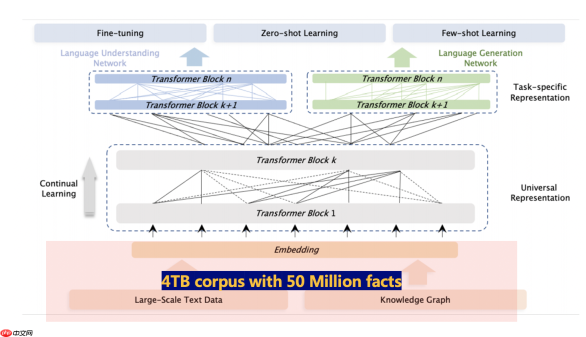
ERNIE 3.0首次在百亿级预训练模型中引入大规模知识图谱,提出了海量无监督文本与大规模知识图谱的平行预训练方法(Universal Knowledge-Text Prediction),通过将知识图谱挖掘算法得到五千万知识图谱三元组与4TB大规模语料同时输入到预训练模型中进行联合掩码训练,促进了结构化知识和无结构文本之间的信息共享,大幅提升了模型对于知识的记忆和推理能力。
ERNIE 3.0框架分为两层。第一层是通用语义表示网络,该网络学习数据中的基础和通用的知识。第二层是任务语义表示网络,该网络基于通用语义表示,学习任务相关的知识。在学习过程中,任务语义表示网络只学习对应类别的预训练任务,而通用语义表示网络会学习所有的预训练任务。
3. 如何使用ERNIE 3.0中文预训练模型进行法律文本多标签分类预测
3.1 环境准备
AI Studio平台默认安装了Paddle和PaddleNLP,并定期更新版本。 如需手动更新Paddle,可参考飞桨安装说明,安装相应环境下最新版飞桨框架。使用如下命令确保安装最新版PaddleNLP:
!python -m pip install paddlepaddle-gpu==2.3.0.post101 -f https://www.paddlepaddle.org.cn/whl/linux/mkl/avx/stable.html
!pip install --upgrade paddlenlp==2.0.8
Looking in indexes: https://pypi.tuna.tsinghua.edu.cn/simple
Looking in links: https://www.paddlepaddle.org.cn/whl/linux/mkl/avx/stable.html
Collecting paddlepaddle-gpu==2.3.0.post101
  Downloading https://paddle-wheel.bj.bcebos.com/2.3.0/linux/linux-gpu-cuda10.1-cudnn7-mkl-gcc5.4-avx/paddlepaddle_gpu-2.3.0.post101-cp37-cp37m-linux_x86_64.whl (566.0 MB)     ━━━━━━━━━━━━━━━━━━━━━━━━━━━━━━━━━━━━━━━ 566.0/566.0 MB 1.7 MB/s eta 0:00:0000:0100:02
Requirement already satisfied: numpy>=1.13 in /opt/conda/envs/python35-paddle120-env/lib/python3.7/site-packages (from paddlepaddle-gpu==2.3.0.post101) (1.19.5)
Requirement already satisfied: protobuf>=3.1.0 in /opt/conda/envs/python35-paddle120-env/lib/python3.7/site-packages (from paddlepaddle-gpu==2.3.0.post101) (3.20.0)
Requirement already satisfied: decorator in /opt/conda/envs/python35-paddle120-env/lib/python3.7/site-packages (from paddlepaddle-gpu==2.3.0.post101) (4.4.2)
Requirement already satisfied: astor in /opt/conda/envs/python35-paddle120-env/lib/python3.7/site-packages (from paddlepaddle-gpu==2.3.0.post101) (0.8.1)
Requirement already satisfied: Pillow in /opt/conda/envs/python35-paddle120-env/lib/python3.7/site-packages (from paddlepaddle-gpu==2.3.0.post101) (8.2.0)
Requirement already satisfied: six in /opt/conda/envs/python35-paddle120-env/lib/python3.7/site-packages (from paddlepaddle-gpu==2.3.0.post101) (1.16.0)
Requirement already satisfied: opt-einsum==3.3.0 in /opt/conda/envs/python35-paddle120-env/lib/python3.7/site-packages (from paddlepaddle-gpu==2.3.0.post101) (3.3.0)
Requirement already satisfied: requests>=2.20.0 in /opt/conda/envs/python35-paddle120-env/lib/python3.7/site-packages (from paddlepaddle-gpu==2.3.0.post101) (2.24.0)
Collecting paddle-bfloat==0.1.2
  Downloading https://pypi.tuna.tsinghua.edu.cn/packages/71/b2/f601d2d515be9206e69baf17cc7b8ef5a1c3384874b4e15da16b9c9cfc2f/paddle_bfloat-0.1.2-cp37-cp37m-manylinux_2_5_x86_64.manylinux1_x86_64.manylinux_2_12_x86_64.manylinux2010_x86_64.whl (373 kB)     ━━━━━━━━━━━━━━━━━━━━━━━━━━━━━━━━━━━━━━ 373.7/373.7 kB 11.6 MB/s eta 0:00:00Requirement already satisfied: idna=2.5 in /opt/conda/envs/python35-paddle120-env/lib/python3.7/site-packages (from requests>=2.20.0->paddlepaddle-gpu==2.3.0.post101) (2.8)
Requirement already satisfied: chardet=3.0.2 in /opt/conda/envs/python35-paddle120-env/lib/python3.7/site-packages (from requests>=2.20.0->paddlepaddle-gpu==2.3.0.post101) (3.0.4)
Requirement already satisfied: certifi>=2017.4.17 in /opt/conda/envs/python35-paddle120-env/lib/python3.7/site-packages (from requests>=2.20.0->paddlepaddle-gpu==2.3.0.post101) (2019.9.11)
Requirement already satisfied: urllib3!=1.25.0,!=1.25.1,=1.21.1 in /opt/conda/envs/python35-paddle120-env/lib/python3.7/site-packages (from requests>=2.20.0->paddlepaddle-gpu==2.3.0.post101) (1.25.6)
Installing collected packages: paddle-bfloat, paddlepaddle-gpu
  Attempting uninstall: paddle-bfloat
    Found existing installation: paddle-bfloat 0.1.7
    Uninstalling paddle-bfloat-0.1.7:
      Successfully uninstalled paddle-bfloat-0.1.7
  Attempting uninstall: paddlepaddle-gpu
    Found existing installation: paddlepaddle-gpu 2.3.2.post112
    Uninstalling paddlepaddle-gpu-2.3.2.post112:
      Successfully uninstalled paddlepaddle-gpu-2.3.2.post112
Successfully installed paddle-bfloat-0.1.2 paddlepaddle-gpu-2.3.0.post101[notice] A new release of pip available: 22.1.2 -> 22.2.2[notice] To update, run: pip install --upgrade pipLooking in indexes: https://pypi.tuna.tsinghua.edu.cn/simple
Requirement already satisfied: paddlenlp in /opt/conda/envs/python35-paddle120-env/lib/python3.7/site-packages (2.1.1)
Collecting paddlenlp
  Downloading https://pypi.tuna.tsinghua.edu.cn/packages/3c/55/9532ad7656bc42f6818f64ae900bb882cba858a36e836bd3700f36db160d/paddlenlp-2.3.7-py3-none-any.whl (1.6 MB)     ━━━━━━━━━━━━━━━━━━━━━━━━━━━━━━━━━━━━━━━━ 1.6/1.6 MB 9.7 MB/s eta 0:00:00ta 0:00:01Requirement already satisfied: seqeval in /opt/conda/envs/python35-paddle120-env/lib/python3.7/site-packages (from paddlenlp) (1.2.2)
Requirement already satisfied: tqdm in /opt/conda/envs/python35-paddle120-env/lib/python3.7/site-packages (from paddlenlp) (4.27.0)
Requirement already satisfied: colorlog in /opt/conda/envs/python35-paddle120-env/lib/python3.7/site-packages (from paddlenlp) (4.1.0)
Requirement already satisfied: multiprocess=3.1.0 in /opt/conda/envs/python35-paddle120-env/lib/python3.7/site-packages (from paddlenlp) (3.20.0)
Requirement already satisfied: paddle2onnx in /opt/conda/envs/python35-paddle120-env/lib/python3.7/site-packages (from paddlenlp) (0.9.8)
Requirement already satisfied: dill=2.0.0
  Downloading https://pypi.tuna.tsinghua.edu.cn/packages/13/68/8f123cf1b84fc32d749357b2c7ed6e9e61c06246965ba7f6f7a78cba54e9/datasets-2.4.0-py3-none-any.whl (365 kB)     ━━━━━━━━━━━━━━━━━━━━━━━━━━━━━━━━━━━━━━ 365.7/365.7 kB 11.3 MB/s eta 0:00:00Requirement already satisfied: requests>=2.19.0 in /opt/conda/envs/python35-paddle120-env/lib/python3.7/site-packages (from datasets>=2.0.0->paddlenlp) (2.24.0)
Requirement already satisfied: packaging in /opt/conda/envs/python35-paddle120-env/lib/python3.7/site-packages (from datasets>=2.0.0->paddlenlp) (21.3)
Collecting xxhash
  Downloading https://pypi.tuna.tsinghua.edu.cn/packages/ef/ac/0eb796cf052c392f1ae586452c89ca66164f7d4f655b039ca3d06e2291af/xxhash-3.0.0-cp37-cp37m-manylinux_2_17_x86_64.manylinux2014_x86_64.whl (212 kB)     ━━━━━━━━━━━━━━━━━━━━━━━━━━━━━━━━━━━━━━━ 212.2/212.2 kB 8.9 MB/s eta 0:00:00Collecting fsspec[http]>=2021.11.1
  Downloading https://pypi.tuna.tsinghua.edu.cn/packages/82/f3/30f7925f22f623ebac35b40d48151578ef7303d897764e1d95323727611b/fsspec-2022.8.2-py3-none-any.whl (140 kB)     ━━━━━━━━━━━━━━━━━━━━━━━━━━━━━━━━━━━━━━━ 140.8/140.8 kB 3.2 MB/s eta 0:00:00a 0:00:01Collecting huggingface-hub=0.1.0
  Downloading https://pypi.tuna.tsinghua.edu.cn/packages/8a/27/d92a2d41373fc91045d9a2ba5f9e0664a0f1ba6c3b52d9bc40ff1eccb5be/huggingface_hub-0.9.1-py3-none-any.whl (120 kB)     ━━━━━━━━━━━━━━━━━━━━━━━━━━━━━━━━━━━━━━ 120.7/120.7 kB 28.1 MB/s eta 0:00:00Collecting tqdm
  Downloading https://pypi.tuna.tsinghua.edu.cn/packages/8a/c4/d15f1e627fff25443ded77ea70a7b5532d6371498f9285d44d62587e209c/tqdm-4.64.0-py2.py3-none-any.whl (78 kB)     ━━━━━━━━━━━━━━━━━━━━━━━━━━━━━━━━━━━━━━━━ 78.4/78.4 kB 17.3 MB/s eta 0:00:00Collecting aiohttp
  Downloading https://pypi.tuna.tsinghua.edu.cn/packages/dd/fe/80c594d62a7ff07730fd2cfc3a058498087436d8c938243e0610d1928f0e/aiohttp-3.8.1-cp37-cp37m-manylinux_2_5_x86_64.manylinux1_x86_64.manylinux_2_12_x86_64.manylinux2010_x86_64.whl (1.1 MB)     ━━━━━━━━━━━━━━━━━━━━━━━━━━━━━━━━━━━━━━━━ 1.1/1.1 MB 10.6 MB/s eta 0:00:0000:0100:01
Requirement already satisfied: numpy>=1.17 in /opt/conda/envs/python35-paddle120-env/lib/python3.7/site-packages (from datasets>=2.0.0->paddlenlp) (1.19.5)
Requirement already satisfied: importlib-metadata in /opt/conda/envs/python35-paddle120-env/lib/python3.7/site-packages (from datasets>=2.0.0->paddlenlp) (4.2.0)
Requirement already satisfied: pandas in /opt/conda/envs/python35-paddle120-env/lib/python3.7/site-packages (from datasets>=2.0.0->paddlenlp) (1.1.5)
Collecting pyarrow>=6.0.0
  Downloading https://pypi.tuna.tsinghua.edu.cn/packages/7f/08/9b5fe7c9e2774bca77dae29d22a446ead804fb8e050f2899ae1f60d73ad1/pyarrow-9.0.0-cp37-cp37m-manylinux_2_17_x86_64.manylinux2014_x86_64.whl (35.3 MB)     ━━━━━━━━━━━━━━━━━━━━━━━━━━━━━━━━━━━━━━━━ 35.3/35.3 MB 11.2 MB/s eta 0:00:0000:0100:01
Collecting responses=0.21.3 in /opt/conda/envs/python35-paddle120-env/lib/python3.7/site-packages (from seqeval->paddlenlp) (0.24.2)
Collecting aiosignal>=1.1.2
  Downloading https://pypi.tuna.tsinghua.edu.cn/packages/3b/87/fe94898f2d44a93a35d5aa74671ed28094d80753a1113d68b799fab6dc22/aiosignal-1.2.0-py3-none-any.whl (8.2 kB)
Collecting frozenlist>=1.1.1
  Downloading https://pypi.tuna.tsinghua.edu.cn/packages/3e/b2/cf7e86583f03fafc93c4103f9a03aaf729dcf4dca9cd3012256a48b766ad/frozenlist-1.3.1-cp37-cp37m-manylinux_2_5_x86_64.manylinux1_x86_64.manylinux_2_17_x86_64.manylinux2014_x86_64.whl (148 kB)     ━━━━━━━━━━━━━━━━━━━━━━━━━━━━━━━━━━━━━━━ 148.0/148.0 kB 3.5 MB/s eta 0:00:00a 0:00:01Requirement already satisfied: typing-extensions>=3.7.4 in /opt/conda/envs/python35-paddle120-env/lib/python3.7/site-packages (from aiohttp->datasets>=2.0.0->paddlenlp) (4.3.0)
Collecting async-timeout=4.0.0a3
  Downloading https://pypi.tuna.tsinghua.edu.cn/packages/d6/c1/8991e7c5385b897b8c020cdaad718c5b087a6626d1d11a23e1ea87e325a7/async_timeout-4.0.2-py3-none-any.whl (5.8 kB)
Requirement already satisfied: attrs>=17.3.0 in /opt/conda/envs/python35-paddle120-env/lib/python3.7/site-packages (from aiohttp->datasets>=2.0.0->paddlenlp) (21.4.0)
Collecting yarl=1.0
  Downloading https://pypi.tuna.tsinghua.edu.cn/packages/2b/89/36a50cab1be3d5099ec66a41212cf0c11507c343074e97e907a2f5f1a569/yarl-1.8.1-cp37-cp37m-manylinux_2_17_x86_64.manylinux2014_x86_64.whl (231 kB)     ━━━━━━━━━━━━━━━━━━━━━━━━━━━━━━━━━━━━━ 231.3/231.3 kB 749.4 kB/s eta 0:00:00a 0:00:01Collecting charset-normalizer=2.0
  Downloading https://pypi.tuna.tsinghua.edu.cn/packages/db/51/a507c856293ab05cdc1db77ff4bc1268ddd39f29e7dc4919aa497f0adbec/charset_normalizer-2.1.1-py3-none-any.whl (39 kB)
Collecting asynctest==0.13.0
  Downloading https://pypi.tuna.tsinghua.edu.cn/packages/e8/b6/8d17e169d577ca7678b11cd0d3ceebb0a6089a7f4a2de4b945fe4b1c86db/asynctest-0.13.0-py3-none-any.whl (26 kB)
Collecting multidict=4.5
  Downloading https://pypi.tuna.tsinghua.edu.cn/packages/db/3f/1c876ed190e8fcd1a2faef3085427e5465076e28813a2499502633f7eed3/multidict-6.0.2-cp37-cp37m-manylinux_2_17_x86_64.manylinux2014_x86_64.whl (94 kB)     ━━━━━━━━━━━━━━━━━━━━━━━━━━━━━━━━━━━━━━━ 94.8/94.8 kB 303.8 kB/s eta 0:00:00a 0:00:01Requirement already satisfied: pyyaml>=5.1 in /opt/conda/envs/python35-paddle120-env/lib/python3.7/site-packages (from huggingface-hub=0.1.0->datasets>=2.0.0->paddlenlp) (5.1.2)
Requirement already satisfied: filelock in /opt/conda/envs/python35-paddle120-env/lib/python3.7/site-packages (from huggingface-hub=0.1.0->datasets>=2.0.0->paddlenlp) (3.0.12)
Requirement already satisfied: pyparsing!=3.0.5,>=2.0.2 in /opt/conda/envs/python35-paddle120-env/lib/python3.7/site-packages (from packaging->datasets>=2.0.0->paddlenlp) (3.0.9)
Requirement already satisfied: urllib3!=1.25.0,!=1.25.1,=1.21.1 in /opt/conda/envs/python35-paddle120-env/lib/python3.7/site-packages (from requests>=2.19.0->datasets>=2.0.0->paddlenlp) (1.25.6)
Requirement already satisfied: chardet=3.0.2 in /opt/conda/envs/python35-paddle120-env/lib/python3.7/site-packages (from requests>=2.19.0->datasets>=2.0.0->paddlenlp) (3.0.4)
Requirement already satisfied: certifi>=2017.4.17 in /opt/conda/envs/python35-paddle120-env/lib/python3.7/site-packages (from requests>=2.19.0->datasets>=2.0.0->paddlenlp) (2019.9.11)
Requirement already satisfied: idna=2.5 in /opt/conda/envs/python35-paddle120-env/lib/python3.7/site-packages (from requests>=2.19.0->datasets>=2.0.0->paddlenlp) (2.8)
Collecting urllib3!=1.25.0,!=1.25.1,=1.21.1
  Downloading https://pypi.tuna.tsinghua.edu.cn/packages/56/aa/4ef5aa67a9a62505db124124a5cb5262332d1d4153462eb8fd89c9fa41e5d92/urllib3-1.25.11-py2.py3-none-any.whl (127 kB)     ━━━━━━━━━━━━━━━━━━━━━━━━━━━━━━━━━━━━━━━ 128.0/128.0 kB 1.8 MB/s eta 0:00:00a 0:00:01Requirement already satisfied: joblib>=0.11 in /opt/conda/envs/python35-paddle120-env/lib/python3.7/site-packages (from scikit-learn>=0.21.3->seqeval->paddlenlp) (0.14.1)
Requirement already satisfied: scipy>=0.19.1 in /opt/conda/envs/python35-paddle120-env/lib/python3.7/site-packages (from scikit-learn>=0.21.3->seqeval->paddlenlp) (1.6.3)
Requirement already satisfied: threadpoolctl>=2.0.0 in /opt/conda/envs/python35-paddle120-env/lib/python3.7/site-packages (from scikit-learn>=0.21.3->seqeval->paddlenlp) (2.1.0)
Requirement already satisfied: zipp>=0.5 in /opt/conda/envs/python35-paddle120-env/lib/python3.7/site-packages (from importlib-metadata->datasets>=2.0.0->paddlenlp) (3.8.1)
Requirement already satisfied: pytz>=2017.2 in /opt/conda/envs/python35-paddle120-env/lib/python3.7/site-packages (from pandas->datasets>=2.0.0->paddlenlp) (2019.3)
Requirement already satisfied: python-dateutil>=2.7.3 in /opt/conda/envs/python35-paddle120-env/lib/python3.7/site-packages (from pandas->datasets>=2.0.0->paddlenlp) (2.8.2)
Requirement already satisfied: six>=1.5 in /opt/conda/envs/python35-paddle120-env/lib/python3.7/site-packages (from python-dateutil>=2.7.3->pandas->datasets>=2.0.0->paddlenlp) (1.16.0)
Installing collected packages: xxhash, urllib3, tqdm, pyarrow, multidict, fsspec, frozenlist, charset-normalizer, asynctest, async-timeout, yarl, aiosignal, responses, paddlefsl, huggingface-hub, aiohttp, datasets, paddlenlp
  Attempting uninstall: urllib3
    Found existing installation: urllib3 1.25.6
    Uninstalling urllib3-1.25.6:
      Successfully uninstalled urllib3-1.25.6
  Attempting uninstall: tqdm
    Found existing installation: tqdm 4.27.0
    Uninstalling tqdm-4.27.0:
      Successfully uninstalled tqdm-4.27.0
  Attempting uninstall: pyarrow
    Found existing installation: pyarrow 2.0.0
    Uninstalling pyarrow-2.0.0:
      Successfully uninstalled pyarrow-2.0.0
  Attempting uninstall: paddlefsl
    Found existing installation: paddlefsl 1.0.0
    Uninstalling paddlefsl-1.0.0:
      Successfully uninstalled paddlefsl-1.0.0
  Attempting uninstall: paddlenlp
    Found existing installation: paddlenlp 2.1.1
    Uninstalling paddlenlp-2.1.1:
      Successfully uninstalled paddlenlp-2.1.1ERROR: pip's dependency resolver does not currently take into account all the packages that are installed. This behaviour is the source of the following dependency conflicts.
parl 1.4.1 requires pyzmq==18.1.1, but you have pyzmq 23.2.0 which is incompatible.Successfully installed aiohttp-3.8.1 aiosignal-1.2.0 async-timeout-4.0.2 asynctest-0.13.0 charset-normalizer-2.1.1 datasets-2.4.0 frozenlist-1.3.1 fsspec-2022.8.2 huggingface-hub-0.9.1 multidict-6.0.2 paddlefsl-1.1.0 paddlenlp-2.3.7 pyarrow-9.0.0 responses-0.18.0 tqdm-4.64.0 urllib3-1.25.11 xxhash-3.0.0 yarl-1.8.1[notice] A new release of pip available: 22.1.2 -> 22.2.2[notice] To update, run: pip install --upgrade pip
import osimport paddleimport paddlenlp
3.2 加载法律文本多标签数据
本数据集(2019年法研杯要素识别任务)来自于“中国裁判文书网”公开的法律文书,每条训练数据由一份法律文书的案情描述片段构成,其中每个句子都被标记了对应的类别标签,数据集一共包含20个标签,标签代表含义如下:
DV1 0 婚后有子女DV2 1 限制行为能力子女抚养DV3 2 有夫妻共同财产DV4 3 支付抚养费DV5 4 不动产分割DV6 5 婚后分居DV7 6 二次起诉离婚DV8 7 按月给付抚养费DV9 8 准予离婚DV10 9 有夫妻共同债务DV11 10 婚前个人财产DV12 11 法定离婚DV13 12 不履行家庭义务DV14 13 存在非婚生子DV15 14 适当帮助DV16 15 不履行离婚协议DV17 16 损害赔偿DV18 17 感情不和分居满二年DV19 18 子女随非抚养权人生活DV20 19 婚后个人财产
数据集示例:
text    labels
所以起诉至法院请求变更两个孩子均由原告抚养,被告承担一个孩子抚养费每月600元。	0,7,3,12014年8月原、被告因感情不和分居,2014年10月16日被告文某某向务川自治县人民法院提起离婚诉讼,被法院依法驳回了离婚诉讼请求。	6,5女儿由原告抚养,被告每月支付小孩抚养费500元;	0,7,3,1
使用本地文件创建数据集,自定义read_custom_data()函数读取数据文件,传入load_dataset()创建数据集,返回数据类型为MapDataset。更多数据集自定方法详见如何自定义数据集。

# 自定义数据集import refrom paddlenlp.datasets import load_datasetdef clean_text(text):
    text = text.replace("
", "").replace("
", "")
    text = re.sub(r"\n
", ".", text)    return text# 定义读取数据集函数def read_custom_data(is_test=False, is_one_hot=True):

    file_num = 6 if is_test else 48
    filepath = 'raw_data/test/' if is_test else 'raw_data/train/'

    for i in range(file_num):
        f = open('{}labeled_{}.txt'.format(filepath, i))        while True:
            line = f.readline()            if not line:                break
            data = line.strip().split('	')            # 标签用One-hot表示
            if is_one_hot:
                labels = [float(1) if str(i) in data[1].split(',') else float(0) for i in range(20)]            else:
                labels = [int(d) for d in data[1].split(',')]            yield {"text": clean_text(data[0]), "labels": labels}
        f.close()

label_vocab = {    0: "婚后有子女",    1: "限制行为能力子女抚养",    2: "有夫妻共同财产",    3: "支付抚养费",    4: "不动产分割",    5: "婚后分居",    6: "二次起诉离婚",    7: "按月给付抚养费",    8: "准予离婚",    9: "有夫妻共同债务",    10: "婚前个人财产",    11: "法定离婚",    12: "不履行家庭义务",    13: "存在非婚生子",    14: "适当帮助",    15: "不履行离婚协议",    16: "损害赔偿",    17: "感情不和分居满二年",    18: "子女随非抚养权人生活",    19: "婚后个人财产"}
# load_dataset()创建数据集train_ds = load_dataset(read_custom_data, is_test=False, lazy=False)
test_ds = load_dataset(read_custom_data, is_test=True, lazy=False)# lazy=False,数据集返回为MapDataset类型print("数据类型:", type(train_ds))# labels为One-hot标签print("训练集样例:", train_ds[0])print("测试集样例:", test_ds[0])
数据类型: <class>
训练集样例: {'text': '2013年11月28日原、被告离婚时自愿达成协议,婚生子张某乙由被告李某某抚养,本院以(2013)宝渭法民初字第01848号民事调解书对该协议内容予以了确认,该协议具有法律效力,对原、被告双方均有约束力。', 'labels': [1.0, 1.0, 0.0, 0.0, 0.0, 0.0, 0.0, 0.0, 0.0, 0.0, 0.0, 0.0, 0.0, 0.0, 0.0, 0.0, 0.0, 0.0, 0.0, 0.0]}
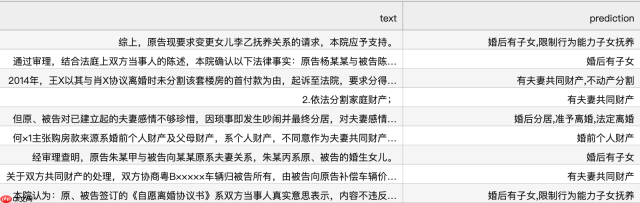
测试集样例: {'text': '综上,原告现要求变更女儿李乙抚养关系的请求,本院应予支持。', 'labels': [1.0, 1.0, 0.0, 0.0, 0.0, 0.0, 0.0, 0.0, 0.0, 0.0, 0.0, 0.0, 0.0, 0.0, 0.0, 0.0, 0.0, 0.0, 0.0, 0.0]}</class>
3.3 加载中文ERNIE 3.0预训练模型和分词器
PaddleNLP中Auto模块(包括AutoModel, AutoTokenizer及各种下游任务类)提供了方便易用的接口,无需指定模型类别,即可调用不同网络结构的预训练模型。PaddleNLP的预训练模型可以很容易地通过from_pretrained()方法加载,Transformer预训练模型汇总包含了40多个主流预训练模型,500多个模型权重。
AutoModelForSequenceClassification可用于多标签分类,通过预训练模型获取输入文本的表示,之后将文本表示进行分类。PaddleNLP已经实现了ERNIE 3.0预训练模型,可以通过一行代码实现ERNIE 3.0预训练模型和分词器的加载。
# 加载中文ERNIE 3.0预训练模型和分词器from paddlenlp.transformers import AutoModelForSequenceClassification, AutoTokenizer

model_name = "ernie-3.0-medium-zh"num_classes = 20model = AutoModelForSequenceClassification.from_pretrained(model_name, num_classes=num_classes)
tokenizer = AutoTokenizer.from_pretrained(model_name)
[2022-09-03 10:06:55,253] [    INFO] - We are using <class> to load 'ernie-3.0-medium-zh'.
[2022-09-03 10:06:55,257] [    INFO] - Downloading https://bj.bcebos.com/paddlenlp/models/transformers/ernie_3.0/ernie_3.0_medium_zh.pdparams and saved to /home/aistudio/.paddlenlp/models/ernie-3.0-medium-zh
[2022-09-03 10:06:55,260] [    INFO] - Downloading ernie_3.0_medium_zh.pdparams from https://bj.bcebos.com/paddlenlp/models/transformers/ernie_3.0/ernie_3.0_medium_zh.pdparams
100%|██████████| 313M/313M [00:10 to load 'ernie-3.0-medium-zh'.
[2022-09-03 10:07:10,690] [    INFO] - Downloading https://bj.bcebos.com/paddlenlp/models/transformers/ernie_3.0/ernie_3.0_medium_zh_vocab.txt and saved to /home/aistudio/.paddlenlp/models/ernie-3.0-medium-zh
[2022-09-03 10:07:10,692] [    INFO] - Downloading ernie_3.0_medium_zh_vocab.txt from https://bj.bcebos.com/paddlenlp/models/transformers/ernie_3.0/ernie_3.0_medium_zh_vocab.txt
100%|██████████| 182k/182k [00:00
        </class>
3.4 基于预训练模型的数据处理
Dataset中通常为原始数据,需要经过一定的数据处理并进行采样组batch。
- 通过Dataset的map函数,使用分词器将数据集从原始文本处理成模型的输入。
- 定义paddle.io.BatchSampler和collate_fn构建 paddle.io.DataLoader。
实际训练中,根据显存大小调整批大小batch_size和文本最大长度max_seq_length。
import functoolsimport numpy as npfrom paddle.io import DataLoader, BatchSamplerfrom paddlenlp.data import DataCollatorWithPadding# 数据预处理函数,利用分词器将文本转化为整数序列def preprocess_function(examples, tokenizer, max_seq_length):
    result = tokenizer(text=examples["text"], max_seq_len=max_seq_length)
    result["labels"] = examples["labels"]    return result

trans_func = functools.partial(preprocess_function, tokenizer=tokenizer, max_seq_length=128)
train_ds = train_ds.map(trans_func)
test_ds = test_ds.map(trans_func)# collate_fn函数构造,将不同长度序列充到批中数据的最大长度,再将数据堆叠collate_fn = DataCollatorWithPadding(tokenizer)# 定义BatchSampler,选择批大小和是否随机乱序,进行DataLoadertrain_batch_sampler = BatchSampler(train_ds, batch_size=64, shuffle=True)
test_batch_sampler = BatchSampler(test_ds, batch_size=64, shuffle=False)
train_data_loader = DataLoader(dataset=train_ds, batch_sampler=train_batch_sampler, collate_fn=collate_fn)
test_data_loader = DataLoader(dataset=test_ds, batch_sampler=test_batch_sampler, collate_fn=collate_fn)
3.5 数据训练和评估
定义训练所需的优化器、损失函数、评价指标等,就可以开始进行预模型微调任务。
import timeimport paddle.nn.functional as Ffrom metric import MultiLabelReport# Adam优化器、交叉熵损失函数、自定义MultiLabelReport评价指标optimizer = paddle.optimizer.AdamW(learning_rate=1e-4, parameters=model.parameters())
criterion = paddle.nn.BCEWithLogitsLoss()
metric = MultiLabelReport()
from eval import evaluate
epochs = 10 # 训练轮次ckpt_dir = "ernie_ckpt" #训练过程中保存模型参数的文件夹global_step = 0 #迭代次数tic_train = time.time()
best_f1_score = 0for epoch in range(1, epochs + 1):    for step, batch in enumerate(train_data_loader, start=1):
        input_ids, token_type_ids, labels = batch['input_ids'], batch['token_type_ids'], batch['labels']        # 计算模型输出、损失函数值、分类概率值、准确率、f1分数
        logits = model(input_ids, token_type_ids)
        loss = criterion(logits, labels)
        probs = F.sigmoid(logits)
        metric.update(probs, labels)
        auc, f1_score, _, _ = metric.accumulate()        # 每迭代10次,打印损失函数值、准确率、f1分数、计算速度
        global_step += 1
        if global_step % 10 == 0:            print(                "global step %d, epoch: %d, batch: %d, loss: %.5f, auc: %.5f, f1 score: %.5f, speed: %.2f step/s"
                % (global_step, epoch, step, loss, auc, f1_score,                    10 / (time.time() - tic_train)))
            tic_train = time.time()
        # 反向梯度回传,更新参数
        loss.backward()
        optimizer.step()
        optimizer.clear_grad()        # 每迭代40次,评估当前训练的模型、保存当前最佳模型参数和分词器的词表等
        if global_step % 40 == 0:
            save_dir = ckpt_dir            if not os.path.exists(save_dir):
                os.makedirs(save_dir)
            eval_f1_score = evaluate(model, criterion, metric, test_data_loader, label_vocab, if_return_results=False)            if eval_f1_score > best_f1_score:
                best_f1_score = eval_f1_score
                model.save_pretrained(save_dir)
                tokenizer.save_pretrained(save_dir)
模型训练过程中会输出如下日志:
global step 10, epoch: 1, batch: 10, loss: 0.34328, auc: 0.63276, f1 score: 0.22379, speed: 1.26 step/sglobal step 20, epoch: 1, batch: 20, loss: 0.27681, auc: 0.68451, f1 score: 0.25070, speed: 0.90 step/sglobal step 30, epoch: 1, batch: 30, loss: 0.21992, auc: 0.73419, f1 score: 0.29259, speed: 0.74 step/sglobal step 40, epoch: 1, batch: 40, loss: 0.18223, auc: 0.78311, f1 score: 0.35254, speed: 0.62 step/seval loss: 0.17606, auc: 0.91074, f1 score: 0.72432, precison: 0.69068, recall: 0.76141[2022-05-13 16:36:18,232] [    INFO] - tokenizer config file saved in ernie_ckpt_1/tokenizer_config.json
[2022-05-13 16:36:18,235] [    INFO] - Special tokens file saved in ernie_ckpt_1/special_tokens_map.json
...
3.6 多标签分类预测结果预测
加载微调好的模型参数进行情感分析预测,并保存预测结果
from eval import evaluate# 模型在测试集中表现model.set_dict(paddle.load('ernie_ckpt/model_state.pdparams'))# 也可以选择加载预先训练好的模型参数结果查看模型训练结果# model.set_dict(paddle.load('ernie_ckpt_trained/model_state.pdparams'))print("ERNIE 3.0 在法律文本多标签分类test集表现", end= " ")
results = evaluate(model, criterion, metric, test_data_loader, label_vocab)
ERNIE 3.0 在法律文本多标签分类test集表现 eval loss: 0.05745, auc: 0.99090, f1 score: 0.89150, precison: 0.87362, recall: 0.91014
test_ds = load_dataset(read_custom_data, is_test=True, is_one_hot=False, lazy=False)
res_dir = "./results"if not os.path.exists(res_dir):
    os.makedirs(res_dir)with open(os.path.join(res_dir, "multi_label.tsv"), 'w', encoding="utf8") as f:
    f.write("text	prediction
")    for i, pred in enumerate(results):
        f.write(test_ds[i]['text']+"	"+pred+"
")
法律多标签文本预测结果示例: