






什么是pinia?怎么使用?本篇文章就来带大家了解一下vue新一代的状态管理库--pinia,希望对大家有所帮助!

什么是 Pinia
Pinia (西班牙语中的菠萝),本质上依然是一个状态管理的库,用于跨组件、页面进行状态共享。【相关推荐:vue.js视频教程】
pinia 与 vuex 的区别:
更友好的TypeScript支持,Vuex之前对TS的支持很不友好
与 Vuex 相比,Pinia 提供了一个更简单的 API,具有更少的仪式,提供了 Composition-API 风格的 API
不再有modules的嵌套结构
也不再有命名空间的概念,不需要记住它们的复杂关系
如何使用 Pinia
1、安装 pinia
yarn add pinia
2、创建一个pinia
// src/stores/index.js
import { createPinia } from "pinia";

const pinia = createPinia()

export default pinia
//main.js
import pinia from './stores'

app.use(pinia)
认识 Store
一个 Store (如 Pinia)是一个实体,它会持有为绑定到你组件树的状态和业务逻辑,也就是保存了全局的状态
这样就可以定义任意数量的Store来管理你的状态,包括 state、getters、actions
1. 定义一个store
Store 是使用 defineStore() 定义的,
且它需要一个唯一名称,作为第一个参数传递

2. 使用 store


操作 State
state 是 store 的核心部分,store是用来实现我们管理状态的。


- 方式一:直接一个个修改state
- 方式二:一次性修改多个状态
- 方式三:替换state
- 方式四:重置state

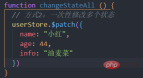


Getters
1. 认识和定义 Getters
Getters相当于Store的计算属性:
- 可以用 defineStore() 中的 getters 属性定义;
- getters中可以定义接受一个state作为参数的函数;
2. 访问 Getters
方式一:访问当前 store 的Getters
方式二:Getters 中访问自己的其他Getters
方式三:访问其他的 store 的Getters
getters: {
    // 1. 基本使用
    debouleCount(state) {
      return state.count * 2
    },
    // 2. 一个 getters 引入另外一个 getters
    useDebouleCount() {
      return this.debouleCount + 2
    },
    // 3. getter也支持返回一个函数
    getFriendById(state) {
      return function (id) {
        for (let i = 0; i <p><img src="https://img.php.cn/upload/article/000/000/024/9b758e20089c830456d8b17003d54ea1-8.png?x-oss-process=image/resize,p_40" alt="image-20220812181122665"></p><h2><strong>认识和定义 Action</strong></h2><blockquote><p>Action 可以理解成组件中的 methods ,和getters一样,在action中可以通过this访问整个store实例的所有操作。</p></blockquote><p><img src="https://img.php.cn/upload/article/000/000/024/4cc76dfa4ba802a30963e696c1128d1f-9.png?x-oss-process=image/resize,p_40" alt="image-20220813121159762"></p><blockquote><p>Action 是支持异步操作的,所以可以使用 await。</p></blockquote><p><img src="https://img.php.cn/upload/article/000/000/024/4cc76dfa4ba802a30963e696c1128d1f-10.png?x-oss-process=image/resize,p_40" alt="image-20220813121241241994"></p><p>更多编程相关知识,请访问:<a href="https://www.php.cn/course.html" target="_blank" textvalue="编程入门">编程入门</a>!!</p>
前端入门到VUE实战笔记:立即使用
在学习笔记中,你将探索 前端 的入门与实战技巧!













