





在jquery中,height()方法用于设置或返回被选元素的高度,可返回第一个匹配元素的高度,语法“$(selector).height()”;但可设置所有匹配元素的高度,语法“$(selector).height(value)”。

本教程操作环境:windows7系统、jquery1.10.2版本、Dell G3电脑。
height() 方法设置或返回被选元素的高度。
当该方法用于返回高度时, 则返回第一个匹配元素的高度。语法格式:
$(selector).height()
当该方法用于设置高度时,则设置所有匹配元素的高度。简单语法格式:
$(selector).height(value)
还可通过调用回调函数来设置高度
$(selector).height(function(index,currentheight))
index - 返回集合中元素的 index 位置。
currentheight - 返回被选元素的当前高度。
示例:

jQuery 1.12.4
下载
jQuery 1.12.4是jQuery 1.x系列的最后一个正式稳定版本,由jQuery团队于2016年发布。该版本主要面向需要兼容旧版浏览器环境的网站和Web应用,尤其适用于仍需支持Internet Explorer 6、Internet Explorer 7、Internet Explorer 8等老旧浏览器的项目。
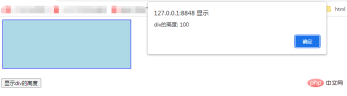
1、获取高度
html>


		<meta><script>
		</script><script>
			$(document).ready(function() {
				$("button").click(function() {
					alert("div的高度: " + $("div").height());
				});
			});
		</script><div></div><br><button>显示div的高度</button>
2、设置高度
html>


		<meta><script>
		</script><script>
			$(document).ready(function() {
				$("#btn1").click(function() {
					$("div").height(500);
				});
				$("#btn2").click(function() {
					$("div").height("10em");
				});
				$("#btn3").click(function() {
					$("div").height("200pt");
				});
			});
		</script><button>设置div高度为500px</button>
		<button>设置div高度为10em</button>
		<button>设置div高度为200pt</button>
		<p><b>注意:</b> 对于em, pt, etc要使用""</p>
		<div></div><br>

相关视频教程推荐:jQuery教程(视频)


