本文主要介绍了jquery插件echarts实现的循环生成图效果,结合完整实例形式分析了echarts插件循环输出数字图形的实现步骤与相关操作技巧,并附带demo源码供读者下载参考,需要的朋友可以参考下,希望能帮助到大家。
1、问题背景:
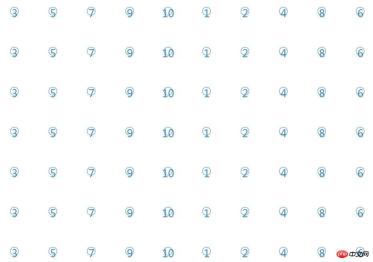
利用for循环生产多个气泡图,并且每个气泡都可以点击
2、实现源码:
html>


    <meta>
    <title>echarts-循环生成图</title>
    <script></script>
    <script></script>
    <style>
      body,html,#p-chart{
        width: 99%;
        height: 100%;
        font-family: "微软雅黑";
        font-size: 12px;
      }
      .chart{
        width: 1200px;
        height: 100px;
      }
    </style>
    <script>
      $(document).ready(function(){
        buildChart();
        buildChartJS();
      });
      function buildChart()
      {
        $("#p-chart").empty();
        var chart = "";
        for(var i=0;i<8;i++)
        {
          chart += "<p id='chart"+i+"' class='chart'>";
        }
        $("#p-chart").append(chart);
      }
      function buildChartJS()
      {
        for(var i=0;i<8;i++)
        {
          var chart = document.getElementById('chart'+i);
          var echart = echarts.init(chart);
          var option = {
            legend: {
              data:['scatter1'],
              show:false
            },
            splitLine:{
                show:false
             },
            grid:{
              borderWidth:0
            },
            xAxis : [
              {
                show:false,
                type : 'value',
                splitNumber: 2,
                scale: true,
                axisLine:{
                  show:false
                },
                splitLine:{
                    show:false
                 },
                axisTick:{
                 show:false
                }
              }
            ],
            yAxis : [
              {
                show:false,
                type : 'value',
                splitNumber: 2,
                scale: true,
                axisLine:{
                  show:false
                },
                splitLine:{
                    show:false
                 }
              }
            ],
            series : [
              {
                name:'scatter1',
                type:'scatter',
                symbol: 'emptyCircle',
                symbolSize: 20,
                itemStyle : {
                  normal: {
                    color:'#0068B7',
                    label:{
                      show: true,
                      position: 'inside',
                      textStyle : {
                        fontSize : 26,
                        fontFamily : '微软雅黑',
                        color:'#0068B7'
                      }
                    }
                  }
                },
                data: randomDataArray()
              }
            ]
          };
          function eConsole(param)
          {
            alert(param.value);
            console.dir(param);
          }
          echart.on("click", eConsole);
          echart.setOption(option);
        }
      }
      function randomDataArray()
      {
        var d = [];
        var arr = [3,5,7,9,10,1,2,4,8,6];
        var len = 10;
        for(var i=0;i<len;i++)
        {
          d.push([i+1,0,arr[i],]);
        }
        return d;
      }
    </script>


    <p></p>
3、实现效果图:

ECharts Master
下载
ECharts 图表大师。根据用户数据和业务上下文,自动设计并生成专业的 ECharts 可视化图表。使用场景:(1) 用户提供表格/JSON/CSV 数据需要可视化,(2) 用户说"帮我做个图"、"画个图表",(3) 需要将查询结果可视化展示。
相关推荐: