






这篇文章主要为大家详细介绍了c#拼图游戏的编写代码,具有一定的参考价值,感兴趣的小伙伴们可以参考一下
本文设计了C#拼图游戏程序,供大家参考,具体内容如下
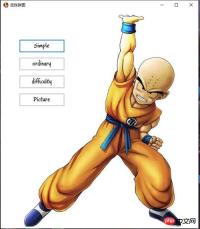
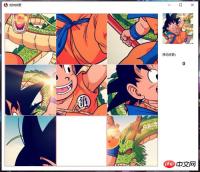
功能描述:
2.游戏难度选择:简单(3*3)、一般(5*5)、困难(9*9)三个级别
3.纪录完成步数
模块:
1.拼图类
2.配置类
3.游戏菜单窗口
4.游戏运行窗口
代码文件VS2013版本:
下载链接: 拼图游戏
--------------------------------------------------我叫分割线---------------------------------------------------------------
1.拼图类
方法:

1.构造函数:传图片并分割成一个一个小图片
2.交换方法
3.大图中截取小单元方法
4.移动单元的方法
5.打乱单元顺序方法
using System;
using System.Collections.Generic;
using System.Drawing;
using System.Linq;
using System.Text;
using System.Threading.Tasks;
using System.Windows.Forms;

namespace 拼图
{
 public class Puzzle
 {
 public enum Diff //游戏难度
 {
 simple,//简单
 ordinary,//普通
 difficulty//困难
 }
 private struct Node //拼图单元格结构体
 {
 public Image Img;
 public int Num;
 }
 private Image _img; //拼图图片
 public int Width; //拼图边长
 private Diff _gameDif; //游戏难度
 private Node[,] node; //单元格数组
 public int N; //单元格数组行列数

 /// <summary>
 /// 构造函数
 /// </summary>
 /// <param>拼图大图
 /// <param>游戏难度,该类下结构体Diff
 public Puzzle(Image Img,int Width, Diff GameDif)
 {
 this._gameDif = GameDif;
 this._img = Img;
 this.Width = Width;
 switch(this._gameDif)
 {
 case Diff.simple:    //简单则单元格数组保存为3*3的二维数组
  this.N = 3;
  node=new Node[3,3];
  break;
 case Diff.ordinary:   //一般则为5*5
  this.N = 5;
  node = new Node[5, 5];
  break;
 case Diff.difficulty:  //困难则为9*9
  this.N = 9;
  node = new Node[9, 9];
  break;
 }

 //分割图片形成各单元保存在数组中
 int Count = 0;
 for (int x = 0; x
 /// 由图片fromImage中截图并返回
 ///
 /// <param>原图片
 /// <param>宽
 /// <param>高
 /// <param>起始X坐标
 /// <param>起始Y坐标
 /// <returns></returns>
 public Image CaptureImage(Image fromImage, int width, int height, int spaceX, int spaceY)
 {
 int x = 0;
 int y = 0;
 int sX = fromImage.Width - width;
 int sY = fromImage.Height - height;
 if (sX > 0)
 {
 x = sX > spaceX ? spaceX : sX;
 }
 else
 {
 width = fromImage.Width;
 }
 if (sY > 0)
 {
 y = sY > spaceY ? spaceY : sY;
 }
 else
 {
 height = fromImage.Height;
 }

 //创建新图位图
 Bitmap bitmap = new Bitmap(width, height);
 //创建作图区域
 Graphics graphic = Graphics.FromImage(bitmap);
 //截取原图相应区域写入作图区
 graphic.DrawImage(fromImage, 0, 0, new Rectangle(x, y, width, height), GraphicsUnit.Pixel);
 //从作图区生成新图
 Image saveImage = Image.FromHbitmap(bitmap.GetHbitmap());
 return saveImage;
 }
 /// <summary>
 /// 移动坐标(x,y)拼图单元
 /// </summary>
 /// <param>拼图单元x坐标
 /// <param>拼图单元y坐标
 public bool Move(int x,int y)
 {
 //MessageBox.Show(" " + node[2, 2].Num);
 if (x + 1 != N && node[x + 1, y].Num == N * N - 1)
 {
 Swap(new Point(x + 1, y), new Point(x, y));
 return true;
 }
 if (y + 1 != N && node[x, y + 1].Num == N * N - 1)
 {
 Swap(new Point(x, y + 1), new Point(x, y));
 return true;
 }
 if (x - 1 != -1 && node[x - 1, y].Num == N * N - 1)
 {
 Swap(new Point(x - 1, y), new Point(x, y));
 return true;
 }
 if (y - 1 != -1 && node[x, y - 1].Num == N * N - 1)
 {
 Swap(new Point(x, y - 1), new Point(x, y));
 return true;
 }
 return false;

 }
 //交换两个单元格
 private void Swap(Point a, Point b)
 {
 Node temp = new Node();
 temp = this.node[a.X, a.Y];
 this.node[a.X, a.Y] = this.node[b.X, b.Y];
 this.node[b.X, b.Y] = temp;
 }
 public bool Judge()
 {
 int count=0;
 for (int x = 0; x
 /// 打乱拼图
 ///
 public void Upset()
 {
 int sum = 100000;
 if (this._gameDif == Diff.simple) sum = 10000;
 //if (this._gameDif == Diff.ordinary) sum = 100000;
 Random ran = new Random();
 for (int i = 0, x = N - 1, y = N - 1; i > 32)|ran.Next());
 switch (ran.Next(0, 4))
 {
  case 0:
  if (x + 1 != N)
  {
  Move(x + 1, y);
  x = x + 1;
  }

  break;
  case 1:
  if (y + 1 != N)
  {
  Move(x, y + 1);
  y = y + 1;
  }
  break;
  case 2:
  if (x - 1 != -1)
  {
  Move(x - 1, y);
  x = x - 1;
  }
  break;
  case 3:
  if (y - 1 != -1)
  {
  Move(x, y - 1);
  y = y - 1;
  }
  break;
 }

 }
 }


 }
}
2、配置类:
using System;
using System.Collections.Generic;
using System.Drawing;
using System.Linq;
using System.Text;
using System.Threading.Tasks;

namespace 拼图
{
 public static class GamePage
 {
 public static Puzzle.Diff Dif; //游戏难度
 public static Image img; //拼图图案
 }
}
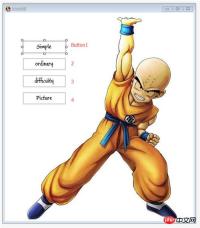
游戏菜单:
通过菜单,上传图片至配置类img,并选择难度上传至配置类Dif,然后拼图对象构造时读取配置类
using System;
using System.Collections.Generic;
using System.ComponentModel;
using System.Data;
using System.Drawing;
using System.Linq;
using System.Text;
using System.Threading.Tasks;
using System.Windows.Forms;

namespace 拼图
{
 public partial class Menu : Form
 {
 public Menu()
 {
 InitializeComponent();
 GamePage.img =Image.FromFile(@"Image\拼图.jpg");
 Control.CheckForIllegalCrossThreadCalls = false;
 }

 private void button1_Click(object sender, EventArgs e)
 {
 GamePage.Dif = Puzzle.Diff.simple;
 this.Hide();
 Form1 ff = new Form1();
 ff.closefather+=new 拼图.Form1.childclose(this.closethis);
 ff.Show();

 }

 private void button2_Click(object sender, EventArgs e)
 {
 GamePage.Dif = Puzzle.Diff.ordinary;
 this.Hide();
 Form1 ff = new Form1();
 ff.closefather += new 拼图.Form1.childclose(this.closethis);
 ff.Show();

 }

 private void button3_Click(object sender, EventArgs e)
 {
 GamePage.Dif = Puzzle.Diff.difficulty;
 this.Hide();
 Form1 ff = new Form1();
 ff.closefather += new 拼图.Form1.childclose(this.closethis);
 ff.Show();

 }

 public void closethis()
 {
 this.Show();
 }


 private void button4_Click(object sender, EventArgs e)
 {
 OpenFileDialog ofd = new OpenFileDialog();
 ofd.ShowDialog();
 GamePage.img = Image.FromFile(ofd.FileName).GetThumbnailImage(600,600,new Image.GetThumbnailImageAbort(delegate { return false; }), IntPtr.Zero);

 }
 private void Menu_Load(object sender, EventArgs e)
 {
 }

 }
}
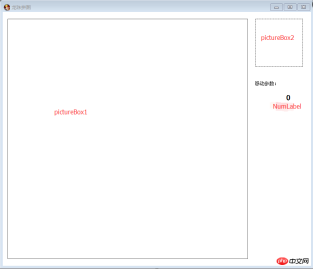
游戏运行窗口:
1.注册鼠标点击事件来获得输入消息
2.显示功能
3.pictureBox1用来展示游戏拼图情况
4.pictureBox2展示完整拼图的缩略图(当鼠标移至pictureBox2时,发送消息,使pictureBox1显示完整拼图)
5.Numlabel来显示移动步数(通过变量Num的累加来计算)
using System;
using System.Collections.Generic;
using System.ComponentModel;
using System.Data;
using System.Drawing;
using System.Linq;
using System.Text;
using System.Threading;
using System.Threading.Tasks;
using System.Windows.Forms;

namespace 拼图
{
 public partial class Form1 : Form
 {
 public Form1()
 {
 InitializeComponent();
 }
 private Puzzle puzzle;
 private int Num=0;
 private Image img;
 private void Form1_Load(object sender, EventArgs e)
 {
 img = GamePage.img;
 pictureBox2.Image = img.GetThumbnailImage(120,120, new Image.GetThumbnailImageAbort(delegate { return false; }), IntPtr.Zero);
 puzzle = new Puzzle(img, 600, GamePage.Dif);
 pictureBox1.Image =puzzle.Display();
 }

 private void pictureBox1_MouseClick(object sender, MouseEventArgs e)
 {
 if (puzzle.Move(e.X / (puzzle.Width / puzzle.N), e.Y / (puzzle.Width / puzzle.N)))
 {
 Num++;
 pictureBox1.Image = puzzle.Display();
 if (puzzle.Judge())
 {
  if (MessageBox.Show("恭喜过关", "是否重新玩一把", MessageBoxButtons.OKCancel) == DialogResult.OK)
  {
  Num = 0;
  puzzle.Upset();
  pictureBox1.Image = puzzle.Display();

  }
  else
  {
  Num = 0;
  closefather();
  this.Close();
  }

 }

 }
 NumLabel.Text = Num.ToString();
 }

 private void pictureBox2_MouseEnter(object sender, EventArgs e)
 {
 pictureBox1.Image = img;
 }

 private void pictureBox2_MouseLeave(object sender, EventArgs e)
 {
 pictureBox1.Image = puzzle.Display();
 }


 private void Form1_FormClosed(object sender, FormClosedEventArgs e)
 {
 closefather();
 }
 public delegate void childclose();
 public event childclose closefather;

 }
}













