在 .net 11 中调用外部程序并读取输出,推荐使用 process.start 配合 processstartinfo 配置属性。将 redirectstandardoutput 和 redirectstandarderror 设为 true,同时设置 useshellexecute 为 false,即可通过 standardoutput.readtoend() 获取标准输出内容。若需处理大量数据或避免死锁,建议异步读取或使用 waitforexit 控制流程。

如何同步获取外部命令的完整输出文本
同步获取输出最简单的方式是阻塞当前线程直到进程结束。适用于脚本执行、一次性工具调用等场景。关键点是必须关闭 UseShellExecute,否则重定向无效。

using System;
using System.Diagnostics;

var startInfo = new ProcessStartInfo
{
    FileName = "echo",
    Arguments = "Hello World",
    RedirectStandardOutput = true,
    UseShellExecute = false,
    CreateNoWindow = true
};

using var process = Process.Start(startInfo);
process.WaitForExit();
string output = process.StandardOutput.ReadToEnd();
Console.WriteLine(output); // 输出: Hello World
上述代码在 Windows 上调用 cmd.exe /c echo 或在 Linux/macOS 上直接调用 echo。注意 FileName 在不同平台可能需要调整,例如 Windows 下常设为 cmd.exe 并传入 /c 参数。运行后 output 变量包含完整的 stdout 内容,类型为 string。
如何处理外部程序的错误输出与退出码
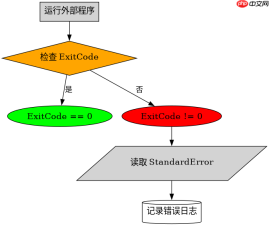
当外部程序失败时,仅读取标准输出不够,还需捕获 StandardError 和检查 ExitCode。这有助于区分正常输出与报错信息,并根据退出码决定后续逻辑。

using System;
using System.Diagnostics;

var startInfo = new ProcessStartInfo
{
    FileName = "python",
    Arguments = "-c \"import sys; sys.exit(1)\"",
    RedirectStandardOutput = true,
    RedirectStandardError = true,
    UseShellExecute = false,
    CreateNoWindow = true
};

using var process = Process.Start(startInfo);
process.WaitForExit();

string stdout = process.StandardOutput.ReadToEnd();
string stderr = process.StandardError.ReadToEnd();
int exitCode = process.ExitCode;

Console.WriteLine($"Exit Code: {exitCode}");
Console.WriteLine($"Stdout: {stdout}");
Console.WriteLine($"Stderr: {stderr}");
该示例模拟一个 Python 脚本故意退出码为 1。实际运行时,stderr 可能为空(因为未打印错误),但 exitCode 为 1。开发者应始终检查 ExitCode 是否为 0,以判断成功与否。若 RedirectStandardError 未启用,错误流可能被丢弃或导致管道阻塞。
当外部程序产生大量输出时为何会卡死
如果外部程序输出量极大,而主程序未正确读取缓冲区,会导致子进程因管道满而挂起,进而引发主程序 WaitForExit 永久等待。这是典型的死锁场景,尤其在日志生成、大数据导出等场景中常见。