






在.net 8中,利用 system.text.json 命名空间下的 jsondocument 类操作复杂文档的核心做法是:通过 jsondocument.parse() 将 json 字符串解析为只读的 jsondocument 实例,随后使用 rootelement 属性获取根节点,并借助 getproperty() 或索引器遍历嵌套结构。这种方法避免了将整个文档反序列化为强类型对象带来的内存开销,特别适合处理大型或结构多变的 json 数据。

如何安全地访问深层嵌套的 JSON 属性?
要安全地访问深层嵌套的属性,应使用 GetProperty() 方法配合路径链式调用,并在每一步检查属性是否存在。对于可能缺失的路径,建议结合 TryGetProperty() 方法以避免抛出 KeyNotFoundException。这种逐层验证的方式能确保在处理如用户配置、日志记录等包含可选字段的复杂文档时程序的健壮性。
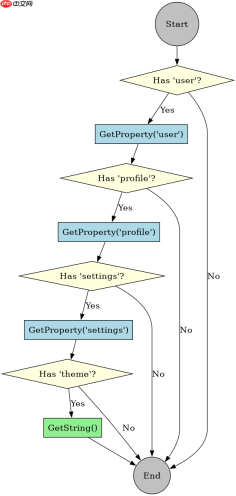
using System;
using System.Text.Json;

class Program
{
    static void Main()
    {
        string json = @"{
            \"user\": {
                \"id\": 101,
                \"profile\": {
                    \"name\": \"Alice\",
                    \"settings\": {
                        \"theme\": \"dark\",
                        \"notifications\": true
                    }
                }
            },
            \"metadata\": {
                \"version\": \"1.0\"
            }
        }";

        using JsonDocument doc = JsonDocument.Parse(json);
        JsonElement root = doc.RootElement;

        // 安全访问深层属性
        if (root.TryGetProperty(\"user\", out JsonElement user))
        {
            if (user.TryGetProperty(\"profile\", out JsonElement profile))
            {
                if (profile.TryGetProperty(\"settings\", out JsonElement settings))
                {
                    if (settings.TryGetProperty(\"theme\", out JsonElement theme))
                    {
                        Console.WriteLine($"Theme: {theme.GetString()}");
                    }
                }
            }
        }

        // 直接访问顶层属性
        if (root.TryGetProperty(\"metadata\", out JsonElement metadata))
        {
            Console.WriteLine($"Version: {metadata.GetProperty(\"version\").GetString()}");
        }
    }
}
预期输出:
Theme: dark
Version: 1.0
如何处理 JSON 数组中的元素集合?
处理 JSON 数组时,需先定位到数组类型的 JsonElement,然后利用其 GetArrayLength() 属性和索引器 [i] 进行遍历。每个数组元素本身也是一个 JsonElement,可以进一步对其内部结构进行查询。这种方式允许开发者在不定义具体实体类的情况下,灵活提取数组内的特定字段或执行条件过滤。


using System;
using System.Text.Json;

class Program
{
    static void Main()
    {
        string json = @"{
            \"orders\": [
                { \"id\": 1, \"status\": \"shipped\", \"amount\": 150.00 },
                { \"id\": 2, \"status\": \"pending\", \"amount\": 75.50 },
                { \"id\": 3, \"status\": \"shipped\", \"amount\": 200.00 }
            ]
        }";

        using JsonDocument doc = JsonDocument.Parse(json);
        JsonElement root = doc.RootElement;

        if (root.TryGetProperty(\"orders\", out JsonElement ordersArray))
        {
            int count = ordersArray.GetArrayLength();
            for (int i = 0; i <p>预期输出:<br>Order 1 shipped with amount 150<br>Order 3 shipped with amount 200</p><h2>当 JSON 文档中包含混合类型字段时如何正确解析?</h2><p>当 JSON 文档中包含混合类型字段(例如某个键的值可能是字符串也可能是数字)时,应使用 <code>JsonElement.ValueKind</code> 属性来判断当前值的实际数据类型,然后根据类型调用相应的转换方法(如 <code>GetString()</code>、<code>GetInt32()</code> 等)。这种做法能有效避免因类型不匹配导致的 <code>InvalidOperationException</code>,确保程序能够正确处理动态变化的数据结构。</p>


