






shell 中的 case 语句通过模式匹配实现条件分支,支持使用通配符进行灵活匹配。基本语法为 case $var in pattern) commands;; ... esac,其中 * 匹配任意字符串,[abc] 匹配指定字符集,[!abc] 匹配非指定字符集。当变量值符合某个模式时,执行对应命令并跳出 case 结构。

case 如何匹配单个字符或特定集合?
case 使用方括号 [] 定义字符集合,用于精确匹配单个位置的字符。例如 [0-9] 匹配任意数字,[a-z] 匹配小写字母。这种匹配方式常用于验证输入格式,如检查用户输入是否为有效选项。

#!/bin/bash
read -p "Enter a single character: " char
case "$char" in
    [0-9])
        echo "You entered a digit."
        ;;
    [a-z])
        echo "You entered a lowercase letter."
        ;;
    [A-Z])
        echo "You entered an uppercase letter."
        ;;
    *)
        echo "You entered a special character or space."
        ;;
esac
运行示例:输入 5 输出 You entered a digit.;输入 a 输出 You entered a lowercase letter.;输入 @ 输出 You entered a special character or space.
case 如何使用通配符匹配复杂字符串?
通配符 * 在 case 中匹配任意长度的字符串(包括空字符串),可与其他字符组合使用。例如 *.txt 匹配所有以 .txt 结尾的文件名,log_* 匹配以 log_ 开头的文件名。这种用法适合处理文件类型、路径前缀等场景。
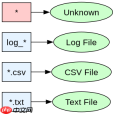
#!/bin/bash
filename="report_2024.txt"
case "$filename" in
    *.txt)
        echo "Text file detected."
        ;;
    *.csv)
        echo "CSV file detected."
        ;;
    log_*)
        echo "Log file detected."
        ;;
    *)
        echo "Unknown file type."
        ;;
esac
运行结果:输入 report_2024.txt 输出 Text file detected.;若输入 data.csv 则输出 CSV file detected.;若输入 log_error.log 则输出 Log file detected.。
当多个模式同时匹配时,case 如何选择执行分支?
case 语句按从上到下顺序匹配模式,一旦找到第一个匹配项即执行对应命令并终止后续匹配。即使后续模式也符合条件,也不会再执行。因此,更具体的模式应放在前面,通用模式(如 *)应放在最后作为默认分支。这种设计确保逻辑清晰且避免意外行为。
#!/bin/bash
value="hello"
case "$value" in
    h*)
        echo "Starts with 'h'."
        ;;
    he*)
        echo "Starts with 'he'."
        ;;
    hello)
        echo "Exactly 'hello'."
        ;;
    *)
        echo "No match."
        ;;
esac
运行结果:输入 hello 输出 Starts with 'h'.,因为 h* 是第一个匹配项,后续 he* 和 hello 虽也匹配但不再执行。这体现了 case 的“首次匹配优先”原则。


