






使用 @datajpatest 可以自动配置 jpa 测试环境,通过注入 jparepository 接口并调用其方法,结合 assertj 或 hamcrest 断言验证查询结果。只需在测试类上添加该注解,spring boot 会自动加载实体类和 repository 定义,无需启动完整 web 容器。

@DataJpaTest 如何自动配置测试上下文?
@DataJpaTest 会扫描 @Entity 类并初始化 EntityManagerFactory,同时仅加载 @Repository Bean,排除其他组件如 Controller 或 Service。这确保了测试聚焦于数据访问层,运行速度快且隔离性好。
import org.junit.jupiter.api.Test;
import org.springframework.beans.factory.annotation.Autowired;
import org.springframework.boot.test.autoconfigure.orm.jpa.DataJpaTest;
import org.springframework.boot.test.autoconfigure.orm.jpa.TestEntityManager;
import org.springframework.test.context.junit.jupiter.SpringExtension;

import static org.assertj.core.api.Assertions.assertThat;

@DataJpaTest
public class UserRepositoryTest {

    @Autowired
    private TestEntityManager entityManager;

    @Autowired
    private UserRepository userRepository;

    @Test
    public void findByEmail_ShouldReturnUser() {
        User user = new User();
        user.setEmail("test@example.com");
        user.setName("Test User");
        entityManager.persist(user);
        entityManager.flush();

        User found = userRepository.findByEmail("test@example.com");
        assertThat(found).isNotNull();
        assertThat(found.getName()).isEqualTo("Test User");
    }
}
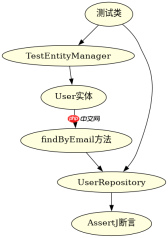
上述代码中,TestEntityManager 用于插入测试数据,UserRepository 是待测的 JPA 接口。运行后,findByEmail 应返回正确对象,断言验证名称匹配。
如何验证复杂 JPQL 查询的正确性?
对于包含条件或聚合的 JPQL 查询,可通过构造特定输入数据并检查返回集合的大小、元素内容或字段值来验证。例如,测试按状态过滤用户列表时,确保只返回符合状态的实体。


import org.junit.jupiter.api.Test;
import org.springframework.beans.factory.annotation.Autowired;
import org.springframework.boot.test.autoconfigure.orm.jpa.DataJpaTest;
import org.springframework.boot.test.autoconfigure.orm.jpa.TestEntityManager;

import java.util.List;

import static org.assertj.core.api.Assertions.assertThat;

@DataJpaTest
public class UserRepositoryComplexQueryTest {

    @Autowired
    private TestEntityManager entityManager;

    @Autowired
    private UserRepository userRepository;

    @Test
    public void findByStatus_Active_ShouldReturnOnlyActiveUsers() {
        User active1 = new User();
        active1.setEmail("active1@example.com");
        active1.setStatus("ACTIVE");
        entityManager.persist(active1);

        User inactive = new User();
        inactive.setEmail("inactive@example.com");
        inactive.setStatus("INACTIVE");
        entityManager.persist(inactive);

        entityManager.flush();

        List<user> result = userRepository.findByStatus("ACTIVE");
        assertThat(result).hasSize(1);
        assertThat(result.get(0).getEmail()).isEqualTo("active1@example.com");
    }
}</user>
此测试中,插入一个活跃和一个非活跃用户,调用 findByStatus 后,结果列表应仅含活跃用户,大小为一,邮箱匹配预期值。
当查询返回空结果时,如何确认行为符合预期?
若查询无匹配数据,DataJpaTest 环境下 Repository 方法应返回空集合或 null(取决于实现),需通过断言验证返回值为空,避免 NullPointerException 或意外数据。


