






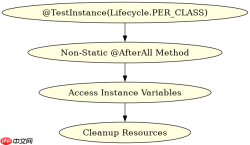
在junit 5中,可以使用 @afterall 注解来在整个测试类结束后释放资源。该注解标记的方法会在该类的所有测试方法执行完毕后运行,通常用于清理共享资源或关闭连接。需要注意的是,@afterall 标记的方法必须是静态的(除非使用 @testinstance(lifecycle.per_class)),并且不能接受任何参数。

如何定义一个标准的 @AfterAll 方法?
要定义一个标准的 @AfterAll 方法,只需在类中添加一个带有 @AfterAll 注解的方法即可。如果使用的是默认的测试实例生命周期(即每个测试方法创建新实例),该方法必须是 static 的;如果希望非静态方法也能作为 @AfterAll 回调,则需要在类上添加 @TestInstance(Lifecycle.PER_CLASS) 注解。
import org.junit.jupiter.api.AfterAll;
import org.junit.jupiter.api.Test;
import org.junit.jupiter.api.TestInstance;
import org.junit.jupiter.api.TestInstance.Lifecycle;

@TestInstance(Lifecycle.PER_CLASS)
public class MyTest {

    private static String sharedResource;

    @org.junit.jupiter.api.BeforeAll
    public static void setup() {
        sharedResource = "Initializing...";
        System.out.println("Setup: " + sharedResource);
    }

    @Test
    public void testOne() {
        System.out.println("Test One");
    }

    @Test
    public void testTwo() {
        System.out.println("Test Two");
    }

    @AfterAll
    public void cleanup() {
        System.out.println("Cleaning up: " + sharedResource);
        sharedResource = null;
    }
}
上述代码展示了如何在JUnit 5中使用 @AfterAll 进行资源清理。通过 @TestInstance(Lifecycle.PER_CLASS),我们允许 cleanup() 方法是非静态的,从而可以直接访问实例变量。如果没有这个注解,cleanup() 必须声明为 static。
静态 @AfterAll 与非静态 @AfterAll 的区别是什么?
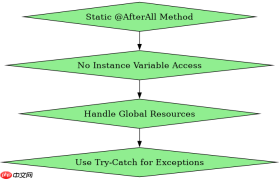
静态 @AfterAll 方法属于类本身,而非静态 @AfterAll 方法属于类的实例。静态方法无法直接访问实例变量,因此适合处理全局资源或状态;非静态方法可以访问实例变量,但需要配合 @TestInstance(Lifecycle.PER_CLASS) 使用。

import org.junit.jupiter.api.AfterAll;
import org.junit.jupiter.api.Test;
import org.junit.jupiter.api.TestInstance;
import org.junit.jupiter.api.TestInstance.Lifecycle;

public class StaticAfterAllTest {

    private static String sharedResource;

    @org.junit.jupiter.api.BeforeAll
    public static void setup() {
        sharedResource = "Static Setup";
        System.out.println("Static Setup: " + sharedResource);
    }

    @Test
    public void testOne() {
        System.out.println("Test One");
    }

    @Test
    public void testTwo() {
        System.out.println("Test Two");
    }

    @AfterAll
    public static void cleanup() {
        System.out.println("Static Cleanup: " + sharedResource);
        sharedResource = null;
    }
}
在这个例子中,cleanup() 方法是静态的,因此它只能访问静态变量 sharedResource。这种方式适用于不需要访问实例状态的场景,例如关闭数据库连接或文件句柄等全局资源。
当 @AfterAll 方法抛出异常时会发生什么?
如果 @AfterAll 方法抛出异常,JUnit 5 会记录该异常并继续执行其他测试。然而,这可能会导致后续测试失败,因为资源可能未被正确清理。为了避免这种情况,建议在 @AfterAll 方法中使用 try-catch 块来捕获并处理异常。
import org.junit.jupiter.api.AfterAll;
import org.junit.jupiter.api.Test;
import org.junit.jupiter.api.TestInstance;
import org.junit.jupiter.api.TestInstance.Lifecycle;

@TestInstance(Lifecycle.PER_CLASS)
public class ExceptionHandlingAfterAllTest {

    private static String sharedResource;

    @org.junit.jupiter.api.BeforeAll
    public static void setup() {
        sharedResource = "Exception Handling Setup";
        System.out.println("Exception Handling Setup: " + sharedResource);
    }

    @Test
    public void testOne() {
        System.out.println("Test One");
    }

    @Test
    public void testTwo() {
        System.out.println("Test Two");
    }

    @AfterAll
    public void cleanup() {
        try {
            System.out.println("Cleaning up: " + sharedResource);
            sharedResource = null;
        } catch (Exception e) {
            System.err.println("Error during cleanup: " + e.getMessage());
        }
    }
}
通过这种方式,即使 @AfterAll 方法在执行过程中遇到错误,也不会影响整个测试套件的结果。同时,异常信息会被打印到标准错误输出中,便于调试和排查问题。


