






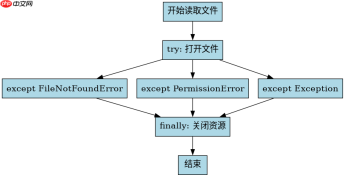
在python初级项目中,优雅处理文件读写异常的最佳实践是使用`try...except`语句块配合具体的异常类型(如`filenotfounderror`和`permissionerror`)进行捕获,并在`finally`子句或上下文管理器中确保资源释放。通过区分不同类型的错误并提供针对性的用户提示或日志记录,可以避免程序崩溃并提升用户体验。
如何区分 FileNotFoundError 与 PermissionError
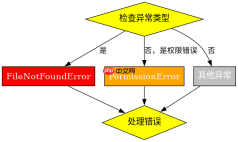
区分这两种异常的关键在于捕获特定的异常类。`FileNotFoundError`通常发生在路径不存在时,而`PermissionError`则发生在权限不足时。通过分别处理它们,可以提供更精确的错误信息。
def read_file_safe(filepath):
    try:
        with open(filepath, 'r') as f:
            return f.read()
    except FileNotFoundError:
        print(f"错误:文件 {filepath} 未找到")
    except PermissionError:
        print(f"错误:没有权限读取 {filepath}")
    except Exception as e:
        print(f"发生未知错误:{e}")

# 测试用例
read_file_safe('nonexistent.txt')
read_file_safe('/root/secret.txt')
如何处理编码错误 UnicodeDecodeError
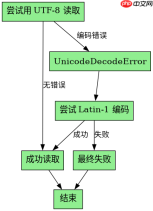
当文件编码与预期不符时,会抛出`UnicodeDecodeError`。处理这种情况需要在打开文件时指定正确的编码,或者在捕获异常后尝试其他编码格式。

Nodriver 异步无检测 Chrome 浏览器自动化 Python
下载
Nodriver是Undetected-Chromedriver的官方继承者,提供异步浏览器自动化功能,可直接与Chrome DevTools Protocol通信,无需Selenium或WebDriver依赖。专为规避反机器人系统(包括Cloudflare和Imperva)的隐蔽网络自动化而构建。
def read_file_with_encoding(filepath, encoding='utf-8'):
    try:
        with open(filepath, 'r', encoding=encoding) as f:
            return f.read()
    except UnicodeDecodeError:
        print(f"警告:文件 {filepath} 的编码可能不是 {encoding},尝试使用 latin-1")
        try:
            with open(filepath, 'r', encoding='latin-1') as f:
                return f.read()
        except Exception as e:
            print(f"最终错误:{e}")
    except Exception as e:
        print(f"其他错误:{e}")

# 测试用例
read_file_with_encoding('mixed_encoding.txt')
基于程序中某个输入、条件或结果的具体问题
在实际应用中,如果文件路径是动态生成的,可能会遇到路径中包含特殊字符的情况。这种情况下,需要确保路径字符串的正确性,并使用`os.path.exists()`预先检查文件是否存在,以减少异常发生的概率。
Python免费学习笔记(深入):立即使用
在学习笔记中,你将探索 Python 的核心概念和高级技巧!


