ansible 批量变更验证的核心做法是结合 check_mode(预演)与 diff 模式,并在执行后通过断言模块或自定义脚本确认目标状态。具体而言,在运行 ansible-playbook 时加入 --check --diff 参数可预览差异而不修改系统;实际变更后,利用 assert 模块检查关键配置项,或通过 shell 命令比对文件哈希值来确保变更符合预期。

如何使用 check_mode 和 diff 进行变更前预演
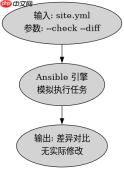
使用 --check 和 --diff 参数可以在不实际修改目标主机的前提下,查看 Ansible 计划做出的更改内容。这对于验证批量变更的逻辑正确性至关重要,能提前发现语法错误或不符合预期的配置调整。
---
- hosts: webservers
  tasks:
    - name: Ensure nginx config is correct
      template:
        src: nginx.conf.j2
        dest: /etc/nginx/nginx.conf
      notify: restart nginx

  handlers:
    - name: restart nginx
      service:
        name: nginx
        state: restarted
运行以下命令即可看到变更详情:
ansible-playbook site.yml --check --diff
预期结果:终端输出中会显示 nginx.conf 文件的旧内容与新内容的差异对比,若没有变化则显示 changed: false。此步骤不会重启 Nginx 服务,仅展示潜在变更。
如何在变更后自动验证配置状态
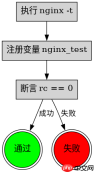
在批量变更执行完毕后,立即使用 assert 模块或 stat 模块验证目标主机的实际状态是否符合预期。这种方法可以确保即使部分任务失败,也能快速定位问题并阻止后续错误操作。
- hosts: webservers
  tasks:
    - name: Verify nginx config syntax
      shell: nginx -t
      register: nginx_test
      changed_when: false

    - name: Assert nginx config is valid
      assert:
        that:
          - "nginx_test.rc == 0"
        fail_msg: "Nginx configuration test failed!"
        success_msg: "Nginx configuration is valid."
预期结果:如果 nginx -t 返回成功(rc=0),则 assert 模块通过,Playbook 继续执行;否则 Playbook 中止并报告错误。这确保了只有配置正确的服务器才会进入生产环境。
基于特定输入条件如何验证文件权限变更
当批量变更涉及文件权限修改时,需针对特定输入条件(如用户、组、权限位)进行精确验证。例如,确保某个配置文件的所有者和权限被正确设置,可通过 stat 模块获取当前状态并与预期值比对。
- hosts: all
  tasks:
    - name: Check file permissions for /etc/secret.conf
      stat:
        path: /etc/secret.conf
      register: file_stat

    - name: Assert correct ownership and permissions
      assert:
        that:
          - "file_stat.stat.pw_name == 'root'"
          - "file_stat.stat.gr_name == 'root'"
          - "file_stat.stat.mode == '0600'"
        fail_msg: "File permissions are incorrect!"
        success_msg: "File permissions are correct."
预期结果:若 /etc/secret.conf 的所有者、所属组和权限模式分别为 root、root 和 0600,则断言通过;否则 Playbook 报错。此方法适用于任何需要严格权限控制的场景。