






在python中,`ord()`与`chr()`是一对互逆函数,配合使用可以实现字符与unicode码位之间的双向转换。具体做法是:调用`ord(char)`获取单个字符串对应的整数码位,调用`chr(code)`将整数还原为对应的字符。这种配合常用于字符编码检查、简单的加密偏移或生成连续字符序列。

如何验证一个字符是否为基本拉丁字母
要判断一个字符是否属于基本拉丁字母(A-Z, a-z),可以分别获取其大写和小写形式的码位范围进行比对。通过`ord()`获取当前字符的码位,并与'A'、'Z'、'a'、'z'的码位比较,即可确定其类别。这种方法比正则表达式更底层,适合需要精确控制编码逻辑的场景。
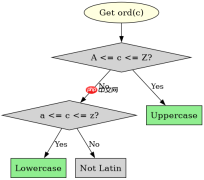
def check_latin_char(c):
    if len(c) != 1:
        return "Input must be a single character"
    code = ord(c)
    upper_start = ord('A')
    upper_end = ord('Z')
    lower_start = ord('a')
    lower_end = ord('z')

    if upper_start <p>预期输出:<br>Uppercase Latin<br>Lowercase Latin<br>Not a Basic Latin Letter<br>Not a Basic Latin Letter</p><h2>如何实现简单的凯撒密码偏移</h2><p>实现凯撒密码的核心在于利用`ord()`和`chr()`对字符码位进行算术偏移。对于英文字母,先将其转换为0-25的索引,加上偏移量后取模26,再转回字符。非字母字符通常保持不变。这个过程展示了两个函数在处理文本变换时的典型协作模式。</p><div class="aritcle_card flexRow artxards">
											<div class="artcardd flexRow">
												<a class="aritcle_card_img" rel="nofollow" href="/xiazai/skill13982" title="Nodriver 异步无检测 Chrome 浏览器自动化 Python"><img
														src="https://img.php.cn/upload/skill/001/246/273/6adaf20d3191a227.jpg" alt="Nodriver 异步无检测 Chrome 浏览器自动化 Python" onerror="this.onerror='';this.src='/static/lhimages/moren/morentu.png'" ></a>
												<div class="aritcle_card_info flexColumn">
													<a rel="nofollow" href="/xiazai/skill13982" title="Nodriver 异步无检测 Chrome 浏览器自动化 Python" class="overflowclass">Nodriver 异步无检测 Chrome 浏览器自动化 Python</a>
													<p class="overflowclass">Nodriver是Undetected-Chromedriver的官方继承者,提供异步浏览器自动化功能,可直接与Chrome DevTools Protocol通信,无需Selenium或WebDriver依赖。专为规避反机器人系统(包括Cloudflare和Imperva)的隐蔽网络自动化而构建。</p>
												</div>
												<a rel="nofollow" href="/xiazai/skill13982" title="Nodriver 异步无检测 Chrome 浏览器自动化 Python" class="aritcle_card_btn flexRow flexcenter"><b></b><span>下载</span>
												</a>
											</div>
										</div><p><img src="https://img.php.cn/upload/article/000/969/633/179565204567990.png?x-oss-process=image/resize,p_40" alt="Python中ord与chr函数在处理Unicode字符时怎么配合使用?"></p><pre class="brush:php;toolbar:false;">def caesar_cipher(text, shift):
    result = []
    for char in text:
        if char.isupper():
            # 'A' is 65, 'Z' is 90
            shifted = (ord(char) - ord('A') + shift) % 26 + ord('A')
            result.append(chr(shifted))
        elif char.islower():
            # 'a' is 97, 'z' is 122
            shifted = (ord(char) - ord('a') + shift) % 26 + ord('a')
            result.append(chr(shifted))
        else:
            result.append(char)
    return ''.join(result)

# Example: Shift by 3
original = "Hello World!"
encrypted = caesar_cipher(original, 3)
decrypted = caesar_cipher(encrypted, -3)

print(f"Original: {original}")
print(f"Encrypted: {encrypted}")
print(f"Decrypted: {decrypted}")
预期输出:
Original: Hello World!
Encrypted: Khoor Zruog!
Decrypted: Hello World!
当输入超出Unicode范围时会发生什么
如果向`chr()`传入一个不在有效Unicode范围内的整数(例如负数或大于0x10FFFF的数),Python会抛出`ValueError`异常。而`ord()`始终接受单个字符并返回合法的整数,不会越界。因此在使用两者配合时,需确保传递给`chr()`的值在合法区间内,否则程序会中断。
Python免费学习笔记(深入):立即使用
在学习笔记中,你将探索 Python 的核心概念和高级技巧!


