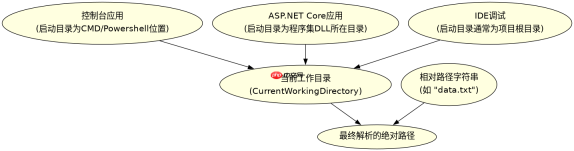
c#读取相对路径的文件时,实际查找的目录取决于程序的启动方式:控制台程序默认从启动该进程的目录(即当前工作目录)开始查找;asp.net core应用默认从包含入口程序集(如program.cs所在dll)的目录开始查找。要获取这个具体的路径,应使用directory.getcurrentdirectory()方法,它返回的是进程当前的工作目录,而非代码文件所在的物理位置。

如何确定并验证当前工作目录
要确定C#程序在运行时到底从哪个目录查找文件,最直接的方法是调用System.IO.Directory.GetCurrentDirectory()。这个方法返回的是操作系统层面的“当前工作目录”,它是所有相对路径解析的基础。对于控制台应用,这通常是你在命令行中执行命令的位置;对于Web应用,这通常是应用程序池或Kestrel服务器启动时的根目录。通过打印这个值,你可以明确知道相对路径会被解析到哪里。
using System;
using System.IO;

namespace RelativePathDemo
{
    class Program
    {
        static void Main(string[] args)
        {
            // 获取当前工作目录
            string currentDir = Directory.GetCurrentDirectory();
            Console.WriteLine($"Current Working Directory: {currentDir}");

            // 尝试读取一个相对路径的文件
            string filePath = "data.txt";
            if (File.Exists(filePath))
            {
                Console.WriteLine($"File '{filePath}' found at: {Path.GetFullPath(filePath)}");
            }
            else
            {
                Console.WriteLine($"File '{filePath}' NOT found in current directory.");
            }
        }
    }
}
为什么代码文件所在目录不是查找起点
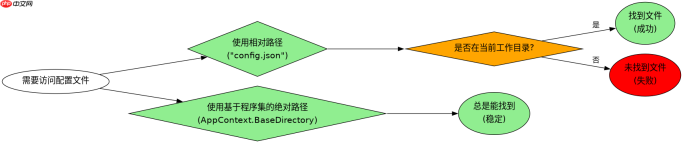
很多开发者误以为相对路径是相对于代码文件(如.cs文件或编译后的.dll)所在的目录,这是一个常见的误区。实际上,除非你显式地指定了基于程序集位置的绝对路径,否则相对路径始终是基于Directory.GetCurrentDirectory()返回的值。例如,如果你的代码位于C:\Projects\MyApp\bin\Debug\,但你是从C:\Users\Admin\运行该程序,那么File.Open("config.json")会去C:\Users\Admin\下找,而不是去bin\Debug下找。这种差异会导致部署后文件找不到,因为工作目录可能发生了变化。

using System;
using System.IO;
using System.Reflection;

namespace PathResolutionDemo
{
    class Program
    {
        static void Main(string[] args)
        {
            // 错误做法:假设相对路径基于代码目录
            // string wrongPath = "config.json";
            // File.Exists(wrongPath); // 可能在当前工作目录找不到

            // 正确做法:如果需要基于代码目录,需手动构建绝对路径
            string codeBase = Assembly.GetExecutingAssembly().Location;
            string codeDir = Path.GetDirectoryName(codeBase);
            string correctFilePath = Path.Combine(codeDir, "config.json");

            Console.WriteLine($"Code Directory: {codeDir}");
            Console.WriteLine($"Full Path to Config: {correctFilePath}");

            if (File.Exists(correctFilePath))
            {
                Console.WriteLine("Config file found using assembly location.");
            }
        }
    }
}
不同启动方式对查找结果的具体影响
当我们在不同的环境中启动同一个C#程序时,Directory.GetCurrentDirectory()的结果会有显著差异,这直接决定了相对路径能否成功解析。在Visual Studio中调试时,工作目录通常是项目根目录;而在IIS或Docker容器中部署时,工作目录可能是系统临时目录或容器根目录。理解这些差异有助于我们选择正确的路径策略:是使用相对路径配合GetCurrentDirectory,还是使用基于AppContext.BaseDirectory的绝对路径来确保稳定性。