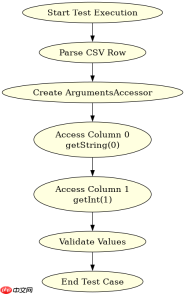
使用junit 5的argumentsaccessor读取参数时,应通过@parameterizedtest注解的argumentssource或source属性传入数据,并在测试方法参数中声明org.junit.jupiter.params.provider.argumentsaccessor类型的参数。按列取值即根据参数在输入行中的索引位置(从0开始)依次调用getxxx(index)方法获取对应值。例如,若每行包含姓名和年龄两列数据,则索引0对应姓名,索引1对应年龄。

如何定义支持多列输入的测试源并映射到ArgumentsAccessor
要按列读取参数,需使用@MethodSource、@CsvSource或@ArgumentsSource提供结构化数据源,JUnit会自动将每一行封装为ArgumentsAccessor对象传递给测试方法。开发者只需在方法签名中加入ArgumentsAccessor参数,即可通过索引访问各列值。例如,使用@CsvSource("Alice,30", "Bob,25")时,第一行会被解析为两个字符串元素,分别位于索引0和1。
import org.junit.jupiter.api.Test;
import org.junit.jupiter.params.ParameterizedTest;
import org.junit.jupiter.params.provider.CsvSource;
import org.junit.jupiter.params.provider.ArgumentsAccessor;

import static org.junit.jupiter.api.Assertions.assertEquals;
import static org.junit.jupiter.api.Assertions.assertNotNull;

class ArgumentsAccessorDemo {

    @ParameterizedTest
    @CsvSource({
        "Alice, 30",
        "Bob, 25"
    })
    void testReadColumnsByIndex(ArgumentsAccessor args) {
        String name = args.getString(0);
        int age = args.getInt(1);

        assertNotNull(name);
        assertEquals(30, age);
    }
}
上述代码中,@CsvSource提供两行数据,每行含两个字段。args.getString(0)获取第一列字符串,args.getInt(1)获取第二列整数。JUnit自动完成类型转换,无需手动解析。运行后,两个测试用例均通过,验证了按列索引读取的正确性。
如何处理空值或缺失列导致的异常
当输入数据存在空值或列数不足时,ArgumentsAccessor会抛出IndexOutOfBoundsException或NullPointerException。例如,若某行只有一列而尝试读取第二列,将触发越界异常;若某列为null且调用getInt(),可能引发类型转换失败。因此,应在访问前检查参数数量或使用hasNext()安全遍历。


import org.junit.jupiter.api.Test;
import org.junit.jupiter.params.ParameterizedTest;
import org.junit.jupiter.params.provider.CsvSource;
import org.junit.jupiter.params.provider.ArgumentsAccessor;

import static org.junit.jupiter.api.Assertions.assertThrows;

class ArgumentsAccessorErrorHandling {

    @ParameterizedTest
    @CsvSource({
        "Alice, 30",
        "Bob"  // 缺少第二列
    })
    void testMissingColumnThrowsException(ArgumentsAccessor args) {
        assertThrows(IndexOutOfBoundsException.class, () -> {
            args.getInt(1); // 第二列不存在,抛出异常
        });
    }
}
该示例中,第二行仅有一个值,调用args.getInt(1)时因索引越界抛出IndexOutOfBoundsException。此行为符合预期,可用于验证输入完整性。实际开发中,可结合args.size()预判列数,避免运行时错误。
基于CSV源中特定列值过滤测试执行
若需根据某一列的值决定是否执行后续逻辑,可在ArgumentsAccessor中先提取该列,再添加条件判断。例如,仅当年龄大于28时才进行断言,否则跳过。这种模式适用于部分数据无效或需动态分支的场景,提升测试覆盖率与效率。