






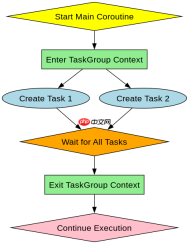
在python 3.11中,使用 asyncio.taskgroup 管理异步并发任务的最佳方式是结合 async with 上下文管理器来自动处理任务的启动、等待和异常清理。你只需在协程内部创建一个 taskgroup 实例,并在其作用域内通过 tg.create_task() 方法提交多个异步函数,当代码块结束时,它会自动等待所有任务完成并聚合可能发生的异常。
如何创建并提交多个并发任务
要启动一组并发任务,你需要在一个 async def 函数中使用 async with asyncio.TaskGroup() as tg: 语法。在这个代码块内部,调用 tg.create_task(coro) 将协程对象加入任务组。这些任务会在创建后尽快开始执行(如果事件循环允许),并且彼此之间是独立的。这种写法比手动收集 asyncio.Task 对象更简洁,因为它消除了手动调用 gather 或逐个 await 的需要。

import asyncio

async def fetch_data(url):
    print(f"Fetching {url}")
    await asyncio.sleep(1)
    return f"Data from {url}"

async def main():
    urls = ["http://example.com/1", "http://example.com/2"]
    async with asyncio.TaskGroup() as tg:
        tasks = []
        for url in urls:
            # create_task 返回一个 Task 对象,但 TG 负责最终结果
            task = tg.create_task(fetch_data(url))
            tasks.append(task)

    # 此时所有任务已完成,可以通过 task.result() 获取结果
    for t in tasks:
        print(t.result())

asyncio.run(main())
如何处理任务组中的异常
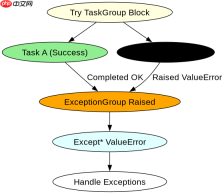
当 TaskGroup 中的任意一个任务抛出异常时,该异常会被捕获并传递给外部的 except* Exception 块。这是 Python 3.11 引入的“分组异常”机制。如果多个任务同时失败,你会收到一个 ExceptionGroup,其中包含所有失败的异常。你可以使用 except* 语法来解包和处理这些异常,或者让未处理的异常导致整个程序崩溃,从而确保资源被正确清理。

Nodriver是Undetected-Chromedriver的官方继承者,提供异步浏览器自动化功能,可直接与Chrome DevTools Protocol通信,无需Selenium或WebDriver依赖。专为规避反机器人系统(包括Cloudflare和Imperva)的隐蔽网络自动化而构建。
import asyncio

async def fail_task(name):
    if name == "bad":
        raise ValueError("Something went wrong")
    await asyncio.sleep(0.5)
    return name

async def main():
    try:
        async with asyncio.TaskGroup() as tg:
            tg.create_task(fail_task("good"))
            tg.create_task(fail_task("bad"))
    except* ValueError as eg:
        print(f"Caught {len(eg.exceptions)} exceptions: {eg.exceptions}")

asyncio.run(main())
TaskGroup 退出时的行为与资源清理
当 async with 块结束或遇到异常退出时,TaskGroup 会确保所有已创建的任务都被取消(如果尚未完成)并等待它们真正停止。这意味着如果你在任务中打开了文件句柄或网络连接,这些资源会在任务取消过程中得到适当的清理。这种“结构化并发”模式保证了即使发生错误,也不会留下悬空的任务或资源泄漏,这与传统的 asyncio.gather 不同,后者在第一个异常发生时可能会忽略其他正在运行的任务。
Python免费学习笔记(深入):立即使用
在学习笔记中,你将探索 Python 的核心概念和高级技巧!


