






在python中解决asyncio与tkinter图形界面的事件循环冲突,核心做法是将tkinter的主循环(`mainloop`)与asyncio的事件循环解耦,通过`after`方法将异步任务调度到tkinter的线程安全队列中。具体而言,需要创建一个自定义的tkinter应用类,在其中集成一个非阻塞的asyncio事件循环,并利用`root.after()`定期检查并运行待处理的协程,从而避免阻塞gui响应。

Tkinter主线程如何安全地调度异步协程
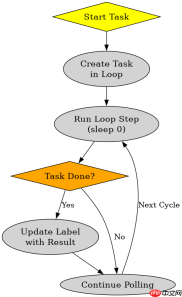
Tkinter的单线程模型要求所有UI更新必须在主线程执行,而asyncio默认使用单线程事件循环,两者直接混合会导致界面卡死。解决方案是在Tkinter的初始化阶段启动一个后台运行的asyncio循环,并通过`root.after`机制轮询该循环中的待办事项。这样,异步函数可以在不阻塞UI的情况下运行,同时其结果可以通过回调函数安全地更新界面。
import tkinter as tk
import asyncio

class AsyncTkApp:
    def __init__(self, root):
        self.root = root
        self.loop = asyncio.new_event_loop()
        asyncio.set_event_loop(self.loop)
        self.pending_tasks = []

        # 创建按钮用于触发异步操作
        btn = tk.Button(root, text="Start Task", command=self.start_async_task)
        btn.pack(pady=20)

        # 标签用于显示状态
        self.label = tk.Label(root, text="Idle")
        self.label.pack()

        # 启动轮询机制
        self.check_pending()

    def start_async_task(self):
        # 在后台循环中创建任务
        task = self.loop.create_task(self.long_running_operation())
        self.pending_tasks.append(task)
        self.label.config(text="Running...")

    async def long_running_operation(self):
        await asyncio.sleep(2)  # 模拟耗时操作
        return "Task Completed"

    def check_pending(self):
        # 使用 after 方法非阻塞地检查并运行事件循环
        try:
            # 运行所有已排队的回调
            self.loop.run_until_complete(asyncio.sleep(0))

            # 检查已完成的任务并更新UI
            for task in self.pending_tasks[:]:
                if task.done():
                    result = task.result()
                    self.root.after(0, lambda r=result: self.update_ui(r))
                    self.pending_tasks.remove(task)
        except Exception as e:
            print(f"Error: {e}")
        finally:
            # 继续轮询
            self.root.after(100, self.check_pending)

    def update_ui(self, result):
        self.label.config(text=result)

if __name__ == "__main__":
    root = tk.Tk()
    app = AsyncTkApp(root)
    root.mainloop()
上述代码定义了一个`AsyncTkApp`类,它在初始化时创建一个新的asyncio事件循环。`start_async_task`方法将协程添加到该循环中。关键的`check_pending`方法利用`root.after(100, ...)`每100毫秒调用一次,它调用`self.loop.run_until_complete(asyncio.sleep(0))`来让事件循环处理当前挂起的回调,而不会真正等待任何长时间运行的操作。一旦任务完成,它通过`self.root.after(0, ...)`将UI更新调度回主线程,确保线程安全。
如何处理异步任务中的异常与取消
当异步任务在执行过程中抛出异常或被用户取消时,必须妥善处理以防止程序崩溃或资源泄漏。在Tkinter环境中,这意味着需要在`check_pending`逻辑中捕获异常,并将错误信息反馈给用户界面,同时正确清理被取消的任务引用。此外,应提供机制允许用户主动取消正在进行的异步操作,例如通过点击“停止”按钮。

Nodriver是Undetected-Chromedriver的官方继承者,提供异步浏览器自动化功能,可直接与Chrome DevTools Protocol通信,无需Selenium或WebDriver依赖。专为规避反机器人系统(包括Cloudflare和Imperva)的隐蔽网络自动化而构建。

import tkinter as tk
import asyncio

class RobustAsyncTkApp:
    def __init__(self, root):
        self.root = root
        self.loop = asyncio.new_event_loop()
        asyncio.set_event_loop(self.loop)
        self.current_task = None

        # UI控件
        btn_start = tk.Button(root, text="Start", command=self.start_task)
        btn_start.pack(side=tk.LEFT, padx=5)

        btn_stop = tk.Button(root, text="Stop", command=self.stop_task)
        btn_stop.pack(side=tk.LEFT, padx=5)

        self.status_label = tk.Label(root, text="Ready")
        self.status_label.pack(pady=10)

        self.error_label = tk.Label(root, text="", fg="red")
        self.error_label.pack()

        self.poll_id = None
        self.start_polling()

    def start_task(self):
        if self.current_task and not self.current_task.done():
            return
        self.error_label.config(text="")
        self.status_label.config(text="Running...")
        self.current_task = self.loop.create_task(self.risky_operation())

    def stop_task(self):
        if self.current_task and not self.current_task.done():
            self.current_task.cancel()
            self.status_label.config(text="Cancelled")

    async def risky_operation(self):
        try:
            for i in range(5):
                await asyncio.sleep(0.5)
                if self.current_task.cancelled():
                    break
            return "Success"
        except asyncio.CancelledError:
            raise
        except Exception as e:
            raise RuntimeError(f"Operation failed: {e}")

    def start_polling(self):
        self._poll()

    def _poll(self):
        if self.poll_id:
            self.root.after_cancel(self.poll_id)

        try:
            # 驱动事件循环前进一小步
            future = asyncio.ensure_future(asyncio.sleep(0), loop=self.loop)
            self.loop.run_until_complete(future)
            future.cancel() # 清理临时future

            if self.current_task and self.current_task.done():
                try:
                    result = self.current_task.result()
                    self.root.after(0, lambda: self.on_task_done(result))
                except asyncio.CancelledError:
                    self.root.after(0, lambda: self.on_task_cancelled())
                except Exception as e:
                    self.root.after(0, lambda err=e: self.on_task_error(err))
                self.current_task = None

        except Exception as e:
            print(f"Polling error: {e}")

        self.poll_id = self.root.after(50, self._poll)

    def on_task_done(self, result):
        self.status_label.config(text=f"Done: {result}")

    def on_task_cancelled(self):
        self.status_label.config(text="Cancelled by user")

    def on_task_error(self, error):
        self.status_label.config(text="Error occurred")
        self.error_label.config(text=str(error))

if __name__ == "__main__":
    root = tk.Tk()
    app = RobustAsyncTkApp(root)
    root.mainloop()
这个增强版示例展示了更健壮的错误处理和取消机制。`stop_task`方法调用`self.current_task.cancel()`来请求取消当前运行的协程。在`risky_operation`中,我们捕获`asyncio.CancelledError`并重新抛出,以便上层能识别取消状态。在`_poll`方法中,我们使用`try...except`块分别处理正常完成、取消和异常三种情况,并通过`self.root.after(0, ...)`将相应的UI更新调度到主线程。这确保了即使异步层出现意外,GUI也能保持响应并给出明确反馈。
当asyncio任务返回None时界面如何正确显示
如果异步任务因逻辑原因或异常静默返回`None`,界面可能会显示为空白或误导性的“None”字符串。为了避免这种情况,应在任务完成后显式检查返回值,并在其为`None`时提供默认的占位文本或错误提示。这有助于区分“无数据”、“操作未完成”和“发生错误”等不同状态,提升用户体验。
Python免费学习笔记(深入):立即使用
在学习笔记中,你将探索 Python 的核心概念和高级技巧!


